LabVIEW
- Iscriversi a feed RSS
- Contrassegnare la discussione come nuova
- Contrassegnare la discussione come letta
- Sposta questo Discussione per l'utente corrente
- Preferito
- Iscriversi
- Disattiva notifiche
- Pagina in versione di stampa
Why Does Adding an Event Change Drag And Drop Functionality

 Mathis_B
in data 01-06-2016 10:07 AM
- Contrassegnare come Nuovo
- Preferito
- Iscriversi
- Disattiva notifiche
- Iscriversi a feed RSS
- Evidenziare
- Stampare
- Segnalare contenuto inappropriato
On the danger of going on a tangent (after all you were looking for an answer as to why, not work arounds). Does a drag and drop result in a value change event (I have to admit I have no experience with them)? If so, could you do your post-drag-processing in such an event?


in data 01-06-2016 11:57 AM
- Contrassegnare come Nuovo
- Preferito
- Iscriversi
- Disattiva notifiche
- Iscriversi a feed RSS
- Evidenziare
- Stampare
- Segnalare contenuto inappropriato
This is going to sound dumb, but the only time a value change event is triggered...is when there is a value change. So if I perform a drag and drop, and it uses the built in functions, if after the drop a value is different then it was, then a value change is triggered. If I have 2 items and the 2nd item is selected, then drop a new item between the first and second items, there will be three items with the second being selected. In this case a value change does not occur. But if you drop it after the second item, then the third item is selected and a value change occurs. If you don't use the built in functions, then after a drop nothing happens (other than events getting triggered) and no value change occured, so no value change event is generated.
Unofficial Forum Rules and Guidelines
Get going with G! - LabVIEW Wiki.
17 Part Blog on Automotive CAN bus. - Hooovahh - LabVIEW Overlord

 Nate_S
in data 01-06-2016 03:24 PM
- Contrassegnare come Nuovo
- Preferito
- Iscriversi
- Disattiva notifiche
- Iscriversi a feed RSS
- Evidenziare
- Stampare
- Segnalare contenuto inappropriato
Hey there!
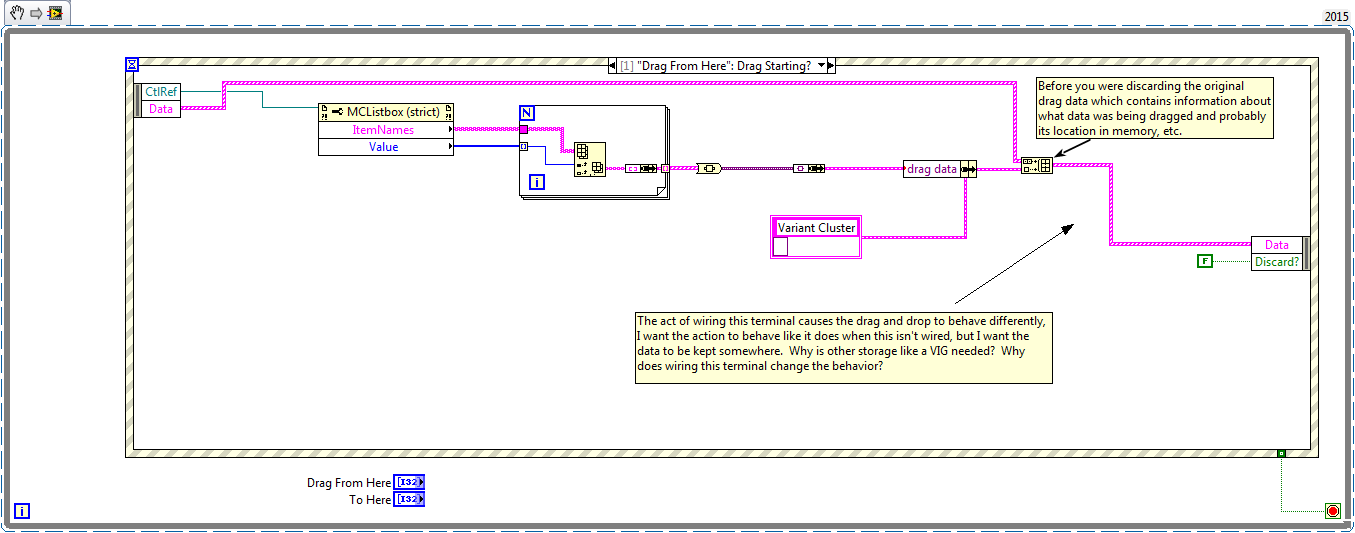
So I think your issue is simply that you were discarding the information LV needs to complete its Drag Drop. Most likely contains information about what data is being dragged and where it is located. The snippet and the attached VI should fix the problem.

in data 01-06-2016 04:25 PM
- Contrassegnare come Nuovo
- Preferito
- Iscriversi
- Disattiva notifiche
- Iscriversi a feed RSS
- Evidenziare
- Stampare
- Segnalare contenuto inappropriato
Why can't I give you more than one kudo? Seriously I didn't know that was necessary. Don't get me wrong there are still several issues I have with dragging and dropping, but this one was because of something I just didn't realize.
Unofficial Forum Rules and Guidelines
Get going with G! - LabVIEW Wiki.
17 Part Blog on Automotive CAN bus. - Hooovahh - LabVIEW Overlord
Nate_S
in data 01-06-2016 04:38 PM
- Contrassegnare come Nuovo
- Preferito
- Iscriversi
- Disattiva notifiche
- Iscriversi a feed RSS
- Evidenziare
- Stampare
- Segnalare contenuto inappropriato
http://zone.ni.com/reference/en-XX/help/371361J-01/glang/get_drag_drop_data/
That article somewhat explains what the LV generated data in that is, but I honestly have no idea what a glyph index is so it goes a bit over my head. I just knew I had done this with one of the projects I was working on last year and had to dig out some old code to figure out what you had done different from me. It was useful for me to append data to that array when I wanted to do some work outside of the event structure. Glad I could help though!
01-06-2016 04:50 PM - modificato 01-06-2016 04:51 PM
- Contrassegnare come Nuovo
- Preferito
- Iscriversi
- Disattiva notifiche
- Iscriversi a feed RSS
- Evidenziare
- Stampare
- Segnalare contenuto inappropriato
Glyph index comes from the Item Symbols value for that row. You can set the symbol of any row and make it visible. It can allow for things like item selection using an icon to show what is selected. Also another link.
http://zone.ni.com/reference/en-XX/help/371361H-01/lvconcepts/using_glyphs/
Unofficial Forum Rules and Guidelines
Get going with G! - LabVIEW Wiki.
17 Part Blog on Automotive CAN bus. - Hooovahh - LabVIEW Overlord
Nate_S
in data 01-06-2016 04:54 PM
- Contrassegnare come Nuovo
- Preferito
- Iscriversi
- Disattiva notifiche
- Iscriversi a feed RSS
- Evidenziare
- Stampare
- Segnalare contenuto inappropriato
Ahh that makes sense, well then there isn't a way to access (publicly) what's contained and used there behind the scenes to complete the drag and drop, but without it it simply doesn't work.
I would be interested to know if there was data more data contained in there that we might be able to access by knowing the correct 'data_names'.
in data 01-07-2016 07:53 AM
- Contrassegnare come Nuovo
- Preferito
- Iscriversi
- Disattiva notifiche
- Iscriversi a feed RSS
- Evidenziare
- Stampare
- Segnalare contenuto inappropriato
Sure we can. In one of the events there is an output that is Available Data Names, and with it you can read all of them. And even here you can probe the Data array and see the data names and their values as variants. Even so for me there wasn't all that much information other than the values of the row on the drag. For me the only data names were LV_LISTBOX, and LV_LISTBOX_ITEMS. Some how these are used in the drop if they exist.
Unofficial Forum Rules and Guidelines
Get going with G! - LabVIEW Wiki.
17 Part Blog on Automotive CAN bus. - Hooovahh - LabVIEW Overlord
 wiebe@CARYA

01-21-2021 04:25 AM - modificato 01-21-2021 04:32 AM
- Contrassegnare come Nuovo
- Preferito
- Iscriversi
- Disattiva notifiche
- Iscriversi a feed RSS
- Evidenziare
- Stampare
- Segnalare contenuto inappropriato
Did anybody figure out how to get the "insert between" line back when filtering events?
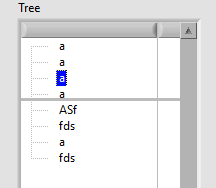
When I drag 'a' over to drop it between 'a' and 'ASF', the default behavior is to get a line.
But I want to disallow dropping on some items.
The moment I add a Drop Over event, the line is gone, even if the Drop Over is always accepted.
I tried to use Mouse Move to somehow filter, but Mouse Move doesn't trigger at all when dragging.
I tried to use a dynamic event (Drag Over and Mouse Move), but that doesn't make a difference.
I tried to use a callback event, but that seems to simply break all dropping. Even if accepted is true, do drop is accepted.
The only 'solution' I could find was LabVIEW-Drag-and-Drop-in-Tree-using-event-structure, but that's a bit too clumsy for me (Using an action engine that sets the cursor to a 'fake' line cursor).
EDIT: Tried to see if dynamically registering\unregistering for the Drag Over event would trick LabVIEW into drawing the line. It doesn't. LabVIEW hangs infinitely, and task manager needs to close it.
 Search LabVIEW like a graph!
 MichaelAivaliot
08-24-2021 01:08 AM - modificato 08-24-2021 01:14 AM
- Contrassegnare come Nuovo
- Preferito
- Iscriversi
- Disattiva notifiche
- Iscriversi a feed RSS
- Evidenziare
- Stampare
- Segnalare contenuto inappropriato
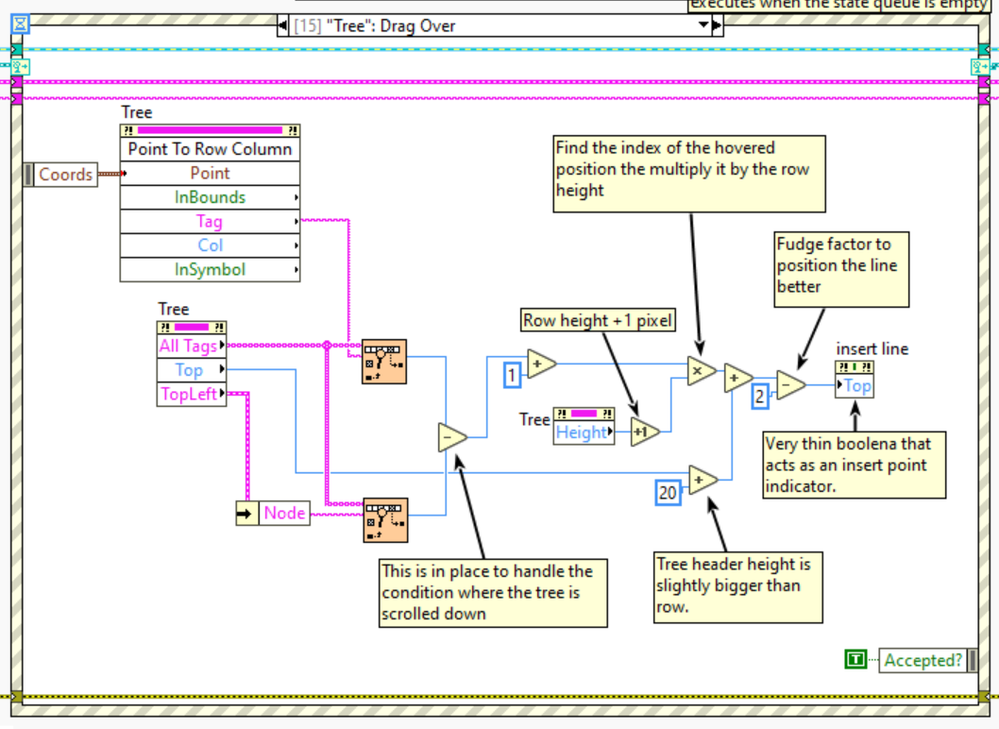
I ran into this recently and the solution I came up with was to use the Drag Over event to live track the mouse and then position a very thin (1pxl) boolean at the insertion point. You can make it snap in place by multiplying the item index by the row height. This makes it behave the same as the built in effect.