ni.com is currently undergoing scheduled maintenance.
Some services may be unavailable at this time. Please contact us for help or try again later.
- Subscribe to RSS Feed
- Mark Topic as New
- Mark Topic as Read
- Float this Topic for Current User
- Bookmark
- Subscribe
- Mute
- Printer Friendly Page
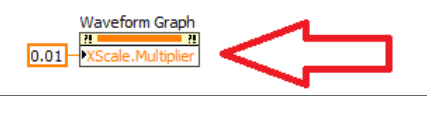
Where is this

 Hiddg
Hiddg
09-27-2022 09:24 AM
- Mark as New
- Bookmark
- Subscribe
- Mute
- Subscribe to RSS Feed
- Permalink
- Report to a Moderator

 XM43
XM43
09-27-2022 09:47 AM
- Mark as New
- Bookmark
- Subscribe
- Mute
- Subscribe to RSS Feed
- Permalink
- Report to a Moderator
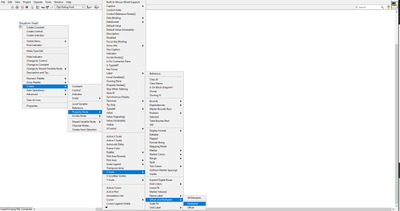
Here:

 altenbach

09-27-2022 09:49 AM
- Mark as New
- Bookmark
- Subscribe
- Mute
- Subscribe to RSS Feed
- Permalink
- Report to a Moderator
Right-click the graph terminal...create...property node...xscale...offset and multiplier...multiplier.


 crossrulz
09-27-2022 09:54 AM
- Mark as New
- Bookmark
- Subscribe
- Mute
- Subscribe to RSS Feed
- Permalink
- Report to a Moderator
Right-click on your graph and choose to Create->Property Node and then find X-Scale->Offset And Multiplier->Multiplier.
There are only two ways to tell somebody thanks: Kudos and Marked Solutions
Unofficial Forum Rules and Guidelines
"Not that we are sufficient in ourselves to claim anything as coming from us, but our sufficiency is from God" - 2 Corinthians 3:5
altenbach
09-27-2022 09:58 AM - edited 09-27-2022 10:07 AM
- Mark as New
- Bookmark
- Subscribe
- Mute
- Subscribe to RSS Feed
- Permalink
- Report to a Moderator
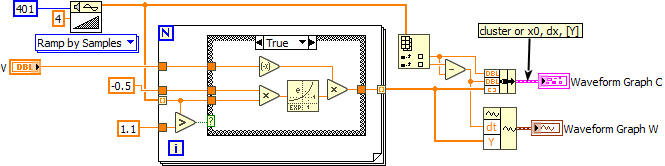
You probably should have kept that in the original discussion.
There are also ways to avoid that property node:
Note that waveform graphs also accept clusters of (x0, dx, [Y]), and waveform datatypes, allowing you to define dx without any property node. Two simple alternatives would be the following: