- Subscribe to RSS Feed
- Mark Topic as New
- Mark Topic as Read
- Float this Topic for Current User
- Bookmark
- Subscribe
- Mute
- Printer Friendly Page
Using cRIO-9074 from Labview: No answer from Target system
Solved!
 Rengel
12-08-2016 09:36 AM - edited 12-08-2016 09:39 AM
- Mark as New
- Bookmark
- Subscribe
- Mute
- Subscribe to RSS Feed
- Permalink
- Report to a Moderator
Hi,
I am in the beginning of using LabView for an FPGA project, but I am struggling to establish the connection between Labview and the cRIO.
I am using a connection over the network, and the cRIO is displayed both in NI-MAX and Labview; normal pinging using the cmd works fine.
Within LabView, I constantly get a "no answer from target system" whenever I try to connect to the device or distribute/start a VI, as seen in the first screenshot:
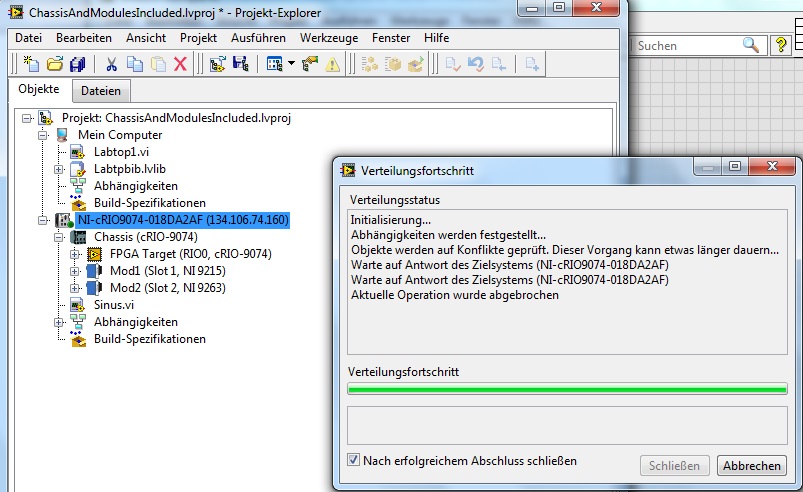
In NI-MAX, my results vary slightly between the various attempted fixes.
Generally though, the device is found and displayed fine in the network, and it sometimes  does load the "network settings" and "system ressources" tabs of the device (after half a century of loading).
One cause i could think of whould be software version compatibility issues between the PC and the cRIO. Somehow I cannott find a table that specifies the compatibilities though. Here are the displayed softwares:

Does that look ok?
I admit that I do not yet understand wether this communication should use NI-RIO, NI-VISA or both, but both seem to make problems.
The NI-RIO Settings on the cRIO display this error:
"Error -63044 (kRIOStatusRioRpcServerMissing):
The RIO server could not be found on the specified remote device. Ensure that NI-RIO software is installed and that the RIO server is running and properly configured."
, while both the RIO and the VISA server are started on my computer, the respective ports match between cRIO and PC and the security settings have a "*" permission.
The VISA error is the Error 0xBFFF00A7 (VI_ERROR_MACHINE_NAVAIL)
(i.e. " the network computer does not exist or does not permit a connection.")
I am working on a Windows 7 32 bit system and have my Firewall deactivated.
If someone sees a pattern here or I am doing some beginners mistake  , I would be quite grateful for any help.
Many regards,
Robin
Solved! Go to Solution.

12-09-2016 02:10 AM
- Mark as New
- Bookmark
- Subscribe
- Mute
- Subscribe to RSS Feed
- Permalink
- Report to a Moderator
Hi,
for the compatibility issues. The versions on cRIO and Host PC must match exactly. I'm a little bit confused about the version mixture on your system, but the versions on your PC and the cRIO seem to match. Nevertheless I would try reformatting your cRIO and install the SW from the scratch.
Or have you done this already?
Kind regards
Heinz
12-09-2016 08:52 AM
- Mark as New
- Bookmark
- Subscribe
- Mute
- Subscribe to RSS Feed
- Permalink
- Report to a Moderator
Well yes I have so far repaired the software with the options offered in NI-MAX and in helped, as it did not even display the cRIO before that.
The only mismatch now is the VISA 15.0.1 on the PC and VISA 14.00 on the cRIO.
I will try installing the 14.00 on the PC next then.
12-15-2016 03:57 AM
- Mark as New
- Bookmark
- Subscribe
- Mute
- Subscribe to RSS Feed
- Permalink
- Report to a Moderator
The problem is that I cannot just reinstall everything from scratch, because especially the cRIO is being used by others too (and it works).
But whichever software I reinstall or repair, I keep getting errors when connecting to the cRIO in Labview.
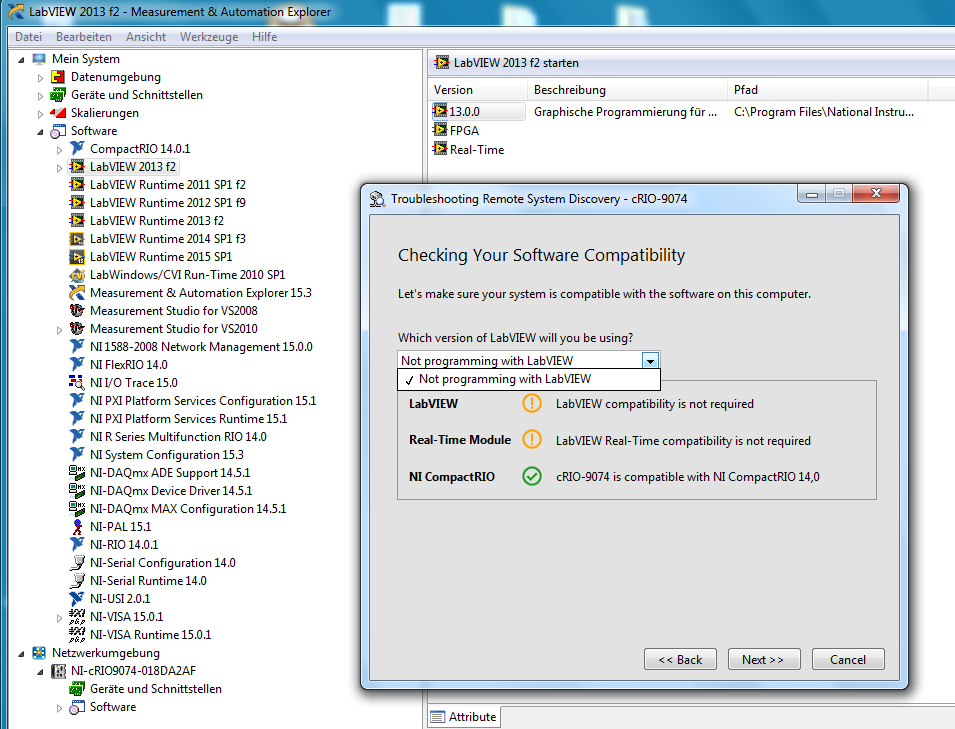
I found another interesting lead in LabView though:
So apparently, NI-MAX does not see programming in LabView or with a Real-Time Module as an option.
But that is what I want to do! And the software is there!
Any ideas? This error is really frustrating me...
03-29-2017 04:53 AM
- Mark as New
- Bookmark
- Subscribe
- Mute
- Subscribe to RSS Feed
- Permalink
- Report to a Moderator
Appearently, the software on the cRIO was damaged.
A "Format Drive" and subsequent reinstallation of the cRIO software resolved the whole story.
