Use Image Data in Append Image to Report
 nskatlv
Hello all,
I searched the forum and elsewhere but couldn't find answer to this seemingly easy problem.
I am writing a number of (.png) images from a bigger image dataset to a MS-Word report using Append Image to Report. The dataset is hosted on my drive. Now, that I want to build an application for my VI, I figured I should convert my complete image dataset to an image data constant, and thus remove path dependency. But the Append Image to Report VI only accepts path or url for writing an image.
Any ideas how to do this.
Regards

 James.M
The Report Generation Toolkit VIs like this one are very limited. If you dive in to the VIs, you'll see that you can manipulate the Word document yourself using the lower level Invoke and Property nodes. I've created a lot of report generation code that uses mostly my own nodes for manipulation, but it's very helpful to use the Report Gen Toolkit VIs as a starting point.
One way I bypassed the path issue in the past was to copy the image to clipboard and then paste where I wanted in the document using Word Find and Replace.
Here's how you can copy the image to clipboard. You'll notice it just uses a Picture control. No path needed.
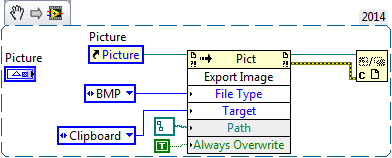

To paste, use Word Find & Replace.vi and wire "^c" to the replace-with input.
Cheers
--------, Unofficial Forum Rules and Guidelines ,--------
'--- >The shortest distance between two nodes is a straight wire> ---'
James.M
I've been trying to figure out a way to paste an image without having to replace text, but I'm not having much luck... Maybe someone else here knows another way. Paging Bob_Schor
Cheers
--------, Unofficial Forum Rules and Guidelines ,--------
'--- >The shortest distance between two nodes is a straight wire> ---'
Thanks for the reply James. Because I have a number of (100's) images and I might be writing any subset of those at one time programmatically, I guess copying to clipboard may not be a viable solution.
The reason I wish to convert them to constants is because I am worried (may be wrongly) that when I convert my VI into an installer, the path links may not work correctly on the new system where it is installed (because of absence of certain foldernames). Or is it that during installer creation, LabView itself creates some sort of constants for all the disk input data, and I shall be fine?
Regards
James.M
You can set up your installer to put files wherever and however you want. If you reference that folder hierarchy, you can search and find the images pretty easily. This is most likely your best option.
You should utilize the Get System Directory VI included with LabVIEW to set your folder path to match the installer location.
Cheers
--------, Unofficial Forum Rules and Guidelines ,--------
'--- >The shortest distance between two nodes is a straight wire> ---'
OK, now this Get System Directory is a new find for me, and this will definitely help put things in order. Thanks. 
Finally, just so that I understand what you said above....
Let's say my VI is reading files from C:\Users\X\Y\Z\PictureFolder\. If I build my installer with this path, I need to have this exact path on the target computer. Correct?
What I could instead do, now that I know Get System Directory, put my files in let's say C:\Users\Public Documents\PictureFolder\ or C:\Users\CurrentUser\Desktop\PictureFolder etc, and modify the links in my VI accordingly to read from the appropriate root. The installed software on the target computer will then automatically pick files from similar root in that computer.
In both the the above cases, do I need to copy all my files to the target computer as well ? I guess so.
What I was wishing for however, was that I don't have any path links at all in my VI. But as long as it works using the way above, I am fine.
Thanks again.
James.M
What you really want is the root directory for where the installer puts the files to match the root directory for where your program looks for the files.
You can deploy all of your images (if you want) using your installer. Similar to this.
In the link above, you'll see that the directories in the list are generic named folders. Some should match up to the Get System Directory outputs.
Cheers
--------, Unofficial Forum Rules and Guidelines ,--------
'--- >The shortest distance between two nodes is a straight wire> ---'
Thanks for directing me to that link. But I got a little confused than before.
Let me try building the installer and shall come back if I need more help.
Regards
James.M
Yeah, give it a try and see how it works.
The installer has the ability to deploy files to the computer it's being installed on. This is a great way to include files with your installer that are needed by the application. I use this functionality regularly for configuration files, data templates, and report templates that my programs use. Including 100s of images might not be the best use of computer memory, though... that's up to you.
Add a folder of images to your project and then open up the installer. Add the folder to the Always Include section of the installer. Set the target location to the root directory that you want to find the files within the Source Files section.
Cheers
--------, Unofficial Forum Rules and Guidelines ,--------
'--- >The shortest distance between two nodes is a straight wire> ---'
