- Subscribe to RSS Feed
- Mark Topic as New
- Mark Topic as Read
- Float this Topic for Current User
- Bookmark
- Subscribe
- Mute
- Printer Friendly Page
- « Previous
-
- 1
- 2
- Next »
Tree Control Drag & Drop in LabVIEW 8

 TCPlomp
12-14-2009 04:06 AM
- Mark as New
- Bookmark
- Subscribe
- Mute
- Subscribe to RSS Feed
- Permalink
- Report to a Moderator
It seems like the 2009 'Drag and drop' features have a 'Accepted' status on the drop event.
Setting this to true will delete the source, after the event has finished!
Ton
Nederlandse
 LabVIEW user groep www.lvug.nl
My LabVIEW Ideas
LabVIEW, programming like it should be!

 SegFault
02-22-2010 08:31 AM
- Mark as New
- Bookmark
- Subscribe
- Mute
- Subscribe to RSS Feed
- Permalink
- Report to a Moderator
Where can I get the info if it was dropped in between two or onto another item?
 useroflabview
04-20-2015 09:55 AM
- Mark as New
- Bookmark
- Subscribe
- Mute
- Subscribe to RSS Feed
- Permalink
- Report to a Moderator
I got stuck at the same point where SegFault got stuck 5 Years. I can't programmatically figure out if I drop in between or onto another item.
However, not being able to do so makes handling drop events by the user rather limited. Apart from that, I still think that there should be an option to keep the Labview internal handling of drop events.
Anybody got a workaround?
 Cordova_Mr
11-21-2016 08:50 PM
- Mark as New
- Bookmark
- Subscribe
- Mute
- Subscribe to RSS Feed
- Permalink
- Report to a Moderator
Hi, i found a way to drop between to elements in the tree control, im sure is not the best way, but it is a way. Sorry for my bad english
*Create an event case for the tree control "drop"
*Use an invoke node linked to a tree control "Point to row column"
*Use the coords that givyou the event and wire it to the invoke node in "point" (With that you are going to "get" in wich element you dropped your dragged element)
*Use property node linked to a tree control "value" (with that you are going to "get" wich element you are dragging)
*Filter any thing you need with that data in that event case
*Optional: you can get "child text" with "active item tag" then "Activecolnum" then "cellstring"
*Here the tricky part: Use "activeitemtag" and active your "dropped element" then get "Height" and "ActiveCellPos/Top"
*Watch Imagen1 to see the operations you need to do
*Then all those data put it in a shift register
*then create an event case "Drag Ended"
*You can see the image 2 to get an idea how to drop elements between
Hope this helps,
Cordova_Mr
11-21-2016 08:58 PM
- Mark as New
- Bookmark
- Subscribe
- Mute
- Subscribe to RSS Feed
- Permalink
- Report to a Moderator
I forgot to add the this othe case

 Hooovahh

11-23-2016 09:34 AM
- Mark as New
- Bookmark
- Subscribe
- Mute
- Subscribe to RSS Feed
- Permalink
- Report to a Moderator
@Cordova_Mr wrote:I forgot to add the this othe case
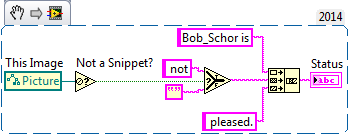
I'd say you forgot everything. Nothing you posted is executable code. On a text based language forum you wouldn't take screenshots of notepad and attach them you'd attach the actual code. Either attach a VI, or attach a snippet which is an image with executable code in it.
http://www.ni.com/tutorial/9330/en/
Unofficial Forum Rules and Guidelines
Get going with G! - LabVIEW Wiki.
17 Part Blog on Automotive CAN bus. - Hooovahh - LabVIEW Overlord
Cordova_Mr
11-23-2016 01:34 PM
- Mark as New
- Bookmark
- Subscribe
- Mute
- Subscribe to RSS Feed
- Permalink
- Report to a Moderator
Well i was just trying to show the way you can do it, i have that code in my vi, but i cant share it, and is working, and the full idea of that, is embodied in those images, you can reproduce it. maybe later i can reproduce that in some vi example, but with those comments i get tempted not to help more
Cordova_Mr
11-24-2016 07:26 PM
- Mark as New
- Bookmark
- Subscribe
- Mute
- Subscribe to RSS Feed
- Permalink
- Report to a Moderator
This is the Test Vi
Hooovahh
11-28-2016 07:37 AM
- Mark as New
- Bookmark
- Subscribe
- Mute
- Subscribe to RSS Feed
- Permalink
- Report to a Moderator
@Cordova_Mr wrote:but with those comments i get tempted not to help more
Not trying to be mean, but I was trying to be stern. And hopefully in the future you (and others) will remember pictures of code are barely useful, by not telling the whole story of what is going on. Thanks for posting your code.
Unofficial Forum Rules and Guidelines
Get going with G! - LabVIEW Wiki.
17 Part Blog on Automotive CAN bus. - Hooovahh - LabVIEW Overlord
 wiebe@CARYA
01-21-2021 04:27 AM
- Mark as New
- Bookmark
- Subscribe
- Mute
- Subscribe to RSS Feed
- Permalink
- Report to a Moderator
Once the Drag Over event is used, the drop between line disappears...
See Why-Does-Adding-an-Event-Change-Drag-And-Drop-Functionality for a more complete narrative.
 Search LabVIEW like a graph!


- « Previous
-
- 1
- 2
- Next »
