- Subscribe to RSS Feed
- Mark Topic as New
- Mark Topic as Read
- Float this Topic for Current User
- Bookmark
- Subscribe
- Mute
- Printer Friendly Page
Time/Date string to seconds?

 patrick54
09-16-2002 02:22 PM
- Mark as New
- Bookmark
- Subscribe
- Mute
- Subscribe to RSS Feed
- Permalink
- Report to a Moderator
Thanks,
Patrick

 Photon_Dan

09-16-2002 03:03 PM
- Mark as New
- Bookmark
- Subscribe
- Mute
- Subscribe to RSS Feed
- Permalink
- Report to a Moderator
You can get most of the values for the cluster by parsing the date and time string that was formatted by the Format Date/Time String function. I would recommend using a Scan from String function to parse the string and extract the necessary values.
The output of the Date/Time to Seconds function is a U32. Run both strings through and you've got two time points in seconds. Subtract for the difference between the two points.
Daniel L. Press
NI Certified LabVIEW Developer
PrimeTest Corporation
www.primetest.com

 Dennis_Knutson
09-16-2002 03:04 PM
- Mark as New
- Bookmark
- Subscribe
- Mute
- Subscribe to RSS Feed
- Permalink
- Report to a Moderator

 GPeople
11-20-2019 11:31 AM
- Mark as New
- Bookmark
- Subscribe
- Mute
- Subscribe to RSS Feed
- Permalink
- Report to a Moderator
Given: date/time string: 11/20/2019 11:59:31 AM
Another way is to convert the date/time string back to a Time Stamp cluster.
Then you can do any math you need very easily.
An easy way to get back to Time Stamp format is to use Scan From String function with %T for the format string input. You will see the output 1 for this function change to a Time Stamp cluster.
If you are concatenating a date string with a time string, you must add the date string to the time string (in other words the upper input to the concat function has to be the TIME string, the lower input has to be the DATE string.
LabVIEW 7.1 - Present

 RTSLVU
11-20-2019 11:45 AM - edited 11-20-2019 11:46 AM
- Mark as New
- Bookmark
- Subscribe
- Mute
- Subscribe to RSS Feed
- Permalink
- Report to a Moderator
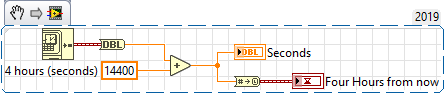
If you convert a time stamp to a double you can do all the math you want on it and convert it back.
=== Engineer Ambiguously ===
========================

 rolfk
rolfk
11-20-2019 02:46 PM
- Mark as New
- Bookmark
- Subscribe
- Mute
- Subscribe to RSS Feed
- Permalink
- Report to a Moderator
@RTSLVU wrote:
If you convert a time stamp to a double you can do all the math you want on it and convert it back.
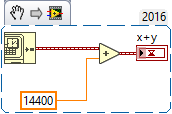
No need for the Timestamp to Double and vv. at all. The arithmetic plus and minus nodes will operate correctly when you try to add or subtract a double (or integer) from a timestamp.
 RTSLVU
11-20-2019 03:24 PM
- Mark as New
- Bookmark
- Subscribe
- Mute
- Subscribe to RSS Feed
- Permalink
- Report to a Moderator
@rolfk wrote:
@RTSLVU wrote:
If you convert a time stamp to a double you can do all the math you want on it and convert it back.
No need for the Timestamp to Double and vv. at all. The arithmetic plus and minus nodes will operate correctly when you try to add or subtract a double (or integer) from a timestamp.
Right... But I really detest coercion dots
AKA "Loser Dots" 😛
=== Engineer Ambiguously ===
========================
rolfk
11-20-2019 03:32 PM - edited 11-20-2019 03:35 PM
- Mark as New
- Bookmark
- Subscribe
- Mute
- Subscribe to RSS Feed
- Permalink
- Report to a Moderator
Not quite sure where you see coercion dots. This is LabVIEW 2016, but I doubt there is much difference since at least around 8.2. Even then a coercion dot is usually not really anything else than an implicit conversion functions. If you have coercion dots on scalar wires and get rid of them by adding a conversion node, you have basically not gained anything nore lost anything. Of course if you can get rid of coercion dots altogether by changing dataypes consistently throughout a diagram, that is even better. If conversions are unavoidable it is a good idea to do them explicitedly on the scalar wire inside a loop rather than on the array that goes into or out of an autoindexed loop, though.

 GerdW
GerdW
11-20-2019 03:40 PM
- Mark as New
- Bookmark
- Subscribe
- Mute
- Subscribe to RSS Feed
- Permalink
- Report to a Moderator
Hi,
additionally you can enable the unit of the numeric constant and set it to "4h" instead of plain "14400" (seconds)...
GerdW
using LV2016/2019/2021 on Win10/11+cRIO, TestStand2016/2019

 Frozen
11-20-2019 04:14 PM - edited 11-20-2019 04:17 PM
- Mark as New
- Bookmark
- Subscribe
- Mute
- Subscribe to RSS Feed
- Permalink
- Report to a Moderator
Since you have saved the data to a text file, I assume you are then reading that file and want to convert that time stamp back to a LabVIEW data type. Try something like this...
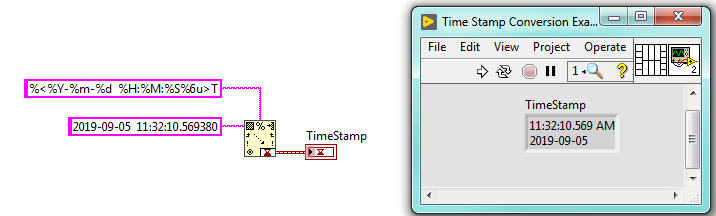

The trick is getting the format string to match the format you have save the data as.
After that, as other have pointed out, just simply add or subtract as required.
EDIT: Oops, looks like GPeople beat me too it
Former Certified LabVIEW Developer (CLD)
