- Subscribe to RSS Feed
- Mark Topic as New
- Mark Topic as Read
- Float this Topic for Current User
- Bookmark
- Subscribe
- Mute
- Printer Friendly Page
String Formating Date
Solved!
 morrissey89
10-31-2017 10:44 AM
- Mark as New
- Bookmark
- Subscribe
- Mute
- Subscribe to RSS Feed
- Permalink
- Report to a Moderator
Hello, this is most likely an easy thing to do but I am not great at formatting string data type.
What I am trying to do is take a time stamp (ex: 10/31/17) and format it to 10-31-17.
I am not sure have to change the "/" into "-" or remove it all together so the date is just 103117 that is fine too.
Solved! Go to Solution.
- Tags:
- String Formatting

 njacacia
10-31-2017 10:54 AM
- Mark as New
- Bookmark
- Subscribe
- Mute
- Subscribe to RSS Feed
- Permalink
- Report to a Moderator
I have found the Help for the Format Date/Time String Function to be quite useful.
Not sure what you are using.
10-31-2017 10:59 AM
- Mark as New
- Bookmark
- Subscribe
- Mute
- Subscribe to RSS Feed
- Permalink
- Report to a Moderator
I have looked there but find the answer I was looking for
njacacia
10-31-2017 11:01 AM
- Mark as New
- Bookmark
- Subscribe
- Mute
- Subscribe to RSS Feed
- Permalink
- Report to a Moderator
@morrissey89 wrote:
I have looked there but find the answer I was looking for
Didn't find or didn't understand.
Different.
10-31-2017 11:03 AM
- Mark as New
- Bookmark
- Subscribe
- Mute
- Subscribe to RSS Feed
- Permalink
- Report to a Moderator
sorry - could not find the answer.
njacacia
10-31-2017 11:04 AM
- Mark as New
- Bookmark
- Subscribe
- Mute
- Subscribe to RSS Feed
- Permalink
- Report to a Moderator
You should show us what you actually TRIED.

 crossrulz

10-31-2017
11:09 AM
- last edited on
03-10-2026
01:22 PM
by
 Content Cleaner
- Mark as New
- Bookmark
- Subscribe
- Mute
- Subscribe to RSS Feed
- Permalink
- Report to a Moderator
Perhaps the Format Codes for the Time Format String would be helpful.

There are only two ways to tell somebody thanks: Kudos and Marked Solutions
Unofficial Forum Rules and Guidelines
"Not that we are sufficient in ourselves to claim anything as coming from us, but our sufficiency is from God" - 2 Corinthians 3:5
 njacacia
10-31-2017 11:17 AM
- Mark as New
- Bookmark
- Subscribe
- Mute
- Subscribe to RSS Feed
- Permalink
- Report to a Moderator
I guess he was looking very hard.

 djac91
10-31-2017 11:24 AM
- Mark as New
- Bookmark
- Subscribe
- Mute
- Subscribe to RSS Feed
- Permalink
- Report to a Moderator
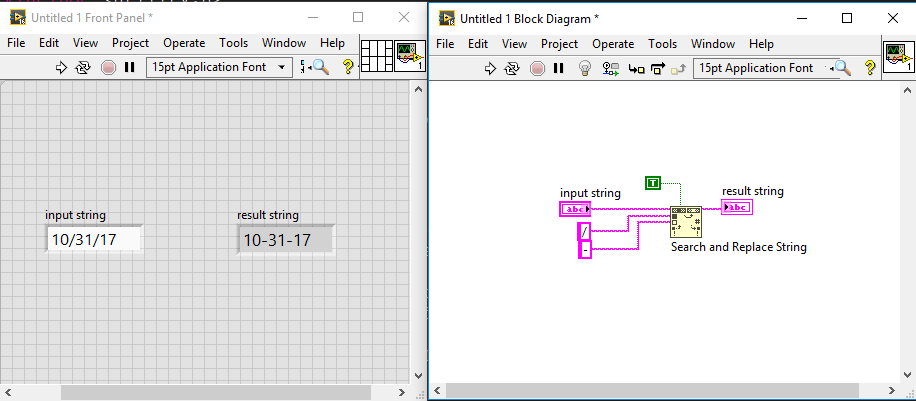
you can do it like this using 'search and replace string'
Waiting For the inner calling 🙂

