- Subscribe to RSS Feed
- Mark Topic as New
- Mark Topic as Read
- Float this Topic for Current User
- Bookmark
- Subscribe
- Mute
- Printer Friendly Page
Strange shift register initialization

 Pavel_47
02-24-2016 07:32 AM
- Mark as New
- Bookmark
- Subscribe
- Mute
- Subscribe to RSS Feed
- Permalink
- Report to a Moderator
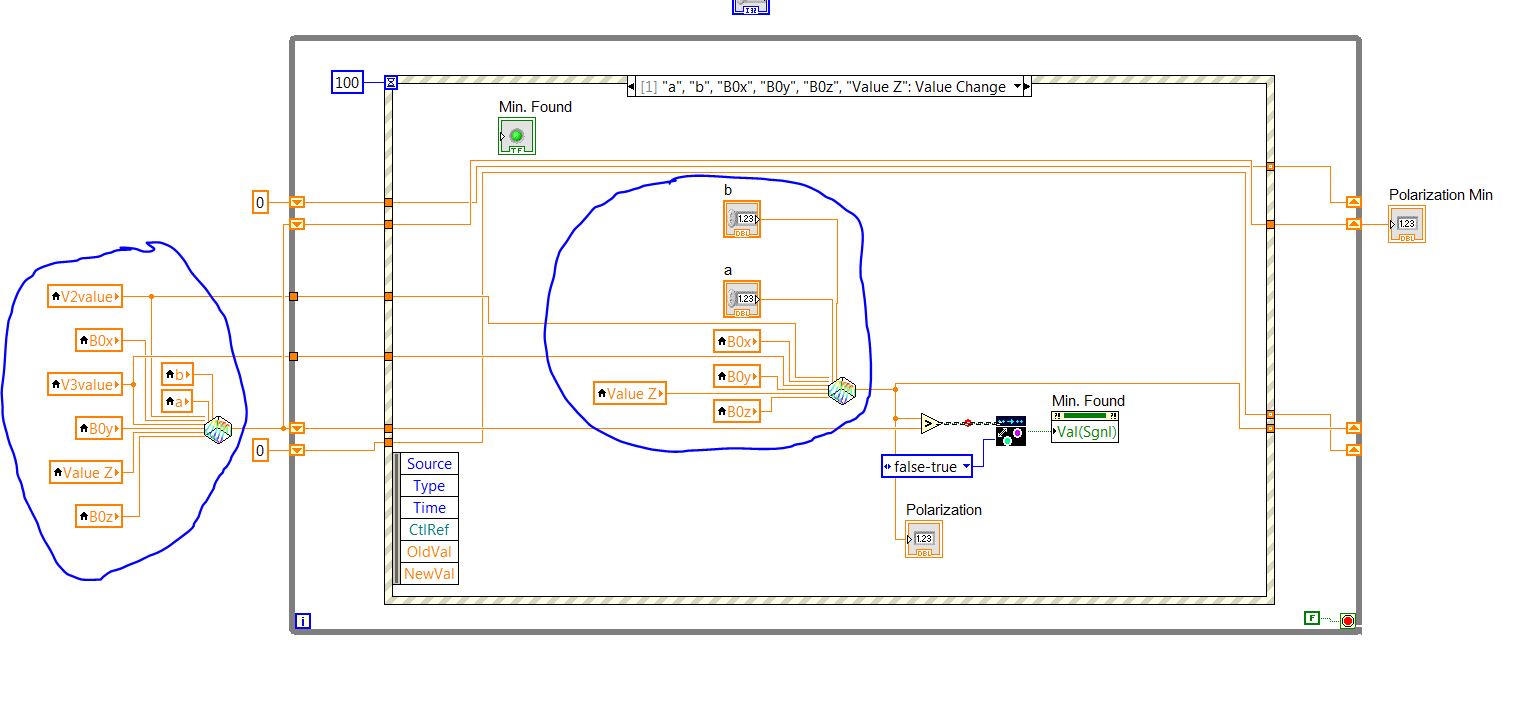
Hello,
The breakpoint fires once program VI started, but it shouldn't.
When I control the values on comparator, indeed TOP value is grater than BOTTOM value, so breakpoint fires correctly.
But these values must be equal.
Where I've been mistaken ?
Thanks
Pavel

 billko
02-24-2016 07:39 AM - edited 02-24-2016 07:41 AM
- Mark as New
- Bookmark
- Subscribe
- Mute
- Subscribe to RSS Feed
- Permalink
- Report to a Moderator
@Pavel_47 wrote:Hello,
The breakpoint fires once program VI started, but it shouldn't.
When I control the values on comparator, indeed TOP value is grater than BOTTOM value, so breakpoint fires correctly.
But these values must be equal.
Where I've been mistaken ?
Thanks
Pavel
Obviously it's not ever getting to the breakpoint! Turn on highlight execution (the lightbulb) and see where all the dots go. Besides being fun to look at, it gives valuable insight to what is going on with your code. 🙂
(Mid-Level minion.)
My support system ensures that I don't look totally incompetent.
Proud to say that I've progressed beyond knowing just enough to be dangerous. I now know enough to know that I have no clue about anything at all.
Humble author of the CLAD Nugget.
mikeporter

02-24-2016 07:46 AM
- Mark as New
- Bookmark
- Subscribe
- Mute
- Subscribe to RSS Feed
- Permalink
- Report to a Moderator
A good way to determine whether you are overusing local variables is to count up the number you use and if the result is greater than 0, you may have a problem.
Mike...
Certified Professional Instructor
Certified LabVIEW Architect
LabVIEW Champion
"... after all, He's not a tame lion..."
For help with grief and grieving.
- Tags:
- local variables
02-24-2016 07:52 AM
- Mark as New
- Bookmark
- Subscribe
- Mute
- Subscribe to RSS Feed
- Permalink
- Report to a Moderator
Highlighting doesn't work properly in my setup: when I start VI, it do some initialization, then wait for user clicks to "START".
Unfortunytely "START" action isn't sensed by VI in highlighted mode.
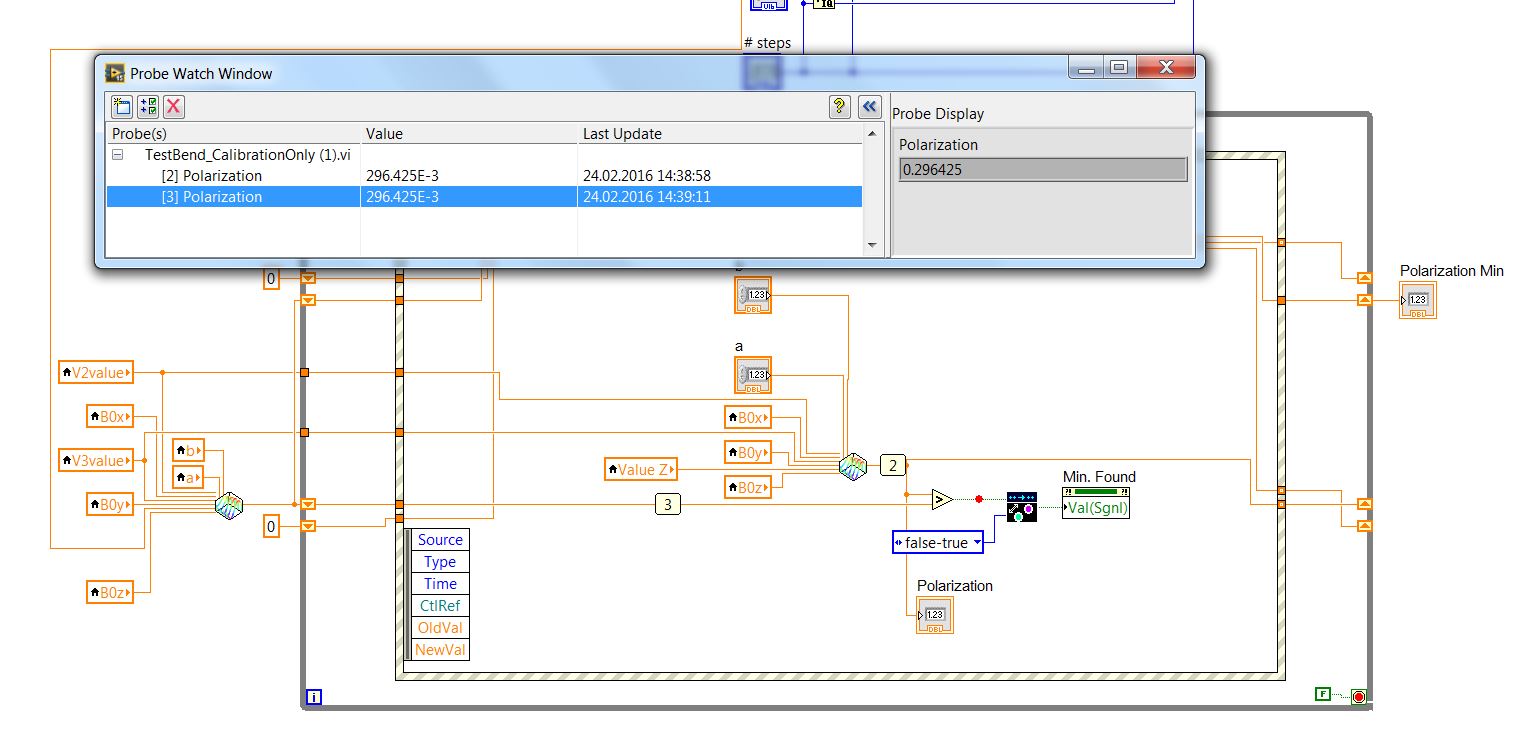
In the meantime I've modified a little bit the VI.
Now both values on comparator are exactly the same ... but breakpoint after ">" comparator fires nevertheless.
02-24-2016 07:56 AM
- Mark as New
- Bookmark
- Subscribe
- Mute
- Subscribe to RSS Feed
- Permalink
- Report to a Moderator
mikeporter a écrit :
You have 8 local variables, none of which are initialized to a known state. Heaven only knows what the result of your calculation will be.
A good way to determine whether you are overusing local variables is to count up the number you use and if the result is greater than 0, you may have a problem.
Mike...
Hello Mike,
All these variables come from controls/indicators on Front Panel, so theirs values are defined before execution (actually execution starts when user clicks on "START" button, i.e. after starting of VI)

 aputman
02-24-2016 08:35 AM
- Mark as New
- Bookmark
- Subscribe
- Mute
- Subscribe to RSS Feed
- Permalink
- Report to a Moderator
@Pavel_47 wrote:Highlighting doesn't work properly in my setup: when I start VI, it do some initialization, then wait for user clicks to "START".
Unfortunytely "START" action isn't sensed by VI in highlighted mode.
In the meantime I've modified a little bit the VI.
Now both values on comparator are exactly the same ... but breakpoint after ">" comparator fires nevertheless.
If Start action isn't "sensed" and the mechanical action for the start button is set to latching, make sure that the terminal for the Start button is in the Start event.
aputman
02-24-2016 08:44 AM - edited 02-24-2016 08:45 AM
- Mark as New
- Bookmark
- Subscribe
- Mute
- Subscribe to RSS Feed
- Permalink
- Report to a Moderator
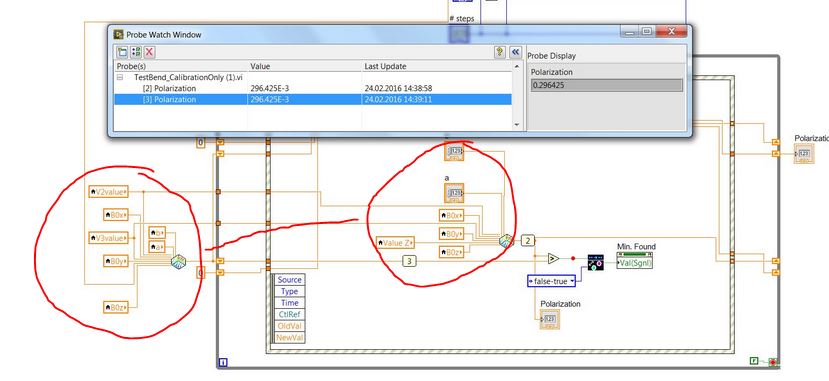
What's the point of doing the same calculations twice and comparing them on the first iteration? One value is never going to be greater than the other....they are always equal. Why not initialize your shift register with 0 or +/- infinity so that you can eliminate those local variables outside the loop. And I assume they are the same calculations since i can't read a tiny image. Code is always better.
02-24-2016 08:54 AM
- Mark as New
- Bookmark
- Subscribe
- Mute
- Subscribe to RSS Feed
- Permalink
- Report to a Moderator
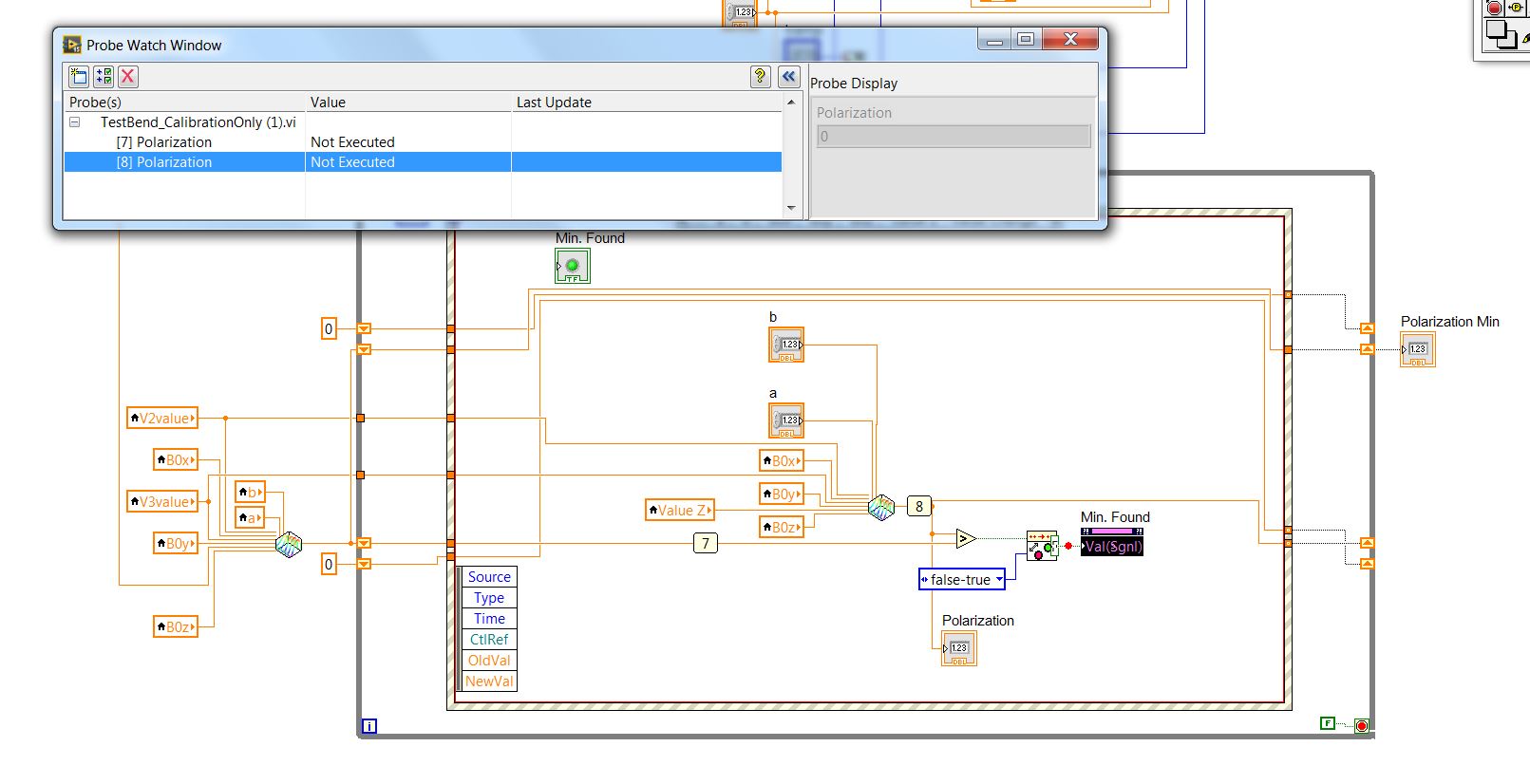
I've followed your suggestion and changed "START" button action for "latched".
Now it actionned whit highlight set ON.
But unfortunately I didn't see the moment when execution riched the breakpoint (just after "Boolean Crossing PtByPt" block).
But once on breakpoint I've visualized the values before ">" comparator ... and found that they are "Not Executed".
So, I'm a little bit confused to understand what is happening.

 GerdW
GerdW
02-24-2016 08:58 AM - edited 02-24-2016 08:59 AM
- Mark as New
- Bookmark
- Subscribe
- Mute
- Subscribe to RSS Feed
- Permalink
- Report to a Moderator
Hi Pavel,
but breakpoint after ">" comparator fires nevertheless.
The breakpoint will fire whenever code execution comes to this point - unless it is a conditional breakpoint.
Is it a conditional breakpoint?
Highlighting doesn't work properly in my setup: when I start VI, it do some initialization, then wait for user clicks to "START".
Unfortunytely "START" action isn't sensed by VI in highlighted mode.
Wrong. In highlight mode your VI behaves the same except it runs much slower…
Now both values on comparator are exactly the same ...
Are you sure they are the same? To the very last bit of the float?
GerdW
using LV2016/2019/2021 on Win10/11+cRIO, TestStand2016/2019
02-24-2016 09:08 AM
- Mark as New
- Bookmark
- Subscribe
- Mute
- Subscribe to RSS Feed
- Permalink
- Report to a Moderator
Hello GerdW,
The breakpoint will fire whenever code execution comes to this point - unless it is a conditional breakpoint.
Is it a conditional breakpoint?
But it should come to this point ONLY if the TOP comparator value is grater than BOTTOM one. Isn't it ?
It's ordinary breakpoint.
Wrong. In highlight mode your VI behaves the same except it runs much slower…
Sure, but I was waiting for about 3 min, clicking time-to-time in "START", but execution didn't reach the location of interest.
Are you sure they are the same? To the very last bit of the float?
On the above post I visualized probed values ... they are the same until 5 digit after point
Thanks
Pavel
