LabVIEW
- S'abonner au fil RSS
- Marquer le sujet comme nouveau
- Marquer le sujet comme lu
- Placer ce Sujet en tête de liste pour l'utilisateur actuel
- Ajouter cette question à mes {0}
- S'abonner
- Sourdine
- Page imprimable
Slider value corresponding to picture ring control

 fredteng
le 08-23-2011 04:08 AM
- Marquer comme nouveau
- Ajouter ce message à mes {0}
- S'abonner
- Sourdine
- S'abonner au fil RSS
- Surligner ce Message
- Imprimer
- Signaler un contenu inapproprié
Hi guys.
I am using LabView 2009. Currently I have a picture ring control in my VI ready for me to create an animation but I am suppose to have a numeric slider beside the picture ring control so that whenever my animation starts, my slider value would change. For example if the first image is being shown by the picture ring control then my slider value would be 0, second image shown by the picture ring, the slider value would be 15. I currently do not have any idea on how to achieve this so I do hope to receive all your prompt replies.
Thanks.
- Balises:
- picture ring
- slider

 AdnanZ
le 08-23-2011 06:08 AM
- Marquer comme nouveau
- Ajouter ce message à mes {0}
- S'abonner
- Sourdine
- S'abonner au fil RSS
- Surligner ce Message
- Imprimer
- Signaler un contenu inapproprié
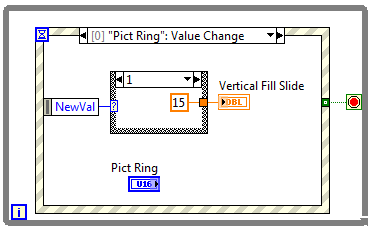
You could use event structures to achieve what you are doing. Have a look at the example below.
le 08-23-2011 10:14 PM
- Marquer comme nouveau
- Ajouter ce message à mes {0}
- S'abonner
- Sourdine
- S'abonner au fil RSS
- Surligner ce Message
- Imprimer
- Signaler un contenu inapproprié

This is what I have done so far, but I can't seem to connect the stop button to the event structure and how do you also change the 

Hope to get your prompt reply.
Thanks.

 RavensFan

le 08-23-2011 10:20 PM
- Marquer comme nouveau
- Ajouter ce message à mes {0}
- S'abonner
- Sourdine
- S'abonner au fil RSS
- Surligner ce Message
- Imprimer
- Signaler un contenu inapproprié
Click on it and pick NewVal out of the list.
I would recommend looking at the online LabVIEW tutorials
LabVIEW Introduction Course - Three Hours
LabVIEW Introduction Course - Six Hours
le 08-23-2011 10:25 PM
- Marquer comme nouveau
- Ajouter ce message à mes {0}
- S'abonner
- Sourdine
- S'abonner au fil RSS
- Surligner ce Message
- Imprimer
- Signaler un contenu inapproprié
I click on 
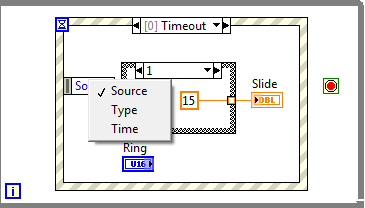
so is there any other way out?
Thanks.
RavensFan
le 08-23-2011 10:31 PM
- Marquer comme nouveau
- Ajouter ce message à mes {0}
- S'abonner
- Sourdine
- S'abonner au fil RSS
- Surligner ce Message
- Imprimer
- Signaler un contenu inapproprié
That's because you are in the Timeout event case. First change your event to be Picture Ring Value Change.
le 08-23-2011 10:43 PM
- Marquer comme nouveau
- Ajouter ce message à mes {0}
- S'abonner
- Sourdine
- S'abonner au fil RSS
- Surligner ce Message
- Imprimer
- Signaler un contenu inapproprié
And how do I do that? Really appreciate your help.
Thanks.
RavensFan
le 08-23-2011 10:46 PM
- Marquer comme nouveau
- Ajouter ce message à mes {0}
- S'abonner
- Sourdine
- S'abonner au fil RSS
- Surligner ce Message
- Imprimer
- Signaler un contenu inapproprié
And that's where doing the tutorials will come in handy.
Go to the title of the event case. Right click. Edit events handled by this case.
le 08-23-2011 10:48 PM
- Marquer comme nouveau
- Ajouter ce message à mes {0}
- S'abonner
- Sourdine
- S'abonner au fil RSS
- Surligner ce Message
- Imprimer
- Signaler un contenu inapproprié
I do know that the tutorials would come in handy but it does takes time for me to read them so probably I would read them while at the same time continue to do my work. As for the stop button, I can't seem to connect it to the event structure.
Thanks.
RavensFan
le 08-23-2011 10:53 PM
- Marquer comme nouveau
- Ajouter ce message à mes {0}
- S'abonner
- Sourdine
- S'abonner au fil RSS
- Surligner ce Message
- Imprimer
- Signaler un contenu inapproprié
Your screen shot doesn't show a stop button so far.
