- Subscribe to RSS Feed
- Mark Topic as New
- Mark Topic as Read
- Float this Topic for Current User
- Bookmark
- Subscribe
- Mute
- Printer Friendly Page
- « Previous
-
- 1
- 2
- Next »
Selecting multiple files by a single Button
Solved!
 GerdW
GerdW

09-21-2017 04:26 AM
- Mark as New
- Bookmark
- Subscribe
- Mute
- Subscribe to RSS Feed
- Permalink
- Report to a Moderator
Hi Mayur,
your message is like showing a scratch on a car and complaining about "it does not drive"!
To explain the problem you need to provide your VI and tell us exactly the input values you used…
GerdW
using LV2016/2019/2021 on Win10/11+cRIO, TestStand2016/2019

 Fred19ni
09-21-2017 04:34 AM
- Mark as New
- Bookmark
- Subscribe
- Mute
- Subscribe to RSS Feed
- Permalink
- Report to a Moderator
Hi Mayur,
Can you describe really what do you want ?
This error appear when file is not in the path that you specified.
Kudos are welcome 
 crossrulz
09-21-2017 04:36 AM - edited 09-21-2017 04:37 AM
- Mark as New
- Bookmark
- Subscribe
- Mute
- Subscribe to RSS Feed
- Permalink
- Report to a Moderator
@Mayur789 wrote:
this is happening after doing that. I connected a indicator to it and it is reading it there.
Need to see code in order to help debug it...
There are only two ways to tell somebody thanks: Kudos and Marked Solutions
Unofficial Forum Rules and Guidelines
"Not that we are sufficient in ourselves to claim anything as coming from us, but our sufficiency is from God" - 2 Corinthians 3:5


09-21-2017 05:00 AM
- Mark as New
- Bookmark
- Subscribe
- Mute
- Subscribe to RSS Feed
- Permalink
- Report to a Moderator
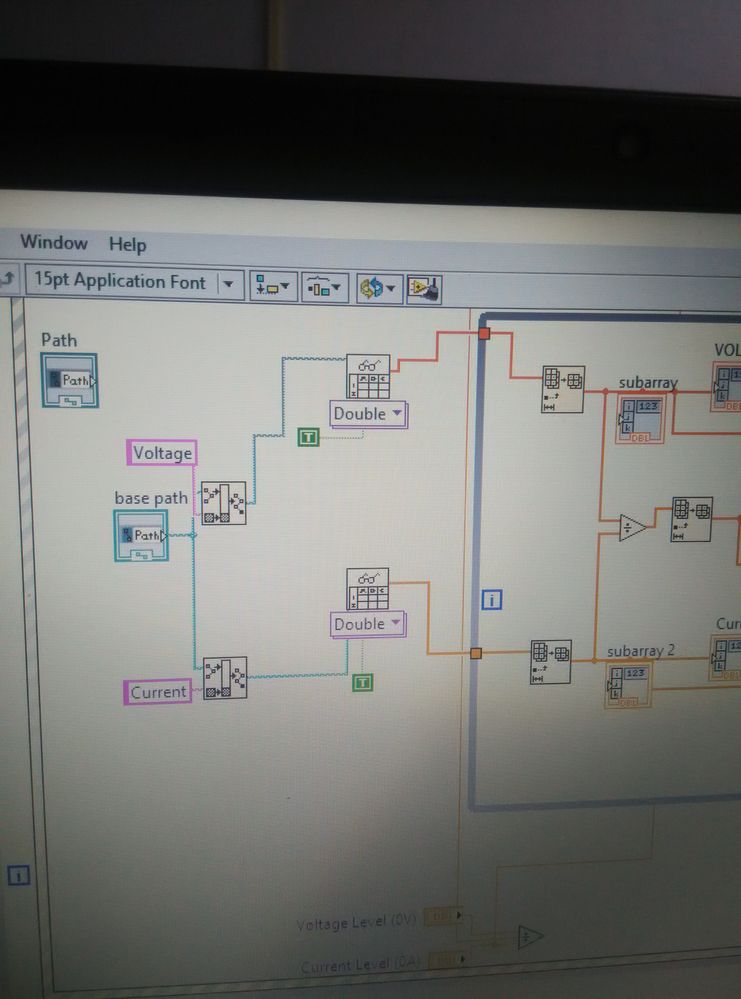
These are my values.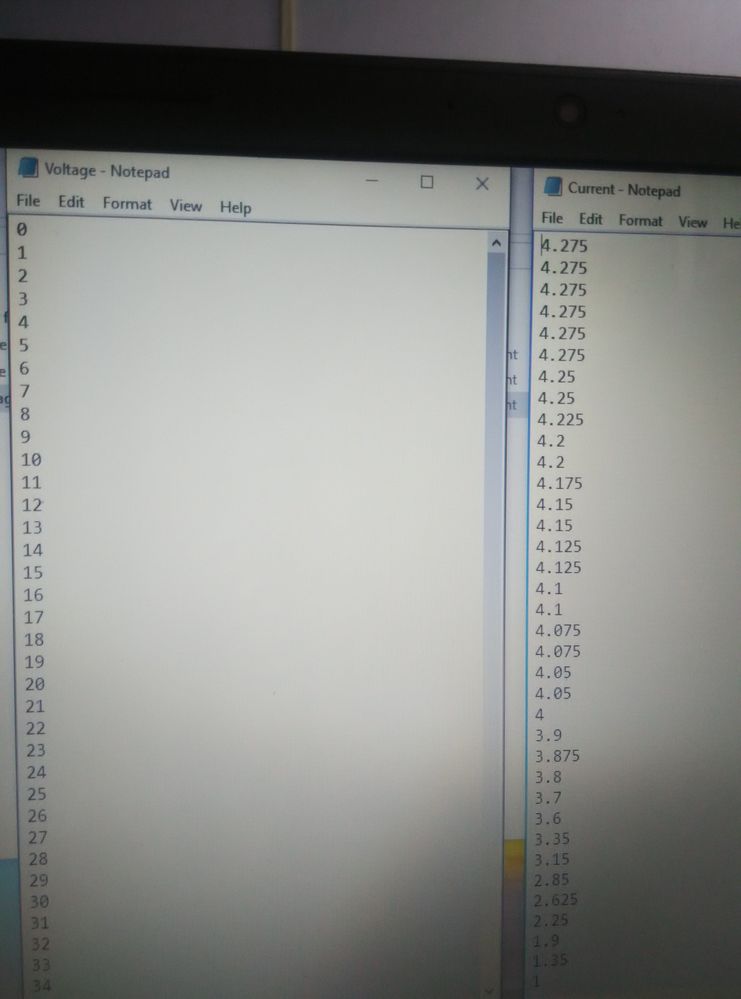
 Fred19ni
09-21-2017 05:19 AM
- Mark as New
- Bookmark
- Subscribe
- Mute
- Subscribe to RSS Feed
- Permalink
- Report to a Moderator
ok Mayur,
If your path is correct (you must verified), add the extension ".txt" to relative path "Voltage" and "Current".
I think that is your problem!
Regards,
Fred
Kudos are welcome!
09-21-2017 05:22 AM
- Mark as New
- Bookmark
- Subscribe
- Mute
- Subscribe to RSS Feed
- Permalink
- Report to a Moderator
They are in .txt only.
Fred19ni
09-21-2017 05:35 AM
- Mark as New
- Bookmark
- Subscribe
- Mute
- Subscribe to RSS Feed
- Permalink
- Report to a Moderator
In your pictures we can see voltage, Current constant in the relative path.
change this to have Voltage.txt and current.txt.
test it and let me know if you have a new error.
Kudos are welcome
09-21-2017 05:43 AM
- Mark as New
- Bookmark
- Subscribe
- Mute
- Subscribe to RSS Feed
- Permalink
- Report to a Moderator
Thank you so much😁
- « Previous
-
- 1
- 2
- Next »
