- Subscribe to RSS Feed
- Mark Topic as New
- Mark Topic as Read
- Float this Topic for Current User
- Bookmark
- Subscribe
- Mute
- Printer Friendly Page
Scripting a DVR
Solved!
 paul_cardinale
11-04-2020 10:38 PM
- Mark as New
- Bookmark
- Subscribe
- Mute
- Subscribe to RSS Feed
- Permalink
- Report to a Moderator
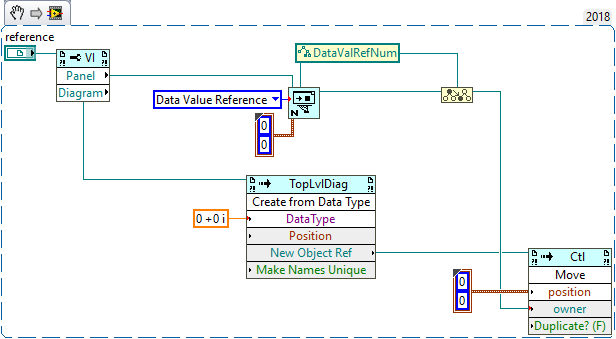
Is it possible to use scripting to create a control that's a Data Value Reference to a specific data type?
Solved! Go to Solution.

 wiebe@CARYA

11-05-2020 06:51 AM - edited 11-05-2020 06:52 AM
- Mark as New
- Bookmark
- Subscribe
- Mute
- Subscribe to RSS Feed
- Permalink
- Report to a Moderator
It would have been as easy as replacing an array element (delete element, move new), except delete is not allowed in a DVR.
A way (only way I can think of) is to script a "New Data Value Reference", script a wired data type, script an indicator, then use that (or a constant created from it) to replace the original constant\control... Very inconvenient, as you'll loose descriptions, labels and such attached to the original, so you'll have even more stuff to worry about.
 Search LabVIEW like a graph!
wiebe@CARYA
Search LabVIEW like a graph!
wiebe@CARYA
11-05-2020 06:59 AM - edited 11-05-2020 07:04 AM
- Mark as New
- Bookmark
- Subscribe
- Mute
- Subscribe to RSS Feed
- Permalink
- Report to a Moderator
wiebe@CARYA wrote:
It would have been as easy as replacing an array element (delete element, move new), except delete is not allowed in a DVR.
It is just as easy (even easier) as replacing an array element:
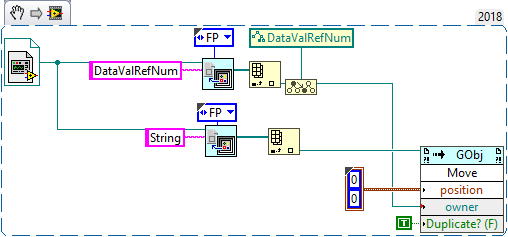
Simply get a reference to the DVR, get a reference to a control, and move it into the DVR.
Guess this works the same for constants:
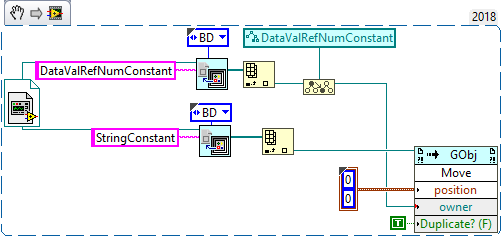
BTW: The casts are useless.
BTW2: The VI reference constant should be replaced with Static VI Reference with a DVR and a control or constant. Think this is obvious to you, but who know who will be reading this.
wiebe@CARYA
11-05-2020 07:13 AM
- Mark as New
- Bookmark
- Subscribe
- Mute
- Subscribe to RSS Feed
- Permalink
- Report to a Moderator
Here's how to create a DVR constant from scratch, with a given variant data type:
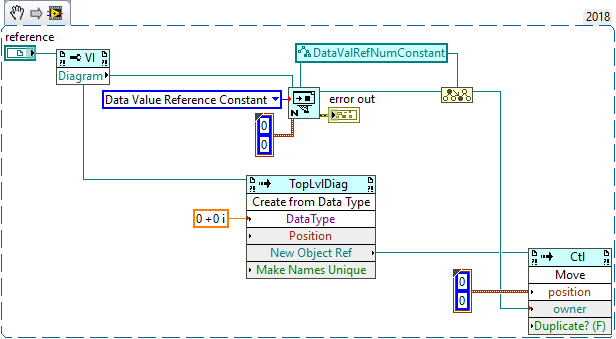
A control is pretty much the same:\