ni.com is currently undergoing scheduled maintenance.
Some services may be unavailable at this time. Please contact us for help or try again later.
- Subscribe to RSS Feed
- Mark Topic as New
- Mark Topic as Read
- Float this Topic for Current User
- Bookmark
- Subscribe
- Mute
- Printer Friendly Page
Scripting: Show node/structure/object in BD
Solved!
 _Y_
_Y_
05-01-2018 03:36 AM
- Mark as New
- Bookmark
- Subscribe
- Mute
- Subscribe to RSS Feed
- Permalink
- Report to a Moderator
Clicking a row in conventional list of Search Results opens BD of corresponding VI and brings the found item in area of view.
Is there a simple way to do the same in LabVIEW scripting? I need to show a BD object to user.
Of course, I can implement traversing through all BD structures, calculating relative positions, etc. etc. However it could be discovering of a wheel.
Thank you
www.azinterface.net - Interface-based multiple inheritance for LabVIEW OOP
Solved! Go to Solution.
- Tags:
- Scripting

 matt.baker
05-09-2018
09:32 AM
- last edited on
05-20-2024
07:55 PM
by
 Content Cleaner
- Mark as New
- Bookmark
- Subscribe
- Mute
- Subscribe to RSS Feed
- Permalink
- Report to a Moderator
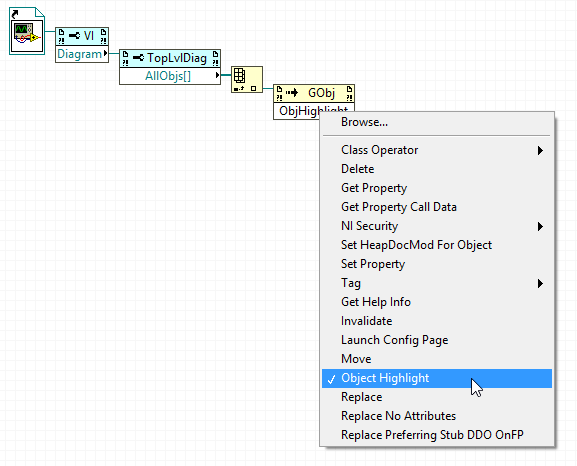
The Object Highlight method using an invoke node should do what you want.
05-09-2018 10:12 AM
- Mark as New
- Bookmark
- Subscribe
- Mute
- Subscribe to RSS Feed
- Permalink
- Report to a Moderator
Thank you, it works (LV2016 32bit)
www.azinterface.net - Interface-based multiple inheritance for LabVIEW OOP
