- Subscribe to RSS Feed
- Mark Topic as New
- Mark Topic as Read
- Float this Topic for Current User
- Bookmark
- Subscribe
- Mute
- Printer Friendly Page
Scan from string with delimiter (variable length string)
Solved!
 abeaver
03-11-2014 01:50 PM - edited 03-11-2014 01:51 PM
- Mark as New
- Bookmark
- Subscribe
- Mute
- Subscribe to RSS Feed
- Permalink
- Report to a Moderator
Hi,
I know there is a simple answer to this question but I cannot seem to find the solution.
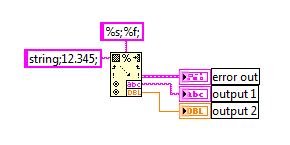
I have an initial string that is delimited by semicolons. I want to extract string "string" into output 1 and floating point number "12.345" into output 2. Since I put the semicolon seperator in the format string you would think it would scan until it reaches that character but instead output 1 is "string;12.345;% and output 2 fails to produce anything.
This format string "%[^;];%f;" will work but seems like a work around to me. Any thoughts?

Solved! Go to Solution.

 uChiron
03-11-2014 02:11 PM - edited 03-11-2014 02:12 PM
- Mark as New
- Bookmark
- Subscribe
- Mute
- Subscribe to RSS Feed
- Permalink
- Report to a Moderator
String length... %<length>s
Period Decimal Separator ( %.; ) before the %f;

 Omar_II
03-11-2014 02:55 PM
- Mark as New
- Bookmark
- Subscribe
- Mute
- Subscribe to RSS Feed
- Permalink
- Report to a Moderator
Try "not a ;" for your first string. [^;]
Try this in your format string
%[^;];%f;
03-11-2014 02:57 PM - edited 03-11-2014 03:00 PM
- Mark as New
- Bookmark
- Subscribe
- Mute
- Subscribe to RSS Feed
- Permalink
- Report to a Moderator
TimeWaveZero: The length of the string varies.
Omar_II: I mentioned this in the orignal post but it seems dirty to me. The scan from string functions usually havethe ability to scan a varible length string until it reaches the exact string, which in this case is a semicolon.

 crossrulz

03-11-2014 03:04 PM - edited 03-11-2014 03:06 PM
- Mark as New
- Bookmark
- Subscribe
- Mute
- Subscribe to RSS Feed
- Permalink
- Report to a Moderator
Omar_II wrote:
%[^;];%f;
That is exactly what is needed. The %[^;] will return a string of variable length up until a ";" is found (not including the ";"). It is not a work around. It is by design.
I highly recommend searching for "Format Specifier Syntax" in the LabVIEW Help. I keep a printout of that help page hanging in my office since it is such a needed resource.
There are only two ways to tell somebody thanks: Kudos and Marked Solutions
Unofficial Forum Rules and Guidelines
"Not that we are sufficient in ourselves to claim anything as coming from us, but our sufficiency is from God" - 2 Corinthians 3:5
 GerdW
GerdW
03-11-2014 03:04 PM
- Mark as New
- Bookmark
- Subscribe
- Mute
- Subscribe to RSS Feed
- Permalink
- Report to a Moderator
Hi abeaver,
ScanFromString scans a variable length string until it reaches a whitespace char (like space, tab, LF, CR)…
GerdW
using LV2016/2019/2021 on Win10/11+cRIO, TestStand2016/2019
- Tags:
- scanfromstring
crossrulz
03-11-2014 03:08 PM
- Mark as New
- Bookmark
- Subscribe
- Mute
- Subscribe to RSS Feed
- Permalink
- Report to a Moderator
GerdW wrote:ScanFromString scans a variable length string until it reaches a whitespace char (like space, tab, LF, CR)…
Wow, I did not know that. I'm not sure if that is good or not. I guess it hasn't burned me yet. But something to keep in mind.
There are only two ways to tell somebody thanks: Kudos and Marked Solutions
Unofficial Forum Rules and Guidelines
"Not that we are sufficient in ourselves to claim anything as coming from us, but our sufficiency is from God" - 2 Corinthians 3:5
Omar_II
03-11-2014 03:17 PM - edited 03-11-2014 03:18 PM
- Mark as New
- Bookmark
- Subscribe
- Mute
- Subscribe to RSS Feed
- Permalink
- Report to a Moderator
@abeaver wrote:
Omar_II: I mentioned this in the orignal post but it seems dirty to me. The scan from string functions usually havethe ability to scan a varible length string until it reaches the exact string, which in this case is a semicolon.
The scan function is what is called "greedy". It will scan using first %s until it finds something that is not a string.
Returning for the first part the longest string the matches. But your string is ALL strings so it grabs all the string to fill the first %s leaving nothing for the rest.
Using Regular Expression there is a flag to make it return the shortest string to meet your format string.
Search for Greedy and non greedy quantifiers.
They might work for the Scan from string function.
I almost never use the Scan from String Function for this very reason. I use Regular Expression so that I can control what I get.

 Darin.K
03-11-2014 03:28 PM
- Mark as New
- Bookmark
- Subscribe
- Mute
- Subscribe to RSS Feed
- Permalink
- Report to a Moderator
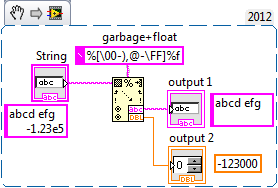
No need to sell scan from string short.

 CFER_STS
07-08-2014 04:16 PM
- Mark as New
- Bookmark
- Subscribe
- Mute
- Subscribe to RSS Feed
- Permalink
- Report to a Moderator
I have used a cheap brute force method to do exactly this: Run the string through a search and replace function first, and change every instance of your chosen delimiter(s) to whitespace, then scan from string with the normal format specifiers.
