- Subscribe to RSS Feed
- Mark Topic as New
- Mark Topic as Read
- Float this Topic for Current User
- Bookmark
- Subscribe
- Mute
- Printer Friendly Page
Resynchronizing C-Series XNET CAN Modules
Solved!
 RHryniowski
06-09-2023 11:09 AM
- Mark as New
- Bookmark
- Subscribe
- Mute
- Subscribe to RSS Feed
- Permalink
- Report to a Moderator
Hi community,
I'm using a C-Series XNET NI-9860 to collect CAN data, I start the session on Monday and by Friday the timestamps of the signals have drifted by ~1 second relative to the system clock and can't be trusted anymore.
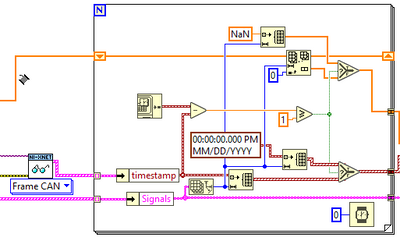
I've read over some KB articles
https://www.ni.com/docs/en-US/bundle/ni-xnet/page/nixnet/synchronization.html
But I don't understand how to synchronize the HW Clock to my system clock, and since it takes 4 days for the issue to return it's hard to trial.
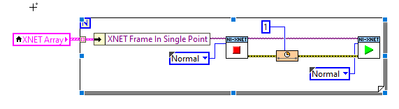
If I stop then restart the session does this force the clocks to resync? Or do I need to include a timing frame first?
Thanks,
Solved! Go to Solution.

 ZYOng
ZYOng
06-09-2023 12:51 PM
- Mark as New
- Bookmark
- Subscribe
- Mute
- Subscribe to RSS Feed
- Permalink
- Report to a Moderator
Regardless of which API is used, XNET will querry the host OS for the current system time when a Interface is started. At that point, the current time is placed into a interface specific timestamp regiseter on the XNET device. The timestamp register will then increment with every tick of the master timebase clock. When a CAN frame is acknowledged, a copy of the timestamp register is attached to the frame and placed into the receive buffer to be read by the XNET API.
Reference: Solved: Re: XNET Timestamp and Windows Timestamp Synchronization
So restarting the interface will force the hardware the query the OS time again.
Applications Engineer | TME Systems
https://tmesystems.net/
-------------------------------------------------------
https://github.com/ZhiYang-Ong
06-09-2023 02:01 PM - edited 06-09-2023 02:03 PM
- Mark as New
- Bookmark
- Subscribe
- Mute
- Subscribe to RSS Feed
- Permalink
- Report to a Moderator
Thanks ZYOng,
The wording in the linked article is a little ambiguous, the commands I am using stop and start the session, the article uses the word interface.
This is the solution I went with, and I'll be watching for a few days to make sure it sticks, but is there a cleaner way? Stopping and starting the session on the computer I have this deployed to takes ~4 seconds, (a lifetime in production) 😏.
ZYOng
06-09-2023 03:07 PM
- Mark as New
- Bookmark
- Subscribe
- Mute
- Subscribe to RSS Feed
- Permalink
- Report to a Moderator
An XNET interface can have more than one session. I am not sure if simply restarting the session will help.
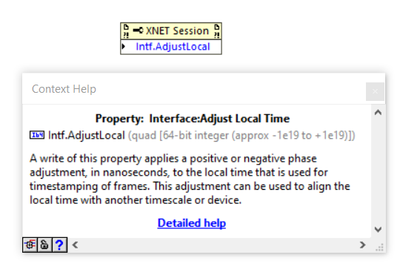
There is a property that allows you to adjust the time without restarting the interface. However, I think it is only supported on PXI/PXIe module.
Applications Engineer | TME Systems
https://tmesystems.net/
-------------------------------------------------------
https://github.com/ZhiYang-Ong
