- Subscribe to RSS Feed
- Mark Topic as New
- Mark Topic as Read
- Float this Topic for Current User
- Bookmark
- Subscribe
- Mute
- Printer Friendly Page
Read HTML code from HTTPS url

 NicolaRE77
12-10-2018 08:06 AM
- Mark as New
- Bookmark
- Subscribe
- Mute
- Subscribe to RSS Feed
- Permalink
- Report to a Moderator
Hello everyone, is it possible to read the HTML content code of a web page that has an url in HTTPS without using IWEBBROWSER2 ??
For example with ActiveX .NET?
Thank you

 deceased
12-11-2018 02:01 AM
- Mark as New
- Bookmark
- Subscribe
- Mute
- Subscribe to RSS Feed
- Permalink
- Report to a Moderator
Use the HTTP client found in the "Data Communication" -> "Protocols" palette.
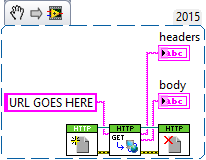

 wiebe@CARYA

12-11-2018 06:11 AM
- Mark as New
- Bookmark
- Subscribe
- Mute
- Subscribe to RSS Feed
- Permalink
- Report to a Moderator
@deceased wrote:
Use the HTTP client found in the "Data Communication" -> "Protocols" palette.
You'd probably need a lot more code (from the Security palette) then that to set up the SSL connection. AFAIK, SSL+HTTP=HTTPS.
I've used stunnel in the past, so the problem doesn't need to be solved in LabVIEW anymore. Stunnel will route the shhtp data to http data.
 Search LabVIEW like a graph!
deceased
Search LabVIEW like a graph!
deceased
12-11-2018 08:02 AM
- Mark as New
- Bookmark
- Subscribe
- Mute
- Subscribe to RSS Feed
- Permalink
- Report to a Moderator
Worked fine for me visiting the HTTPS of amazon.com. Body contained the full HTML/Javacript.
The header did include the HSTS request, but at that point I already had the body.
If you try to visit the HTTP version, it only returns a 301 permanent redirect header (pointing to the HTTPS version) and no Body.
0xDEAD
12-11-2018 09:22 AM - edited 12-11-2018 09:24 AM
- Mark as New
- Bookmark
- Subscribe
- Mute
- Subscribe to RSS Feed
- Permalink
- Report to a Moderator
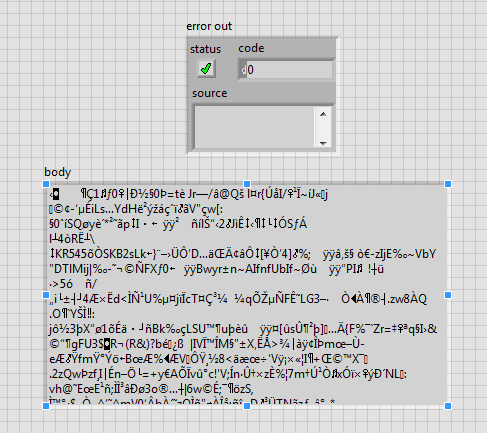
Hi deceased, I tried with the example above (http post) but it does not work, the html code returned in the body is encoded and therefore illegible.
url : https://www.amazon.com
12-11-2018 09:25 AM - edited 12-11-2018 09:27 AM
- Mark as New
- Bookmark
- Subscribe
- Mute
- Subscribe to RSS Feed
- Permalink
- Report to a Moderator
@wiebe@CARYA
OK, thanks for the reply :), would you have an example code?
wiebe@CARYA
12-11-2018 09:59 AM
- Mark as New
- Bookmark
- Subscribe
- Mute
- Subscribe to RSS Feed
- Permalink
- Report to a Moderator
@NicolaRE77 wrote:
@wiebe@CARYA
OK, thanks for the reply :), would you have an example code?
Not really. I actually have no idea how that would work from LabVIEW. I saw that the HTTP interface has SSL options, but I have no idea what should be wired to what VI...
When I used stunnel, my application actually was the HTTP server. I used .NET for that, and figured I'd better outsource the SSL part.
12-11-2018 10:33 AM
- Mark as New
- Bookmark
- Subscribe
- Mute
- Subscribe to RSS Feed
- Permalink
- Report to a Moderator
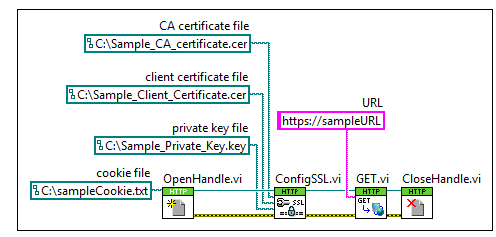
ok, I think there is this, but where do I find all these certificates and api key?
Is not the client_certificate alone enough?


12-17-2018 10:35 AM
- Mark as New
- Bookmark
- Subscribe
- Mute
- Subscribe to RSS Feed
- Permalink
- Report to a Moderator

 rolfk
rolfk
12-17-2018 10:48 AM - edited 12-17-2018 10:55 AM
- Mark as New
- Bookmark
- Subscribe
- Mute
- Subscribe to RSS Feed
- Permalink
- Report to a Moderator
wiebe@CARYA wrote:
You'd probably need a lot more code (from the Security palette) then that to set up the SSL connection. AFAIK, SSL+HTTP=HTTPS.
Nope. The HTTP VIs do unlike what their name might suggest, also support the HTTPS protocol. As long as you try to connect to a HTTPS server with valid certificate signed by one of the well known certification authorities, they should simply work. If you try to access a server with self signed certificate you have to setup your own certification store with the correct certificate which the HTTP VIs only expose a very simple and not always workable method for.

