- Subscribe to RSS Feed
- Mark Topic as New
- Mark Topic as Read
- Float this Topic for Current User
- Bookmark
- Subscribe
- Mute
- Printer Friendly Page
Problem with merging frames with subdiagram label

 CLH239
04-09-2013 03:31 PM
- Mark as New
- Bookmark
- Subscribe
- Mute
- Subscribe to RSS Feed
- Permalink
- Report to a Moderator
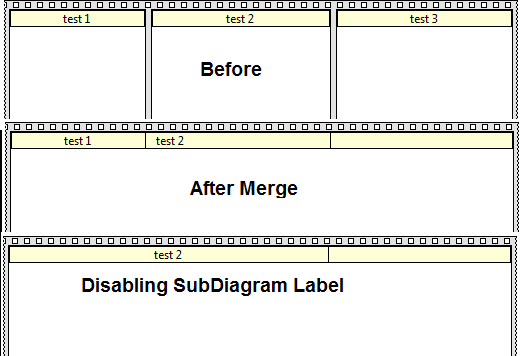
I noticed a problem today with using subdiagram labels in a flat sequence. If I merge frames in the sequence the labels come together and can't be deleted. If I uncheck Subdiagram labels from the visible items menu, the label stays there. Trying to select just the label selects the entire flat sequence.
Wasn't sure if this was a bug or not.
Thanks,
Chris

 billko
04-09-2013 06:01 PM
- Mark as New
- Bookmark
- Subscribe
- Mute
- Subscribe to RSS Feed
- Permalink
- Report to a Moderator
I see what you mean. One more reason to stay away from flat sequence structures - unless they contain only one frame. Yes, there actually is a use for a flat sequence structure with one frame.
(Mid-Level minion.)
My support system ensures that I don't look totally incompetent.
Proud to say that I've progressed beyond knowing just enough to be dangerous. I now know enough to know that I have no clue about anything at all.
Humble author of the CLAD Nugget.

04-10-2013 05:13 PM
- Mark as New
- Bookmark
- Subscribe
- Mute
- Subscribe to RSS Feed
- Permalink
- Report to a Moderator
Hi Chris,
I took a look and was easily able to reproduce this incorrect behavior. This was reported to R&D (# 402433) for further investigation.
Thanks for bringing this to our attention!
Andy C.
Applications Engineering
National Instruments
- Tags:
- CAR

 Hornless.Rhino
07-17-2014 11:34 PM
- Mark as New
- Bookmark
- Subscribe
- Mute
- Subscribe to RSS Feed
- Permalink
- Report to a Moderator
I've just hit this myself. Is there any update? Or any way to remove the surpurfluous label?
It gets worse when you enlarge the merged frame in both directions and you end up with a label across the middle of the frame stuck behind everything and impossible to remove.

07-18-2014
03:01 PM
- last edited on
12-04-2024
10:43 AM
by
 Content Cleaner
- Mark as New
- Bookmark
- Subscribe
- Mute
- Subscribe to RSS Feed
- Permalink
- Report to a Moderator
Hello Hornless.Rhino,
You can check the current status of bug fixes for different versions of LabVIEW online. A list of bug fixes for LabVIEW 2013 SP1 can be found online at https://www.ni.com/en/support/documentation/bugs/14/archived--labview-2013-sp1-bug-fixes.html
As prevously stated by Any-C the reference number for this bug is 402433. At this time, the bug has not been fixed but you can keep checking on the provided website and subsequent versions of LabVIEW.
Hornless.Rhino
07-22-2014 07:19 PM
- Mark as New
- Bookmark
- Subscribe
- Mute
- Subscribe to RSS Feed
- Permalink
- Report to a Moderator
Didn't know about that page. Thanks.

 ddox
ddox
06-23-2015 03:15 PM
- Mark as New
- Bookmark
- Subscribe
- Mute
- Subscribe to RSS Feed
- Permalink
- Report to a Moderator
I'm running LabVIEW 2014 with all the most recent updates and just ran into this exact problem. Is there a fix or workaround yet or am I stuck with a giant immovable label in the middle of the Block Diagram?
mikeporter

06-23-2015 09:45 PM
- Mark as New
- Bookmark
- Subscribe
- Mute
- Subscribe to RSS Feed
- Permalink
- Report to a Moderator
Mike...
Certified Professional Instructor
Certified LabVIEW Architect
LabVIEW Champion
"... after all, He's not a tame lion..."
For help with grief and grieving.
ddox
06-23-2015 11:20 PM
- Mark as New
- Bookmark
- Subscribe
- Mute
- Subscribe to RSS Feed
- Permalink
- Report to a Moderator
mikeporter
06-24-2015 05:00 AM
- Mark as New
- Bookmark
- Subscribe
- Mute
- Subscribe to RSS Feed
- Permalink
- Report to a Moderator
1 Convert stacked sequence to a flat one.
2 Remove the flat sequence.
3 Hit block diagram cleanup
Most of the time that is all that is required because there is usually already data dependencies between the frames.
Mike...
Certified Professional Instructor
Certified LabVIEW Architect
LabVIEW Champion
"... after all, He's not a tame lion..."
For help with grief and grieving.
