- Subscribe to RSS Feed
- Mark Topic as New
- Mark Topic as Read
- Float this Topic for Current User
- Bookmark
- Subscribe
- Mute
- Printer Friendly Page
Problem in segregating the data from array
Solved!
 suyash.barodiya
12-03-2017 02:00 PM
- Mark as New
- Bookmark
- Subscribe
- Mute
- Subscribe to RSS Feed
- Permalink
- Report to a Moderator
Dear all,
I am getting the data from different analog and digital channel and continuously storing it in the array.
I want to segregate channel wise data. Please refer attached image.
First three are analog then rest two are boolean then repeat.
can I separate the yellow data in some register, where next value can overwrite the previous one.. and so on for rest of the data.
Please find attachment
Thanks in advance 🙂
Solved! Go to Solution.

 crossrulz

12-03-2017 09:38 PM
- Mark as New
- Bookmark
- Subscribe
- Mute
- Subscribe to RSS Feed
- Permalink
- Report to a Moderator
Use Reshape Array to turn it into a 2D array so that each row contains a set of readings. Then you can just use Index Array to get the column(s) you care about.
There are only two ways to tell somebody thanks: Kudos and Marked Solutions
Unofficial Forum Rules and Guidelines
"Not that we are sufficient in ourselves to claim anything as coming from us, but our sufficiency is from God" - 2 Corinthians 3:5

 MaxJoseph
12-04-2017 02:11 AM
- Mark as New
- Bookmark
- Subscribe
- Mute
- Subscribe to RSS Feed
- Permalink
- Report to a Moderator
Decimate array, extended to a total of 5 elements, will have the yellow data in the first output and the red data in the second output.
I don't know if this is faster than reshape followed by index. Do a benchmark and let us know!
 GerdW
GerdW
12-04-2017 03:44 AM
- Mark as New
- Bookmark
- Subscribe
- Mute
- Subscribe to RSS Feed
- Permalink
- Report to a Moderator
Hi suyash,
after going through some basic LabVIEW lessons you should be able to get to the very basic "index array elements in a loop approach":
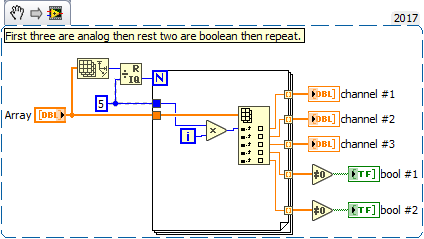

(ReshapeArray and DecimateArray will also solve your problem, probably in a more optimized way. But still then you should understand the code you are writing…)
GerdW
using LV2016/2019/2021 on Win10/11+cRIO, TestStand2016/2019
crossrulz
12-04-2017 06:31 AM
- Mark as New
- Bookmark
- Subscribe
- Mute
- Subscribe to RSS Feed
- Permalink
- Report to a Moderator
@MaxJoseph wrote:
Decimate array, extended to a total of 5 elements, will have the yellow data in the first output and the red data in the second output.
I don't know if this is faster than reshape followed by index. Do a benchmark and let us know!
From a scalability perspective, the reshape is better. The Decimate 1D Array forces you to a set number of channels at compile time. The Reshape Array allows me to define how many channels at runtime (more scalable).
However, if I had to guess I would say the Decimate 1D Array would likely be faster. Need benchmarks to prove it. I may be surprised.
There are only two ways to tell somebody thanks: Kudos and Marked Solutions
Unofficial Forum Rules and Guidelines
"Not that we are sufficient in ourselves to claim anything as coming from us, but our sufficiency is from God" - 2 Corinthians 3:5
12-12-2017 12:46 AM
- Mark as New
- Bookmark
- Subscribe
- Mute
- Subscribe to RSS Feed
- Permalink
- Report to a Moderator
Hello Every one,
Thank you very much for providing me the solution.
All the options are working but decimate array worked for me. I do not have waste knowledge of LabVIEW but in may case i have seen that option of reshaping array is faster than decimate array, but still we need some experts review on it.
Have a great day 
