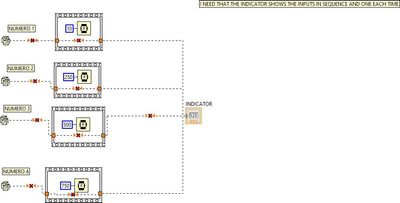
One indicator and four inputs
已解决!


 Frozen
Answering your question directly... Use 3 local variable (right click -> create local variable).
BTW. You are probably asking the "wrong" question because local (global) variable are rarely the "right" answer.
Former Certified LabVIEW Developer (CLD)

 RTSLVU
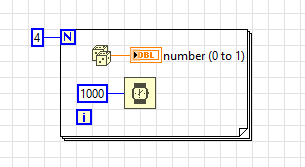
Look at some of the free online tutorials, specifically For Loops.
=== Engineer Ambiguously ===
========================
Hello
Thank you. Just to be clear, the random numbers are only to example , they are temperature measures in real world.
RTSLVU
@marques51 wrote:
Hello
Thank you. Just to be clear, the random numbers are only to example , they are temperature measures in real world.
Well you should have asked a better question maybe?
Show us the code you have, explain what it is supposed to do, and tell us the part that is giving you trouble.
=== Engineer Ambiguously ===
========================

 GerdW
GerdW

Hi marques,
@marques51 wrote:
Thank you. Just to be clear, the random numbers are only to example , they are temperature measures in real world.
Why do you want to show 4 temperatures in just one indicator?
HOW do you want to show 4 values within this one indicator?
Build a cluster from your 4 temperatures and show them on a gauge with 4 needles!
GerdW
using LV2016/2019/2021 on Win10/11+cRIO, TestStand2016/2019
RTSLVU
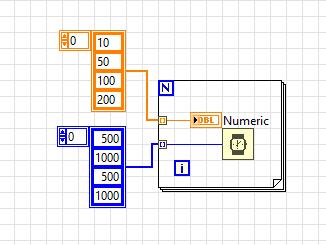
In your example I notice you have four "numbers" and four delay periods.
Again using a For Loop (auto indexing an Array) four different values get displayed at four different intervals.
=== Engineer Ambiguously ===
========================
 BertMcMahan
Could you describe in words what you're trying to do?
For example, "I have four temperature measurements at different locations on a device, and would like to switch which temperature is indicated in the display once every second. Thus, you'd start with temperature sensor A's value displayed for 1 second, then sensor B for one second, then sensor C for one second, then D for one second, then back to A to repeat the cycle."
RTSLVU
@marques51 wrote:
Trusted Enthusiast I aprreciate your work, but is showing only the random number 4...(200 in your example)
Me?
The you did something wrong as the indicator should
- Display 10
- Wait 500mS
- Display 50
- Wait 1000mS
- Display 100
- Wait 500mS
- Display 200
- Wait 1000mS
- End
But yeah when the program completes the indicator will be displaying the last number (200).
Put a While Loop around it to make it continuously cycle.
But honestly this is exactly why you should be posting your code and asking for help with the part you are having trouble with. As it's too easy to get off into the weeds with theoretical program fragments like this and confuse the issue even more.
Just look at the responses most of them are asking for more information.
=== Engineer Ambiguously ===
========================
