ni.com is currently undergoing scheduled maintenance.
Some services may be unavailable at this time. Please contact us for help or try again later.
- Subscribe to RSS Feed
- Mark Topic as New
- Mark Topic as Read
- Float this Topic for Current User
- Bookmark
- Subscribe
- Mute
- Printer Friendly Page
NI VISA

 shaunmarsh123
01-25-2018 12:28 AM
- Mark as New
- Bookmark
- Subscribe
- Mute
- Subscribe to RSS Feed
- Permalink
- Report to a Moderator
I am using NI VISA to detect my USB device (which is ATMEL ASF Board) ,so i create driver following this and when i open ni max to use my usb device it show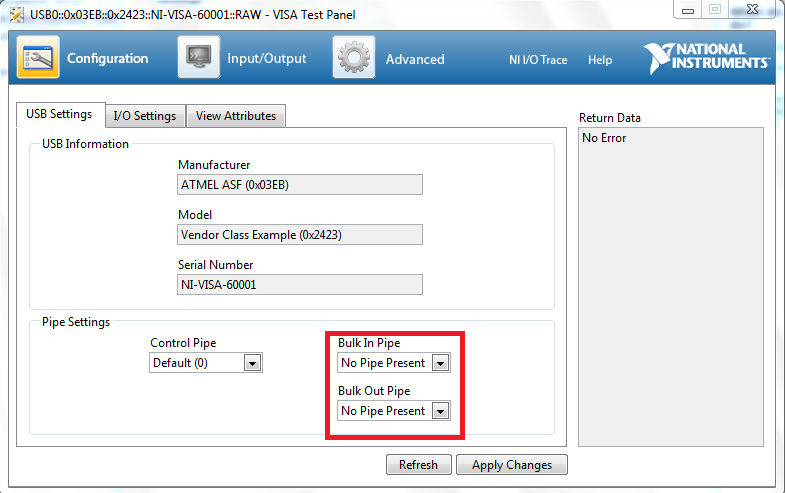
i used usblyzer for same device and it shows correct bulk in pipe at 83h as it should be..
- Tags:
- LabVIEW
01-26-2018 04:46 AM
- Mark as New
- Bookmark
- Subscribe
- Mute
- Subscribe to RSS Feed
- Permalink
- Report to a Moderator
i am using NI-VISA Driver Wizard to make driver of my "ASF USB" (ATMEL WITH
VID=03EB & PID=2423) as shown in NI-VISA Driver Wizard.png and you can see
(numberofopenpipes: 0) then i make a driver and it successfully connect my
device then i open NI max to test my usb device ni max detect my device as
can be seen in image (ni max1. png) and when i open visa test pannel it show
bulk in pipe= no pipe present ( as highlighted in (ni max 2.png) and if i set
these value and apply changes it shows an error which can be seen on (ni
max3.png)
NOTE: unzip attached image.zip folder to see all referred images.
what can i do to get my device to properly work with ni visa?
i think NI visa is showing (numberofopenpipes:0) that's why i am having this
issue.
how can it be resolved ?
please provide a possible solution as i am stuck with it for nearly 2 day.
i have tried my USB device with other driver and software and i was working.
- Tags:
- LabVIEW
01-26-2018 09:52 PM
- Mark as New
- Bookmark
- Subscribe
- Mute
- Subscribe to RSS Feed
- Permalink
- Report to a Moderator
can anyone assist me with this problem ?

 LabviewKK
01-27-2018
05:02 PM
- last edited on
06-24-2025
12:39 PM
by
 Content Cleaner
- Mark as New
- Bookmark
- Subscribe
- Mute
- Subscribe to RSS Feed
- Permalink
- Report to a Moderator
i did not set pipe in& out.
May be you can try it.
https://forums.ni.com/t5/Example-Code/VISA-List-all-VISA-Devices/ta-p/3504571
01-29-2018 09:47 PM
- Mark as New
- Bookmark
- Subscribe
- Mute
- Subscribe to RSS Feed
- Permalink
- Report to a Moderator
thanks 回應,
but this vi show the information of devices connected and not the solution of my problems .

01-30-2018 09:57 AM
- Mark as New
- Bookmark
- Subscribe
- Mute
- Subscribe to RSS Feed
- Permalink
- Report to a Moderator
Hi Shaunmarsh123,
Which OS are you using?
If you are using Windows 8 or 10, then I recommend looking at the article below.
Using a *.inf File from the Driver Development Wizard on Windows 8
https://knowledge.ni.com/KnowledgeArticleDetails?id=kA00Z0000019L9QSAU
The only difference for Windows 10 will be that you need the Windows 10 WDK instead of Windows 8.
Regards,
Jared T.
01-30-2018 10:07 PM
- Mark as New
- Bookmark
- Subscribe
- Mute
- Subscribe to RSS Feed
- Permalink
- Report to a Moderator
i am using windows 7 .. now what should i do ?
01-31-2018
09:03 AM
- last edited on
06-24-2025
12:39 PM
by
Content Cleaner
- Mark as New
- Bookmark
- Subscribe
- Mute
- Subscribe to RSS Feed
- Permalink
- Report to a Moderator
Have you walked through this Tutorial to ensure you set up your driver properly?
USB Instrument Control Tutorial
https://knowledge.ni.com/KnowledgeArticleDetails?id=kA03q000000x1qzCAA&l=en-US
Regards,
Jared T.
