- Subscribe to RSS Feed
- Mark Topic as New
- Mark Topic as Read
- Float this Topic for Current User
- Bookmark
- Subscribe
- Mute
- Printer Friendly Page
Multiple analog inputs with different configuration RSE/Differential
Solved!
 JackT
JackT
07-03-2013 04:05 AM
- Mark as New
- Bookmark
- Subscribe
- Mute
- Subscribe to RSS Feed
- Permalink
- Report to a Moderator
Hi
Can anyone advise how to measure two analog inputs with different configurations using a USB 6009?
I am aware of the syntax to create to virtual channels for the DAQmx Create Virtual Channel(s) so I have created two channels using Dev3/ai0:1 but I would like the first channel to be RSE and the second to be Differential.
So far I have not found any way to specify the configuration for the separate channels.
Any ideas much appreciated!
Jack
Solved! Go to Solution.

 moderator1983
07-03-2013 04:49 AM
- Mark as New
- Bookmark
- Subscribe
- Mute
- Subscribe to RSS Feed
- Permalink
- Report to a Moderator
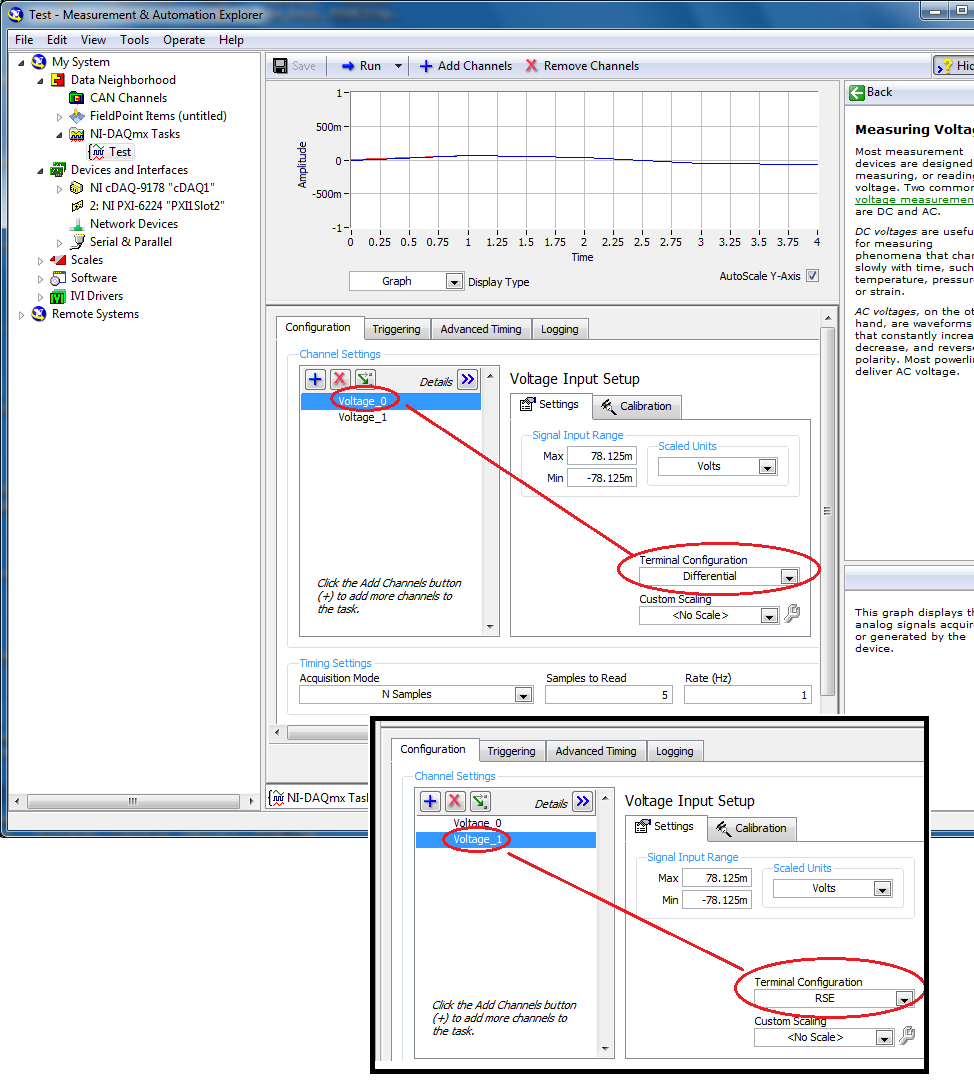
Have you tried this??

07-03-2013 05:04 AM
- Mark as New
- Bookmark
- Subscribe
- Mute
- Subscribe to RSS Feed
- Permalink
- Report to a Moderator
Hi
Thanks for the response.
I have just tried as you suggest using the DAQ Assistant (creating two channels and setting the configuration differently) and this seems to work.
I prefer to use the 'low' level vi's so still curious to know if there is a way to set the configuration using them.
Cheers
Jack
moderator1983
07-03-2013 05:30 AM
- Mark as New
- Bookmark
- Subscribe
- Mute
- Subscribe to RSS Feed
- Permalink
- Report to a Moderator
@JackT wrote:
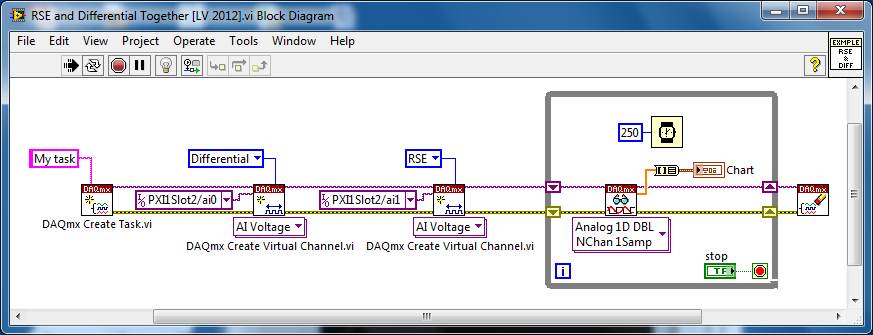
I prefer to use the 'low' level vi's so still curious to know if there is a way to set the configuration using them.
It should be like this:
07-03-2013 05:32 AM
- Mark as New
- Bookmark
- Subscribe
- Mute
- Subscribe to RSS Feed
- Permalink
- Report to a Moderator
Great!
Thanks for the advice.
moderator1983
07-03-2013 05:34 AM
- Mark as New
- Bookmark
- Subscribe
- Mute
- Subscribe to RSS Feed
- Permalink
- Report to a Moderator
Well, you can always skip the very first node (which is DAQmx Create Task.vi), I just kept it for elaborating the concept.
