- Subscribe to RSS Feed
- Mark Topic as New
- Mark Topic as Read
- Float this Topic for Current User
- Bookmark
- Subscribe
- Mute
- Printer Friendly Page
More String Control Scrollbar Bugs

 X.
X.
04-03-2014 12:57 PM
- Mark as New
- Bookmark
- Subscribe
- Mute
- Subscribe to RSS Feed
- Permalink
- Report to a Moderator
In the series of bugs that will never be fixed but need to be posted for the record, here is a variant of the String Control horizontal scrollbar topic.
Take a String Control (works with Classic, Modern and Silver):

Show its horizontal scrollbar. That's not an immediate process, so here is the wya it goes in LV 2013:
- Show Properties
- Go to the Appearance Tab
- Uncheck "Wrap at word breaks"
- Check "Show horizontal scrollbar"
Here's the result:
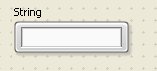
Where's the scrollbar?
You have to grab one of the control edges, expand it VERTICALLY by one pixel and the container box with then snap to a size that accounts for the scrollbar height:

Expanding HORIZONTALLY has no effect:

If you try that with the System String Control, similar limitations apply but you get a bonus:

The one pixel tall string!
- Tags:
- X_Bug_Report

 ChrisStrykesAga
04-07-2014 06:41 AM
- Mark as New
- Bookmark
- Subscribe
- Mute
- Subscribe to RSS Feed
- Permalink
- Report to a Moderator
Are you using LabVIEW 2013 SP1 or just 2013? I don't currently see any internal documentation of this, so I am going to recreate the situations using SP1.
I should be able to get back to you later today with more information and the next steps I will be taking.
04-07-2014 10:26 AM
- Mark as New
- Bookmark
- Subscribe
- Mute
- Subscribe to RSS Feed
- Permalink
- Report to a Moderator
2013 SP1 Windows XP 32bit

 billko
04-07-2014 11:13 AM
- Mark as New
- Bookmark
- Subscribe
- Mute
- Subscribe to RSS Feed
- Permalink
- Report to a Moderator
My guess is that the box just isn't big enough to show the scroll bar. If you re-size the control vertically before you enable the scroll bar, it shows up just fine.
(Mid-Level minion.)
My support system ensures that I don't look totally incompetent.
Proud to say that I've progressed beyond knowing just enough to be dangerous. I now know enough to know that I have no clue about anything at all.
Humble author of the CLAD Nugget.
04-07-2014 02:41 PM - edited 04-07-2014 02:42 PM
- Mark as New
- Bookmark
- Subscribe
- Mute
- Subscribe to RSS Feed
- Permalink
- Report to a Moderator
That is probably a good guess. However, I would argue that if I go throught the trouble of opening the Properties Panel to ask for a horizontal scrollbar, I'd be happy to get the scrollbar added.
I have actually found out another oddity (which makes the behavior of the System String somewhat less outlandish):
If you take the default Silver String control, which has a height of 37 pixels, and expands it to 39 pixels or more, then following the procedure I described in my original post, the horizontal scollbar will be shown.
Like this:
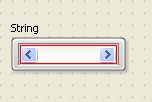
Here I have painted the String background in red so that you can see that a 1 or 2 pixel string display area is available (like I described for the System string, but here, if you further manipulate the control, it will snap to a more reasonable height allowing you to type in something visible).
So, what I am saying is that there is not much coherence in what the algorithm considers a valid condition to show a scrollbar. Of course all this becomes very interesting when the font size is changed...
billko
04-07-2014 03:01 PM
- Mark as New
- Bookmark
- Subscribe
- Mute
- Subscribe to RSS Feed
- Permalink
- Report to a Moderator
@X. wrote:
That is probably a good guess. However, I would argue that if I go throught the trouble of opening the Properties Panel to ask for a horizontal scrollbar, I'd be happy to get the scrollbar added.
I have actually found out another oddity (which makes the behavior of the System String somewhat less outlandish):
If you take the default Silver String control, which has a height of 37 pixels, and expands it to 39 pixels or more, then following the procedure I described in my original post, the horizontal scollbar will be shown.
Like this:
Here I have painted the String background in red so that you can see that a 1 or 2 pixel string display area is available (like I described for the System string, but here, if you further manipulate the control, it will snap to a more reasonable height allowing you to type in something visible).
So, what I am saying is that there is not much coherence in what the algorithm considers a valid condition to show a scrollbar. Of course all this becomes very interesting when the font size is changed...
Well, you just illustrated exactly what I meant. The scroll bar is as tall as the control itself is. I think it is unavoidable though. Just look at everything that has a scroll bar. The scroll bar gets added to the INSIDE of the window that needs it, not the outside.
(Mid-Level minion.)
My support system ensures that I don't look totally incompetent.
Proud to say that I've progressed beyond knowing just enough to be dangerous. I now know enough to know that I have no clue about anything at all.
Humble author of the CLAD Nugget.
04-07-2014 03:07 PM
- Mark as New
- Bookmark
- Subscribe
- Mute
- Subscribe to RSS Feed
- Permalink
- Report to a Moderator
Indeed, and I said so.
However, I think I have also proven that this "internal" addition of a scrollbar concept hasn't been thought through by NI, since they seem to be shy to add one when there is 0-pixel space, but not when there is 1-pixel space (or 2, I am not sure).
What is the sense of this, for any one out there?
Disclaimer: I don't have a degree in CS, but I will call a cat a cat.
billko
04-07-2014 03:12 PM
- Mark as New
- Bookmark
- Subscribe
- Mute
- Subscribe to RSS Feed
- Permalink
- Report to a Moderator
I think it is simply that there is not enough room to display the scrollbar. Probably what needs to be done is either make the default size of the control a little taller or make the scrollbar a little shorter.
I didn't mean to imply that it was correct behavior. It's just expected behavior.
(Mid-Level minion.)
My support system ensures that I don't look totally incompetent.
Proud to say that I've progressed beyond knowing just enough to be dangerous. I now know enough to know that I have no clue about anything at all.
Humble author of the CLAD Nugget.

 RavensFan

04-07-2014 03:14 PM
- Mark as New
- Bookmark
- Subscribe
- Mute
- Subscribe to RSS Feed
- Permalink
- Report to a Moderator
I think you do have a bug here.
Even if you work with a Modern style string control, it is doing similar things. And when it adds the scrollbar overtop of the existing single line string area, it doesn't look like a scrollbar, it looks like an empty string box that you can't type into when you try.
04-07-2014 03:15 PM - edited 04-07-2014 03:16 PM
- Mark as New
- Bookmark
- Subscribe
- Mute
- Subscribe to RSS Feed
- Permalink
- Report to a Moderator
This got me curious about the vertical scrollbar behavior, and this is exactly similar:


Clearly not large enough to see a full character.
After blowing the Font Size (repeated Ctrl+=):

I have got a single character "c" in this string.
