- Subscribe to RSS Feed
- Mark Topic as New
- Mark Topic as Read
- Float this Topic for Current User
- Bookmark
- Subscribe
- Mute
- Printer Friendly Page
MS Word Report Generation Filename Input
Solved!
 CastleWorks
01-06-2017 09:27 AM
- Mark as New
- Bookmark
- Subscribe
- Mute
- Subscribe to RSS Feed
- Permalink
- Report to a Moderator
I am using the MS Office Report Genertation VI and selecting a custom template.
I am able to populate all fields correctly, but is there a way for me to specify the "save as" filename as an input?
The report filename will change each time the program is ran based on the product serial number.
Is there a way to create a filename input?
Solved! Go to Solution.

 aputman
01-06-2017 09:32 AM
- Mark as New
- Bookmark
- Subscribe
- Mute
- Subscribe to RSS Feed
- Permalink
- Report to a Moderator
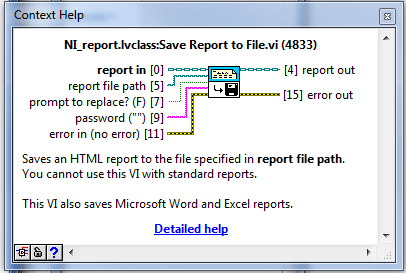
Do you mean the "Save Report to File" VI?
01-06-2017 09:36 AM
- Mark as New
- Bookmark
- Subscribe
- Mute
- Subscribe to RSS Feed
- Permalink
- Report to a Moderator
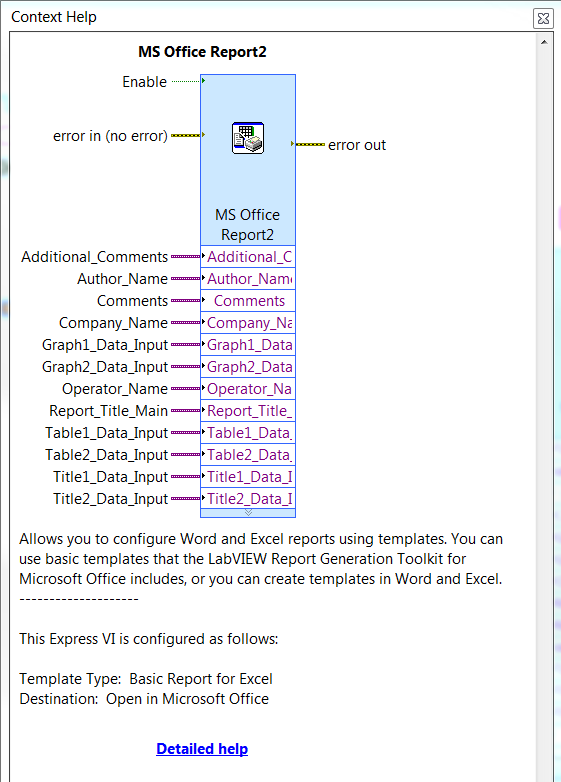
I am using the following VI to create the report.
 aputman
01-06-2017 09:47 AM - edited 01-06-2017 09:47 AM
- Mark as New
- Bookmark
- Subscribe
- Mute
- Subscribe to RSS Feed
- Permalink
- Report to a Moderator
Then don't use that. 
Actually you can expand the express VI to show other config parameters, including save path. Drag the handle on the edge of the VI downwards to reveal other parameters.
I try to avoid using the Express VIs because they are very limited in their functionality and you can only do the thing they were designed to do, which is usually not what I am wanting to do. You can create a copy of the Express VI and using the copy, right click it and open the front panel to see the underlying code behind it. Then you can use that code as a basis for what you want to do and customize it to your heart's content. However, you won't have the dialog box functionality that you had before.
01-06-2017 09:53 AM
- Mark as New
- Bookmark
- Subscribe
- Mute
- Subscribe to RSS Feed
- Permalink
- Report to a Moderator
Thanks for the input, I do see the save path input when using the basic report for Word, but if I select custom report for Word (I'd like to use my own template) that option seems to go away.
I may try modifying the VI like you say.
aputman
01-06-2017 09:59 AM
- Mark as New
- Bookmark
- Subscribe
- Mute
- Subscribe to RSS Feed
- Permalink
- Report to a Moderator
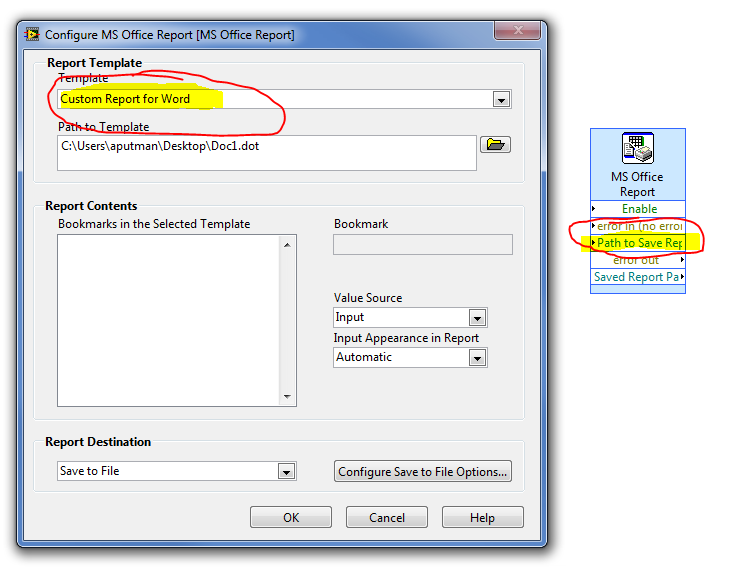
Works for me.
01-06-2017 10:11 AM
- Mark as New
- Bookmark
- Subscribe
- Mute
- Subscribe to RSS Feed
- Permalink
- Report to a Moderator
Hmmm, interesting. Not sure what I am doing wrong. Do I need to do something on my template possibly?
 aputman
01-06-2017 10:16 AM
- Mark as New
- Bookmark
- Subscribe
- Mute
- Subscribe to RSS Feed
- Permalink
- Report to a Moderator
Do you have the report destination set to "Save to File"? If it's set to Open in Office, the save path input goes away.
01-06-2017 10:22 AM
- Mark as New
- Bookmark
- Subscribe
- Mute
- Subscribe to RSS Feed
- Permalink
- Report to a Moderator
FOR THE WIN!.....yep that was my oversight. Thanks for the help!
aputman
01-06-2017 10:28 AM
- Mark as New
- Bookmark
- Subscribe
- Mute
- Subscribe to RSS Feed
- Permalink
- Report to a Moderator
Mark the solution so that others coming along can skip straight to the answer. Kudos are also appreciated.
