- Subscribe to RSS Feed
- Mark Topic as New
- Mark Topic as Read
- Float this Topic for Current User
- Bookmark
- Subscribe
- Mute
- Printer Friendly Page
Linking C++ DLL into LabVIEW
Solved!
 kahlenberg
01-22-2016 04:16 AM - edited 01-22-2016 04:26 AM
- Mark as New
- Bookmark
- Subscribe
- Mute
- Subscribe to RSS Feed
- Permalink
- Report to a Moderator
Hi,
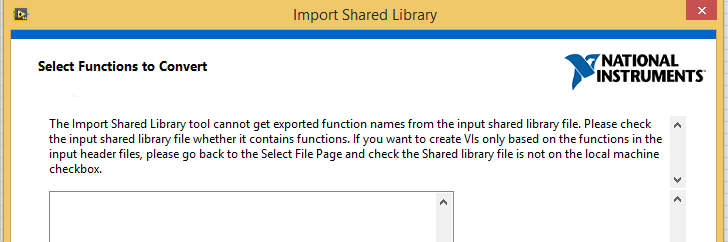
I am suffering about linking a DLL into LabVIEW. I am using LabVIEW 2014 32-bit and generating my DLL in Visual Studio Express 2013. I am using Import Library Wizard (Tools->Import->Shared Library), I select DLL file and header file, I click next, and getting error "The Import Shared Library tool cannot get exported function names ....." as pictured below.
I read lots of topics in Forum about DLL importing, but I could not solve my problem.
What am I doing wrong?
Thanks.
commdll.hpp

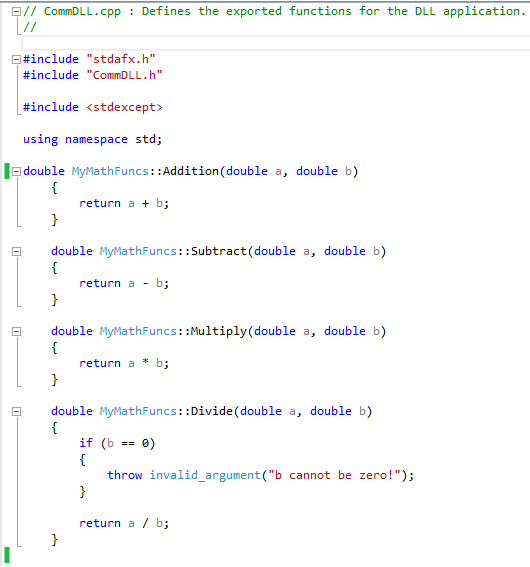
comdll.cpp
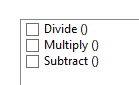
If I select I get only 3 functions, the function Addition is not listed as pictured below:

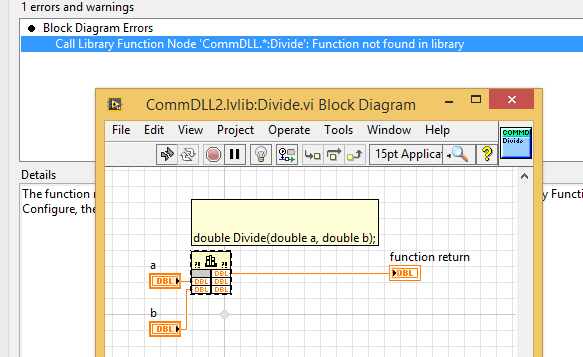
And of course it does not work.
Solved! Go to Solution.

 Michel_Gauvin
01-22-2016 09:26 AM
- Mark as New
- Bookmark
- Subscribe
- Mute
- Subscribe to RSS Feed
- Permalink
- Report to a Moderator
I've you tried to disable the name mangling when compiling your *.dll?
Michel

 KevinSmith13
01-22-2016 09:31 AM
- Mark as New
- Bookmark
- Subscribe
- Mute
- Subscribe to RSS Feed
- Permalink
- Report to a Moderator
In my experience, I have instantiated my class in global space and wrapped the object's class methods inside global space functions as shown below. And when you build this, make sure you tell your compiler to set the BUILDING_EXAMPLE_DLL flag (i.e. CXXFLAGS = -DBUILDING_EXAMPLE_DLL)
example_dll.h file:
#ifndef EXAMPLE_DLL_H
#define EXAMPLE_DLL_H

	#ifdef __cplusplus
	extern "C" {
	#endif

		#ifdef BUILDING_EXAMPLE_DLL
		#define EXAMPLE_DLL __declspec(dllexport)
		#else
		#define EXAMPLE_DLL __declspec(dllimport)
		#endif

		double EXAMPLE_DLL Addition(double a, double b);

	#ifdef __cplusplus
	}
	#endif

#endif // EXAMPLE_DLL_H
example_dll.cpp
#include "example_dll.h"
#include "MyMathFuncs.h"

/*
 * An example of shared (global) data
 *
 */
MyMathFuncs myMathFuncs;

double Addition(double a, double b)
{
	return myMathFuncs.Addition(a,b);
}

 .aCe.
.aCe.

01-22-2016 10:24 AM
- Mark as New
- Bookmark
- Subscribe
- Mute
- Subscribe to RSS Feed
- Permalink
- Report to a Moderator
Have a look at this whitepaper: http://www.ni.com/white-paper/3056/en/ for building a C++ dll. The example code is helpful too.


 nathand
01-22-2016 11:32 AM
- Mark as New
- Bookmark
- Subscribe
- Mute
- Subscribe to RSS Feed
- Permalink
- Report to a Moderator
LabVIEW cannot do anything with a C++ class in a DLL, including import functions contained in a class. Any function you want to call from LabVIEW must be a standard C function. You need to rewrite your DLL without classes, or wrap the classes in standard C functions.
01-26-2016 03:36 AM
- Mark as New
- Bookmark
- Subscribe
- Mute
- Subscribe to RSS Feed
- Permalink
- Report to a Moderator
Thanks, I followed that white paper, I deleted class and implemented everything as C functions, it works now.
PincoG
04-22-2016 10:24 AM
- Mark as New
- Bookmark
- Subscribe
- Mute
- Subscribe to RSS Feed
- Permalink
- Report to a Moderator
I've got a similar problem, witha dll.h like this:
/*------------------------------------------------------------------------------------------*/
/* Exported DLL Functions */
/*------------------------------------------------------------------------------------------*/
#ifdef _cplusplus
extern "C" {
#else
#ifdef __cplusplus
extern "C" {
#endif
#endif
LONG __stdcall MY_Create(char * Device);
(all functions are declared like this)
Wizard don't find anything. Why?
Thanks
nathand
04-22-2016 10:48 AM
- Mark as New
- Bookmark
- Subscribe
- Mute
- Subscribe to RSS Feed
- Permalink
- Report to a Moderator
If you attach the .h file to a message here, then someone else can try running the import wizard with it and see what changes you would need to make to the file in order for the wizard to be able to import it. Or, you can simply configure the Call Library Function Node calls yourself for the functions you want to use, and skip the wizard. Possibly you need to set the include path so that the wizard can find some other header that's referenced.
PincoG
04-26-2016 01:18 AM
- Mark as New
- Bookmark
- Subscribe
- Mute
- Subscribe to RSS Feed
- Permalink
- Report to a Moderator
I haven't been truly:
Wizard find functions in DLL but not in header file of which I attached the very first part.
nathand
04-26-2016 08:28 PM
- Mark as New
- Bookmark
- Subscribe
- Mute
- Subscribe to RSS Feed
- Permalink
- Report to a Moderator
Again, can you attach the full .h file so other forum users can try running the import wizard on it, to see what the problem might be?
Have you tried configuring the call library function node manually, rather than relying on the wizard?
