- Subscribe to RSS Feed
- Mark Topic as New
- Mark Topic as Read
- Float this Topic for Current User
- Bookmark
- Subscribe
- Mute
- Printer Friendly Page
Labview Runtime Engine 2021
Solved!
 Dragonrider
01-18-2023 01:50 PM
- Mark as New
- Bookmark
- Subscribe
- Mute
- Subscribe to RSS Feed
- Permalink
- Report to a Moderator
Greetings Everyone,
This is driving me crazy. Computer is windows 10 with no Labview ever installed. A co-worker created a program for me in Labview 2021 to analyze some data and sent me the executable along with the .ini and alias file. I am fairly literate in Labview but have not had the chance to install on this new PC at work. I originally installed RTE 2021 and got the error shown. I then installed the latest patch SP1 f2 in case that was the issue. Same result. "Unable to locate Runtime Engine Labview 2021." Does anyone have any ideas? Do I need to install VISA Runtime also? Or something else? The program essentially reads all the data files in a selected folder, creates an array of failures to view, and calculates First Pass Yield. Unable to get help from the author for a few days as he is out on vacation. You can see in the image that the RTE is installed as indicated in NI Package Manager. I even tried doing a repair to the RTE to no avail. I have Administrator rights on the PC. The RTE was installed directly from the NI Website using the Download Manager.
Any ideas????
Thanks,
Frank
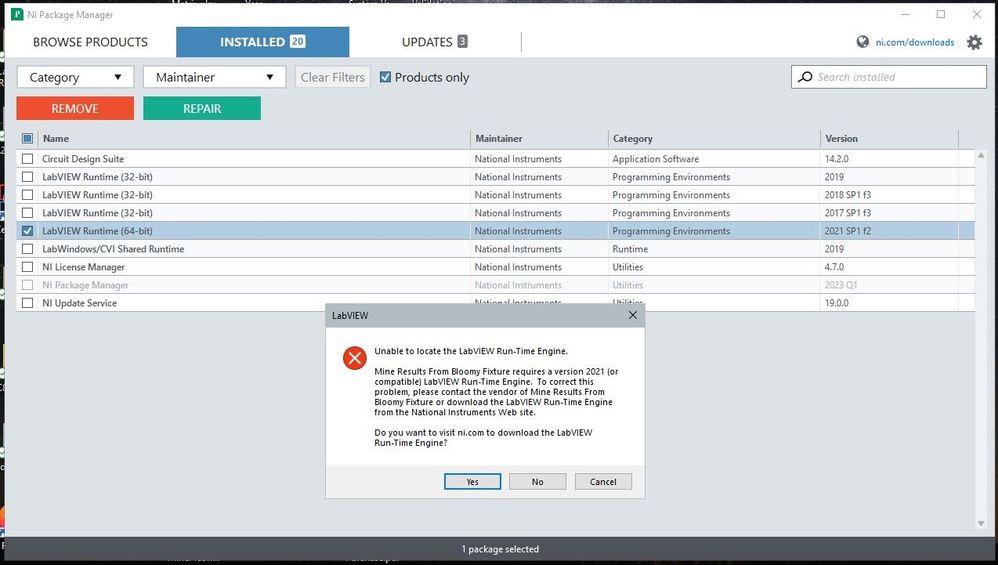
Solved! Go to Solution.

 Martin_Henz
01-18-2023 02:43 PM
- Mark as New
- Bookmark
- Subscribe
- Mute
- Subscribe to RSS Feed
- Permalink
- Report to a Moderator
Have you also tried to install the 32 Bit runtime engine?
01-18-2023 02:47 PM
- Mark as New
- Bookmark
- Subscribe
- Mute
- Subscribe to RSS Feed
- Permalink
- Report to a Moderator
I haven't but great suggestion. Will do that now. Nothing to lose...
 JSport
07-31-2023 12:34 PM
- Mark as New
- Bookmark
- Subscribe
- Mute
- Subscribe to RSS Feed
- Permalink
- Report to a Moderator
Hi Frank, Were you ever able to solve this issue? I am having the same problem (Same error) with an application that was shared with me by a colleague. Another LabVIEW app I have works just fine.
Thanks!

 altenbach

07-31-2023 04:54 PM
- Mark as New
- Bookmark
- Subscribe
- Mute
- Subscribe to RSS Feed
- Permalink
- Report to a Moderator
@JSport wrote:
Hi Frank, Were you ever able to solve this issue? I am having the same problem (Same error) with an application that was shared with me by a colleague. Another LabVIEW app I have works just fine.
Thanks!
Did you see the respsonse about the correct bitness? Maybe the other application is different.

08-01-2023 07:14 AM
- Mark as New
- Bookmark
- Subscribe
- Mute
- Subscribe to RSS Feed
- Permalink
- Report to a Moderator
Greetings. Sorry for the late response but I am on vacation lol. The issue did turn out to be 32-bit versus 64-bit. I had originally installed the 64-bit version of the runtime engine and it turns out that the software guy that wrote the program had a 32-bit computer. Once I downloaded the 32-bit runtime engine everything worked with no issues. If you haven't already try installing the one that you haven't already installed. Good luck
altenbach
08-01-2023 08:14 AM
- Mark as New
- Bookmark
- Subscribe
- Mute
- Subscribe to RSS Feed
- Permalink
- Report to a Moderator
@Dragonrider wrote:
. I had originally installed the 64-bit version of the runtime engine and it turns out that the software guy that wrote the program had a 32-bit computer.
It is much more likely that he had a 64bit OS (if that's what you mean by "computer"), but was using 32bit LabVIEW. Many still do for various reasons.

 AEI_JR
06-11-2024 01:27 PM
- Mark as New
- Bookmark
- Subscribe
- Mute
- Subscribe to RSS Feed
- Permalink
- Report to a Moderator
Came across this thread when doing research for a customer having trouble reinstalling one of our applications. My first thought was a RTE bit incompatibility, which they are checking on (we only use 32-bit LabVIEW). The message they are getting has me somewhat concerned though, because it's something I've not come across before.
"Unable to locate the LabVIEW Full Featured Run-Time Engine."
The Full Featured part gives me pause, as I don't understand the implication. Anyone else come across this term in this context?

 Derek_W
10-10-2025 04:27 PM
- Mark as New
- Bookmark
- Subscribe
- Mute
- Subscribe to RSS Feed
- Permalink
- Report to a Moderator
I am experiencing the same 'Full Featured' message, did you come to any resolution for this issue?

 Kyle97330
10-10-2025 06:08 PM
- Mark as New
- Bookmark
- Subscribe
- Mute
- Subscribe to RSS Feed
- Permalink
- Report to a Moderator
Do you use the DSC module?
Unable to Locate the Labview Run-Time Engine With DSC Module Application
That one specifically mentions the "Full featured" problem. Darren kind of backs that up in his post here:
https://knowledge.ni.com/KnowledgeArticleDetails?id=kA00Z0000019MECSA2&l=en-US
