- Subscribe to RSS Feed
- Mark Topic as New
- Mark Topic as Read
- Float this Topic for Current User
- Bookmark
- Subscribe
- Mute
- Printer Friendly Page
LabVIEW on Raspberry Pi 3


02-27-2019 06:02 AM - edited 02-27-2019 06:03 AM
- Mark as New
- Bookmark
- Subscribe
- Mute
- Subscribe to RSS Feed
- Permalink
- Report to a Moderator
@Hooovahh wrote:
Yeah I doubt you'll be able to get your program to be written in the same way mine was. It was written in LabVIEW 7.1 which is about 15 years old, and in software development terms it might as well be written on stone tablets. It probably is only officially supported on Windows XP, but because it was so old it could have the RTE included, and relied on fewer modern things that might not be there in this version of Windows. I think ultimately you'll need to try to figure out why your OS doesn't have the MSI installer components required for installing LabVIEW.
When only File_Renamer.exe file is changed (other files keeps as the same), my project exe. cant work, right ?
Or if you send me your project (not exe) I can change and recreate according to my project. But sorry it's not possible because of your LV version?
I have to create same files and compound them in a folder. Of course according to Windows 10 and Labview 2017. OK, then I have to have executive environment variables. How can I learn this files to do by same method, do you have any idea ?
(If you're confused, i can try to tell more clear.)
02-27-2019 06:11 AM
- Mark as New
- Bookmark
- Subscribe
- Mute
- Subscribe to RSS Feed
- Permalink
- Report to a Moderator
@Hooovahh wrote:
There might be other options like ThinApp or other software to make an application portable.
I'm plannig to try them for Windows however if they work on Linux, maybe I can work on Rasbian OS.
@Hooovahh wrote:
Really I'm just trying to come up with ways to get a LabVIEW RTE going without having to install it, unless there is a way to force it to be installed.
When you find anything, let me know.

 wiebe@CARYA

02-27-2019 06:24 AM
- Mark as New
- Bookmark
- Subscribe
- Mute
- Subscribe to RSS Feed
- Permalink
- Report to a Moderator
@bestecf wrote:
wiebe@CARYA wrote:
Could you elaborate on what you did exactly?
I installed (with some effort) the Insider Windows for RPi 3B+, but I only get a shell-less windows...
I'm using RPi 3B. But I didn't apply different things. I only run exe file.
On what OS? What Image? Where did you get it?
I've tried a few ways to install Windows, but only the IoT version works, but it doesn't give me a Windows desktop.
 Search LabVIEW like a graph!
wiebe@CARYA
Search LabVIEW like a graph!
wiebe@CARYA
02-27-2019 06:29 AM
- Mark as New
- Bookmark
- Subscribe
- Mute
- Subscribe to RSS Feed
- Permalink
- Report to a Moderator
@bestecf wrote:
@Hooovahh wrote:
Yeah I doubt you'll be able to get your program to be written in the same way mine was. It was written in LabVIEW 7.1 which is about 15 years old, and in software development terms it might as well be written on stone tablets. It probably is only officially supported on Windows XP, but because it was so old it could have the RTE included, and relied on fewer modern things that might not be there in this version of Windows. I think ultimately you'll need to try to figure out why your OS doesn't have the MSI installer components required for installing LabVIEW.
When only File_Renamer.exe file is changed (other files keeps as the same), my project exe. cant work, right ?
Or if you send me your project (not exe) I can change and recreate according to my project. But sorry it's not possible because of your LV version?
I have to create same files and compound them in a folder. Of course according to Windows 10 and Labview 2017. OK, then I have to have executive environment variables. How can I learn this files to do by same method, do you have any idea ?
(If you're confused, i can try to tell more clear.)
The zip contains dependencies needed to run a LabVIEW7 executable. So if you make a new LabVIEW 7 executable, it will probably run, if you stick to the base line features. Only the new exe would need to be added to the files.
There's no accepted way to get LabVIEW 2017 working. Under Linux, there are some tools and better feedback on what is missing. Under Windows, it will be 80% trial and error, 20% educated guessing.
02-27-2019 06:35 AM
- Mark as New
- Bookmark
- Subscribe
- Mute
- Subscribe to RSS Feed
- Permalink
- Report to a Moderator
@bestecf wrote:
I did a lot of research during this period, and I found a very new project. I tried that it works.
Using this interface, you can deploy Windows 10 to Raspberry Pi 3 thanks to WoA Deployer.
I mentioned about that previously. You can examine link 
I downloaded windows 10 build 17134 ISO to my RPi 3B.
wiebe@CARYA
02-27-2019 07:00 AM
- Mark as New
- Bookmark
- Subscribe
- Mute
- Subscribe to RSS Feed
- Permalink
- Report to a Moderator
@bestecf wrote:
@bestecf wrote:
I did a lot of research during this period, and I found a very new project. I tried that it works.
Using this interface, you can deploy Windows 10 to Raspberry Pi 3 thanks to WoA Deployer.
I mentioned about that previously. You can examine link
I downloaded windows 10 build 17134 ISO to my RPi 3B.
How did you get that image from https://uup.rg-adguard.net/? There are 5 options... That's where it fails for me... After 20 minutes, the download script simply says that there's an error.
02-27-2019 07:05 AM
- Mark as New
- Bookmark
- Subscribe
- Mute
- Subscribe to RSS Feed
- Permalink
- Report to a Moderator
wiebe@CARYA wrote:
How did you get that image from https://uup.rg-adguard.net/? There are 5 options...

02-27-2019 07:09 AM
- Mark as New
- Bookmark
- Subscribe
- Mute
- Subscribe to RSS Feed
- Permalink
- Report to a Moderator
Actually, they said that;
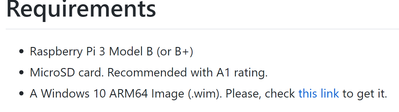
But when I tried RPi B+, it didn't work.
wiebe@CARYA
02-27-2019 07:16 AM
- Mark as New
- Bookmark
- Subscribe
- Mute
- Subscribe to RSS Feed
- Permalink
- Report to a Moderator
@bestecf wrote:
Actually, they said that;
But when I tried RPi B+, it didn't work.
For the normal (MS) install, the 3B+ needs the insider version as well...
I have yet to pass the downloading stage.
1st attempt: virus scanner removed some files.
2nd attempt: script gave an error after 20 minutes.
3rd attempt: moved .cmd to other directory. Immediate error.
4th attempt: pending...
5th attempt: will try your selection (although I'd probably get me an updated version)
02-27-2019 07:19 AM
- Mark as New
- Bookmark
- Subscribe
- Mute
- Subscribe to RSS Feed
- Permalink
- Report to a Moderator
wiebe@CARYA wrote:
@bestecf wrote:
Actually, they said that;
But when I tried RPi B+, it didn't work.
For the normal (MS) install, the 3B+ needs the insider version as well...
I have yet to pass the downloading stage.
1st attempt: virus scanner removed some files.
2nd attempt: script gave an error after 20 minutes.
3rd attempt: moved .cmd to other directory. Immediate error.
4th attempt: pending...
5th attempt: will try your selection (although I'd probably get me an updated version)
Oh yes, your windows version ? It should be latest one.
