- Subscribe to RSS Feed
- Mark Topic as New
- Mark Topic as Read
- Float this Topic for Current User
- Bookmark
- Subscribe
- Mute
- Printer Friendly Page
LabVIEW CLI can't execute Get Build Specification Version (path).vi
Solved!
 MangeshD
11-30-2018
01:51 AM
- last edited on
04-30-2025
09:22 AM
by
 Content Cleaner
- Mark as New
- Bookmark
- Subscribe
- Mute
- Subscribe to RSS Feed
- Permalink
- Report to a Moderator
We need to use the LabVIEW CLI scripting to access version information from build specification in *.lvproj.
There are Get and Set version information VIs available for build specifications and I am trying to run these VIs (from CLI) to access the build version and set the build version.
I am using LabVIEW CLI 2018 to perform action as RUN VI.
There is no specific information is given on how the order of connector pane terminals should be for constructing a command.So, I reffered the context help for the order information and constructed the command.
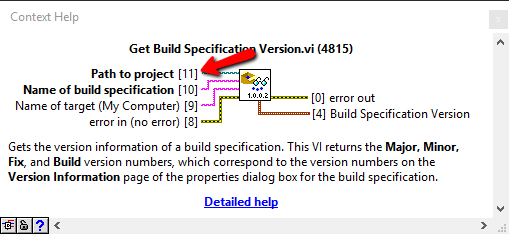
"LabVIEWCLI -OperationName RunVI -VIPath "C:\Program Files (x86)\National Instruments\LabVIEW 2018\vi.lib\AppBuilder\AB_API_Simple\Get Build Specification Version (path).vi" "My Computer" <Build Specification Name> <Project Path> -PortNumber <PORT>"
This results in an error
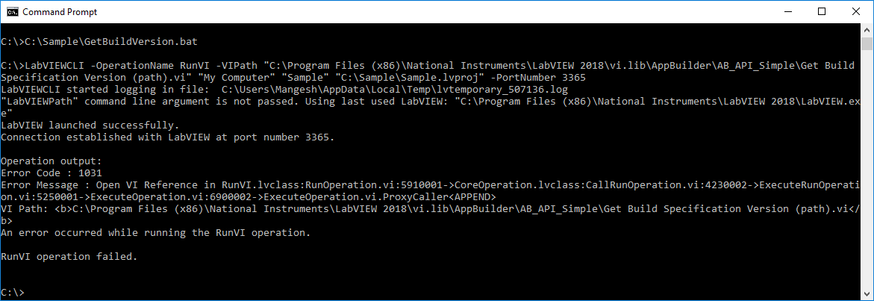
The other way I tried
"LabVIEWCLI -OperationName RunVI -VIPath "C:\Program Files (x86)\National Instruments\LabVIEW 2018\vi.lib\AppBuilder\AB_API_Simple\Get Build Specification Version (path).vi" <Project Path> <Build Specification Name> "My Computer" -PortNumber <PORT>"
But this also results in same error.
Sample LabVIEW project and CLI command is added below.
Solved! Go to Solution.

 Dhakkan
11-30-2018 03:10 AM
- Mark as New
- Bookmark
- Subscribe
- Mute
- Subscribe to RSS Feed
- Permalink
- Report to a Moderator
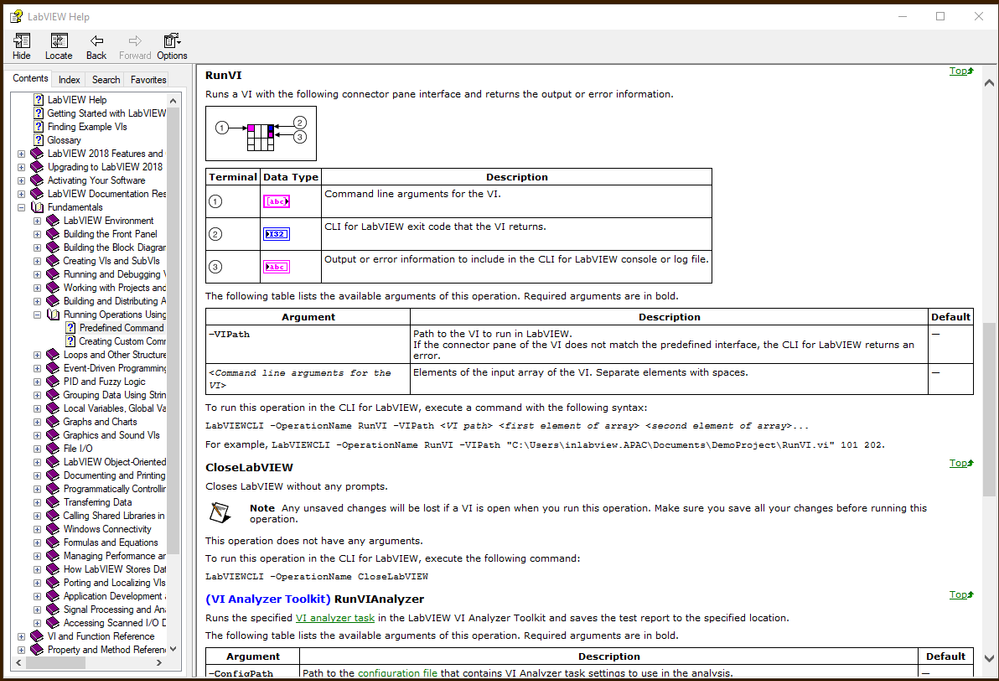
From the LabVIEWCLI documentation, it appears you need to package the VI you wish to run in a wrapper that has a specific connector pane:
12-19-2018 12:12 PM
- Mark as New
- Bookmark
- Subscribe
- Mute
- Subscribe to RSS Feed
- Permalink
- Report to a Moderator
