ni.com is currently undergoing scheduled maintenance.
Some services may be unavailable at this time. Please contact us for help or try again later.
- Subscribe to RSS Feed
- Mark Topic as New
- Mark Topic as Read
- Float this Topic for Current User
- Bookmark
- Subscribe
- Mute
- Printer Friendly Page
- « Previous
-
- 1
- 2
- Next »
Keeping plot colors with the right data
Solved!

10-31-2012 10:59 AM
- Mark as New
- Bookmark
- Subscribe
- Mute
- Subscribe to RSS Feed
- Permalink
- Report to a Moderator
I apologize, but your example on this post is clearer. I'll try this method.
10-31-2012 11:18 AM
- Mark as New
- Bookmark
- Subscribe
- Mute
- Subscribe to RSS Feed
- Permalink
- Report to a Moderator
I understand how this works now, but can't find a 'color box' to insert into the block diagram. Pity the novice.

 nathand
10-31-2012 11:21 AM
- Mark as New
- Bookmark
- Subscribe
- Mute
- Subscribe to RSS Feed
- Permalink
- Report to a Moderator
I don't suppose you've considered upgrading to a newer version of LabVIEW?
You can search the palettes to find a function by name. I believe the color box constant is under Programming -> Graphics and Sound -> Picture Functions.

 .aCe.
.aCe.

10-31-2012 11:22 AM - edited 10-31-2012 11:24 AM
- Mark as New
- Bookmark
- Subscribe
- Mute
- Subscribe to RSS Feed
- Permalink
- Report to a Moderator
Also:
Not sure if this works in 7.1
1. select color box on the front panel but drop it on the block diagram
or
2. quick drop (ctrl + space) in block diagram and type Color Box Constant

10-31-2012 11:29 AM
- Mark as New
- Bookmark
- Subscribe
- Mute
- Subscribe to RSS Feed
- Permalink
- Report to a Moderator
No luck. I found a box I could drop in the block diagram, but there is no control wire out.
.aCe.
10-31-2012 11:34 AM - edited 10-31-2012 11:36 AM
- Mark as New
- Bookmark
- Subscribe
- Mute
- Subscribe to RSS Feed
- Permalink
- Report to a Moderator
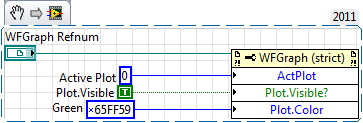
Basically its a number (three bytes which represent a colour in RGB), just wire a numeric constant.
For example green is
0x65FF59

 altenbach
10-31-2012 11:35 AM
- Mark as New
- Bookmark
- Subscribe
- Mute
- Subscribe to RSS Feed
- Permalink
- Report to a Moderator
rwbrook@integratedps.com wrote:
No luck. I found a box I could drop in the block diagram, but there is no control wire out.
What does that sentence mean? Can you attach a picture?

10-31-2012 11:36 AM
- Mark as New
- Bookmark
- Subscribe
- Mute
- Subscribe to RSS Feed
- Permalink
- Report to a Moderator
Excellent! That I can do! As far as upgrading, I was sent 8.0 while still under warranty and the vi that I bought the whole package to do would no longer work. Hence, I backed off 8.0, went back to 7.1 and here I am. There are usually ways to do everything I need to do. Thank you for the explanation!
10-31-2012 11:46 AM
- Mark as New
- Bookmark
- Subscribe
- Mute
- Subscribe to RSS Feed
- Permalink
- Report to a Moderator
I found the RGB to color vi. Should work fine. Thanks to all.
10-31-2012 12:17 PM
- Mark as New
- Bookmark
- Subscribe
- Mute
- Subscribe to RSS Feed
- Permalink
- Report to a Moderator
Success! Thanks to all.
Ron
- « Previous
-
- 1
- 2
- Next »
