- Subscribe to RSS Feed
- Mark Topic as New
- Mark Topic as Read
- Float this Topic for Current User
- Bookmark
- Subscribe
- Mute
- Printer Friendly Page
Installing LabPython LabView 2010
Solved!
 shultz58
02-01-2011 10:03 AM
- Mark as New
- Bookmark
- Subscribe
- Mute
- Subscribe to RSS Feed
- Permalink
- Report to a Moderator
Has anyone successfully installed LabPython on LabView 2010?
I attempted to install the .ogp package using VI Package Manager, and ran into a missing dependency
ogrsc_dynamicpalette >= 2.0.
I followed the example on,
http://forums.openg.org/index.php?showtopic=1121
editing the .ogp package to change the 2.0 to 0.1, as indicated.
However, upon installation, the VI Package Manager claims that the package is not compatible with the current LabView version.
Solved! Go to Solution.
02-08-2011 10:30 AM
- Mark as New
- Bookmark
- Subscribe
- Mute
- Subscribe to RSS Feed
- Permalink
- Report to a Moderator
Answered in the following thread:
http://forums.ni.com/t5/LabVIEW/I-downloaded-labpython-how-do-you-get-it-to-work/m-p/1437378#M552616

 MattA1
08-15-2011 12:15 PM
- Mark as New
- Bookmark
- Subscribe
- Mute
- Subscribe to RSS Feed
- Permalink
- Report to a Moderator
Shultz,
I read your posts in that other thread, but still don't understand how you solved the problem (I'm having the same one).
How exactly did you " install orgs_dynamicpalette using VIPM"? Is there a separate package you have to install just for that?
A quick google hasn't found one.
Some people have suggested unzipping the .ogp, editing spec to say >=0.1 on the orgs_dynamicpalette line, rather than
2.0 and then re-zipping the folder and saving as an .ogp. For them it seems to work, but for me VIPM complains that the
result isn't compatible with anything at all.
LabVIEW 2013, Windows 7
He who asks the question is a fool for five minutes; he who does not ask the question remains a fool forever.

 Thør
Thør
08-16-2011 07:43 PM - edited 08-16-2011 07:44 PM
- Mark as New
- Bookmark
- Subscribe
- Mute
- Subscribe to RSS Feed
- Permalink
- Report to a Moderator
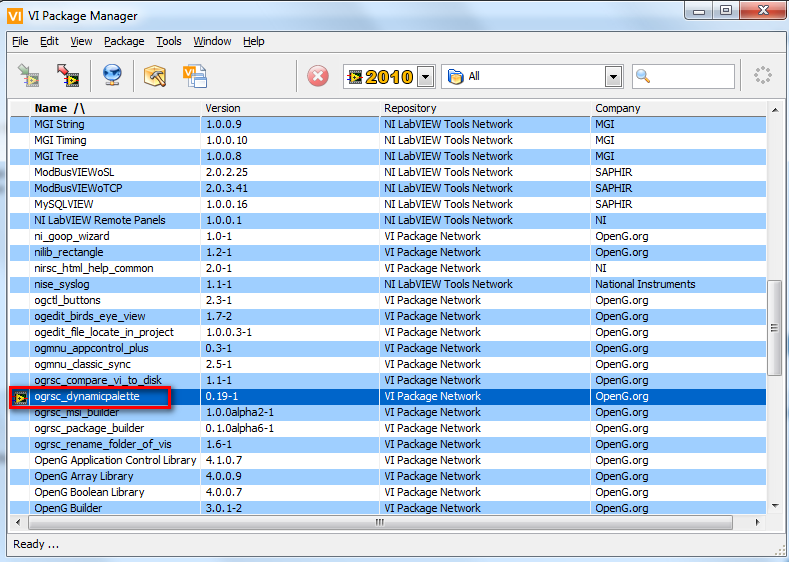
ogrsc_dynamicpalette should be listed in the VI Package manager by default. Do you have the most recent version of this downloaded and installed?
 MattA1
08-17-2011 03:17 AM
- Mark as New
- Bookmark
- Subscribe
- Mute
- Subscribe to RSS Feed
- Permalink
- Report to a Moderator
Thanks for your reply; it's always a bit dodgy posting in an old thread!
I assumed that it was already a part of the LabPython package I had, as it had appeared before but was greyed out. Now it's not there at all,
and I've honed my Google-fu and found a link to download it. Hopefully that'll work; if so, sorry for the bother and thanks, if not I'll be back with more questions no doubt! xD
LabVIEW 2013, Windows 7
He who asks the question is a fool for five minutes; he who does not ask the question remains a fool forever.
