- Subscribe to RSS Feed
- Mark Topic as New
- Mark Topic as Read
- Float this Topic for Current User
- Bookmark
- Subscribe
- Mute
- Printer Friendly Page
- « Previous
-
- 1
- 2
- Next »
Image processing in LabVIEW


08-09-2019 05:18 AM
- Mark as New
- Bookmark
- Subscribe
- Mute
- Subscribe to RSS Feed
- Permalink
- Report to a Moderator
There is around 100 intensity values more then the coordinates but it is ok, we can delete them.
Best.

 wiebe@CARYA

08-09-2019 06:20 AM
- Mark as New
- Bookmark
- Subscribe
- Mute
- Subscribe to RSS Feed
- Permalink
- Report to a Moderator
Do you have requirements for the interpolation?
Nearest neighborhood interpolation is still interpolation, but often doesn't suffice.
Anyway, the biggest problem is the amount of data. Simply finding the nearest point(s) in a naïve way takes a lot of time (several minutes), just because each destination coordinate needs to be compared with all other data points.
The data you have is ordered. You can probably benefit from that, if you can somehow separate the individual lanes.
Otherwise, I guess you can make bins (basically the original coordinate modulus something to speed up the search for nearest points. You'd need either overlapping bins, or search the bin the point is in and it's neighborhood bins.
I'm not sure I can have a go at that, something came up before my 3 week holidays.
BTW. you're not alone:
https://stackoverflow.com/questions/37963504/interpolating-between-multiple-points
Always nice to see your problem being classified as 'non trivial'. Some great pointer there though.
 Search LabVIEW like a graph!
wiebe@CARYA
Search LabVIEW like a graph!
wiebe@CARYA
08-09-2019 06:23 AM
- Mark as New
- Bookmark
- Subscribe
- Mute
- Subscribe to RSS Feed
- Permalink
- Report to a Moderator
btw with naïve interpolation (nearest and taking for ever) I got a picture of a rotated tunnel.
Is this LIDAR data or something? Just curious.
08-09-2019 06:28 AM
- Mark as New
- Bookmark
- Subscribe
- Mute
- Subscribe to RSS Feed
- Permalink
- Report to a Moderator
Hello,
Can you please send me the VI you did for interpolation.
Best.
wiebe@CARYA
08-09-2019 08:26 AM
- Mark as New
- Bookmark
- Subscribe
- Mute
- Subscribe to RSS Feed
- Permalink
- Report to a Moderator
@yass_BER wrote:
Can you please send me the VI you did for interpolation.
Interpolation is a big word. I just picked the closed point (in a naïve way). Formally that is interpolation...
It takes a while to run (depending on the points in the ramp).
wiebe@CARYA
08-09-2019 09:51 AM - edited 08-09-2019 09:52 AM
- Mark as New
- Bookmark
- Subscribe
- Mute
- Subscribe to RSS Feed
- Permalink
- Report to a Moderator
Here's an update.
It is not correct. It puts the points in bins (in a messy way, this needs cleanup!). Then it only looks in the right bin for the closest point. Or closest point if you are eventually doing barycentric coordinates or something like that.
The closest point could be in the next or previous bin, if it's at a border. That can be adapted fairly easy, it's just more detail. But simple array manipulation.
It gets the rendering from minutes to seconds.
There's no downside, but it is tricky to get the bin's right. But be careful, if the bins are too small, the current, next and previous bin might all be empty. If they are too large, it will get slow again. As your points are on a grid, that shouldn't be too hard to find a good bin size.
EDIT: Oops, must save VI before uploading.

 alexderjuengere
08-09-2019 01:25 PM
- Mark as New
- Bookmark
- Subscribe
- Mute
- Subscribe to RSS Feed
- Permalink
- Report to a Moderator
@yass_BER wrote:
I am using intensity graph and i want to ameliorate the look of the image.
[...]
I am receiving data from a robot X,Y and i have the intensity of each pixel, However, the robot doesn't go through all the points ( i set 0 by default to that pixels), and now i want to interpolate the data in order to have a better look of the image
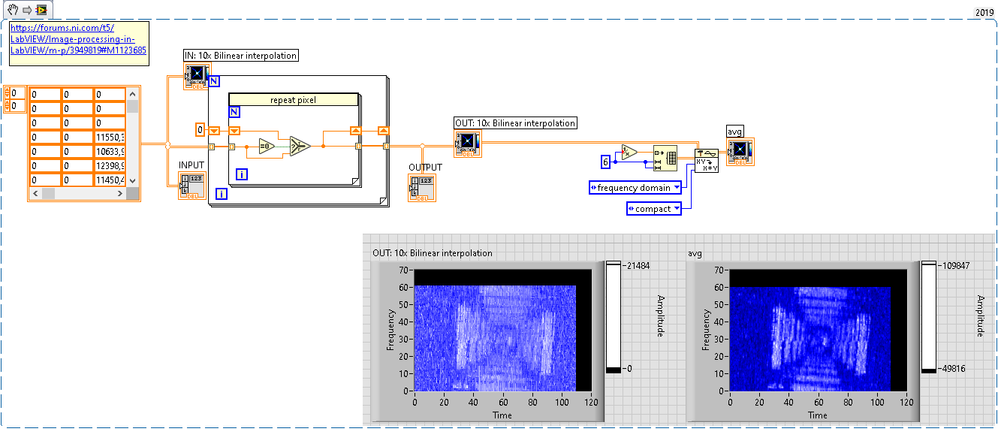
if this is only a cosmetic issue, couldn't you just repeat the last valid pixel?

Of course, wiebe's approach is much more sophisticated and the result also looks much better in comparison:

alexderjuengere
08-09-2019 01:34 PM - edited 08-09-2019 01:38 PM
- Mark as New
- Bookmark
- Subscribe
- Mute
- Subscribe to RSS Feed
- Permalink
- Report to a Moderator
after the repetition, we could do some smoothing by applying a local average in a 6x6 window
by using the https://zone.ni.com/reference/en-XX/help/371361P-01/lvanls/convolution/
- « Previous
-
- 1
- 2
- Next »
