LabVIEW
- Suscribirse a un feed RSS
- Marcar tema como nuevo
- Marcar tema como leído
- Colocar este tema arriba del foro
- Favorito
- Suscribir
- Silenciar
- Página de impresión sencilla
- « Anterior
-
- 1
- 2
- Siguiente »
IP IMAGE

 Hooovahh

el 06-14-2021 09:44 AM
- Marcar como nuevo
- Favorito
- Suscribir
- Silenciar
- Suscribirse a un feed RSS
- Resaltar
- Imprimir
- Informe de contenido inapropiado
And the VLC method I linked to earlier?
Unofficial Forum Rules and Guidelines
Get going with G! - LabVIEW Wiki.
17 Part Blog on Automotive CAN bus. - Hooovahh - LabVIEW Overlord
 billko
el 06-14-2021 09:45 AM
- Marcar como nuevo
- Favorito
- Suscribir
- Silenciar
- Suscribirse a un feed RSS
- Resaltar
- Imprimir
- Informe de contenido inapropiado
@VINICIUSALLAN wrote:
it gives me this information in the "body" and "headers" field and I don't know how to proceed after that

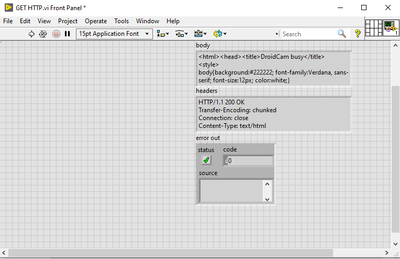
I suppose you will have to parse the contents of the body.
(Mid-Level minion.)
My support system ensures that I don't look totally incompetent.
Proud to say that I've progressed beyond knowing just enough to be dangerous. I now know enough to know that I have no clue about anything at all.
Humble author of the CLAD Nugget.


el 06-14-2021 09:55 AM
- Marcar como nuevo
- Favorito
- Suscribir
- Silenciar
- Suscribirse a un feed RSS
- Resaltar
- Imprimir
- Informe de contenido inapropiado
I tried it with the VLC method that you gave me, but it's giving this error
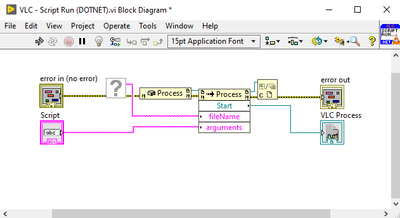
I also got lost on which VI to use for my problem.
Hooovahh
06-14-2021 11:01 AM - editado 06-14-2021 11:03 AM
- Marcar como nuevo
- Favorito
- Suscribir
- Silenciar
- Suscribirse a un feed RSS
- Resaltar
- Imprimir
- Informe de contenido inapropiado
If you open the context help and hover of the missing VI you'll see it is asking for a VI that you didn't download from that example code. Download all then open the "VLC - Play Stream&Snapshot&speed.vi". Provide the media source, and run it. Make sure you have VLC x86 version if you are using LabVIEW 32 bit.
Unofficial Forum Rules and Guidelines
Get going with G! - LabVIEW Wiki.
17 Part Blog on Automotive CAN bus. - Hooovahh - LabVIEW Overlord
el 06-14-2021 12:35 PM
- Marcar como nuevo
- Favorito
- Suscribir
- Silenciar
- Suscribirse a un feed RSS
- Resaltar
- Imprimir
- Informe de contenido inapropiado

the VI worked, but I don't understand how to link with the IP was the image to appear in picture BOX?
Hooovahh
el 06-15-2021 08:55 AM
- Marcar como nuevo
- Favorito
- Suscribir
- Silenciar
- Suscribirse a un feed RSS
- Resaltar
- Imprimir
- Informe de contenido inapropiado
When I saw this error in the past it was because I was using the 64 bit version of VLC and the 32 bit version of LabVIEW.
"I downloaded the latest version of VLC Win32 from here, then made sure that the DLL path to libvlc.dll, was to the one in the Program Files (x86) folder."
Unofficial Forum Rules and Guidelines
Get going with G! - LabVIEW Wiki.
17 Part Blog on Automotive CAN bus. - Hooovahh - LabVIEW Overlord
- « Anterior
-
- 1
- 2
- Siguiente »
