- Subscribe to RSS Feed
- Mark Topic as New
- Mark Topic as Read
- Float this Topic for Current User
- Bookmark
- Subscribe
- Mute
- Printer Friendly Page
IP IMAGE

 VINICIUSALLAN
06-09-2021 11:26 AM
- Mark as New
- Bookmark
- Subscribe
- Mute
- Subscribe to RSS Feed
- Permalink
- Report to a Moderator
Hello everyone
I have an ip camera that outputs a web image via an ip address.
I'm not able to get this image through labview, is there any library or example to help me?

 Kyle97330
06-09-2021
12:14 PM
- last edited on
11-06-2024
04:57 PM
by
 Content Cleaner
- Mark as New
- Bookmark
- Subscribe
- Mute
- Subscribe to RSS Feed
- Permalink
- Report to a Moderator
Well, what have you tried? There's an HTTP GET VI that might work if you can connect to a session with it and know the URL.
Do you need to save the image or just show it? To show it, you could try just embedding a web browser in your front panel via ActiveX.
Also, what model of camera is it? Depending on the model, it might have an API in addition to just a web interface, and you might be able to use that.

 alexderjuengere
06-09-2021 02:11 PM
- Mark as New
- Bookmark
- Subscribe
- Mute
- Subscribe to RSS Feed
- Permalink
- Report to a Moderator

 Hooovahh

06-09-2021 03:52 PM
- Mark as New
- Bookmark
- Subscribe
- Mute
- Subscribe to RSS Feed
- Permalink
- Report to a Moderator
+1 for VLC. Here is some example code I've used on IP based cameras, and USB webcams.
Unofficial Forum Rules and Guidelines
Get going with G! - LabVIEW Wiki.
17 Part Blog on Automotive CAN bus. - Hooovahh - LabVIEW Overlord
06-13-2021 02:35 PM
- Mark as New
- Bookmark
- Subscribe
- Mute
- Subscribe to RSS Feed
- Permalink
- Report to a Moderator
I tried to follow the tips you gave me, but I'm not getting where I want.

There is an application that creates an IP for my cell phone's camera, and through the brownser I can get images from the camera. What my boss asked was that I create a VI that takes this image from the cell phone, through the labview, and I can't do it, these paths you gave me, would it be the best for this?
Hooovahh
06-14-2021 08:46 AM
- Mark as New
- Bookmark
- Subscribe
- Mute
- Subscribe to RSS Feed
- Permalink
- Report to a Moderator
You still haven't shared anything. What have you tried? What about it isn't working? What errors are you getting?
Unofficial Forum Rules and Guidelines
Get going with G! - LabVIEW Wiki.
17 Part Blog on Automotive CAN bus. - Hooovahh - LabVIEW Overlord
06-14-2021 09:10 AM
- Mark as New
- Bookmark
- Subscribe
- Mute
- Subscribe to RSS Feed
- Permalink
- Report to a Moderator
I don't understand how I'm going to connect the tips you gave with my problem.
I'm new to the platform and I'm having a hard time understanding it. I'm sending a print of the image I need to get in real time.

I need to open a screen in labview that transmits this image from the camera in real time, I don't need to save anything

 rolfk
rolfk
06-14-2021 09:25 AM - edited 06-14-2021 09:31 AM
- Mark as New
- Bookmark
- Subscribe
- Mute
- Subscribe to RSS Feed
- Permalink
- Report to a Moderator
So you open a browser window to "http://192.168.15.3:4747/video".
You need to use the HTTP Client VIs here. Have you tried a LabIEWHTTPClient.lvlib/GET.vi call with this URL? What error do you get? What doesn't work?
And no this won't give you an image yet. But before we can do that you need to get the data into LabVIEW first. Then we can start to worry about how to get this data formatted in a way that it can be displayed. Also important will be to know if NI IMAQ Vision is an option for you or not. Do you have NI IMAQ Vision available?
 Hooovahh
06-14-2021 09:27 AM
- Mark as New
- Bookmark
- Subscribe
- Mute
- Subscribe to RSS Feed
- Permalink
- Report to a Moderator
For someone wanting to use LabVIEW, you've shared a surprisingly low amount of code.
Unofficial Forum Rules and Guidelines
Get going with G! - LabVIEW Wiki.
17 Part Blog on Automotive CAN bus. - Hooovahh - LabVIEW Overlord
06-14-2021 09:36 AM
- Mark as New
- Bookmark
- Subscribe
- Mute
- Subscribe to RSS Feed
- Permalink
- Report to a Moderator

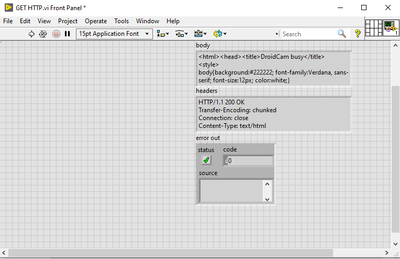
it gives me this information in the "body" and "headers" field and I don't know how to proceed after that
