- Subscribe to RSS Feed
- Mark Topic as New
- Mark Topic as Read
- Float this Topic for Current User
- Bookmark
- Subscribe
- Mute
- Printer Friendly Page
How to save X and Y values using waveform chart?

 RavensFan

02-23-2020 10:31 AM
- Mark as New
- Bookmark
- Subscribe
- Mute
- Subscribe to RSS Feed
- Permalink
- Report to a Moderator
You need to attach your actual VI and not just a picture of a tiny section of your code. I don't understand your comment about the 0th index because we only see the last part of all your array manipulations.
One problem with your VI is your opening the file, writing to it, and closing it on every iteration.
That means whatever was in the file before is going to be overwritten unless you happen to move the file pointer to the end of the file after opening.
If you recall, I said "Then open the file before you start, and use Write to Text File functions to save your data point." To be more specific.
1. Open the file before the loop.
2. Write the data points withing the loop.
3. Close the file after the loop.

 cbutcher
02-23-2020 10:55 AM
- Mark as New
- Bookmark
- Subscribe
- Mute
- Subscribe to RSS Feed
- Permalink
- Report to a Moderator
Here's an example assuming you want the time to be specific to the minimum sample:
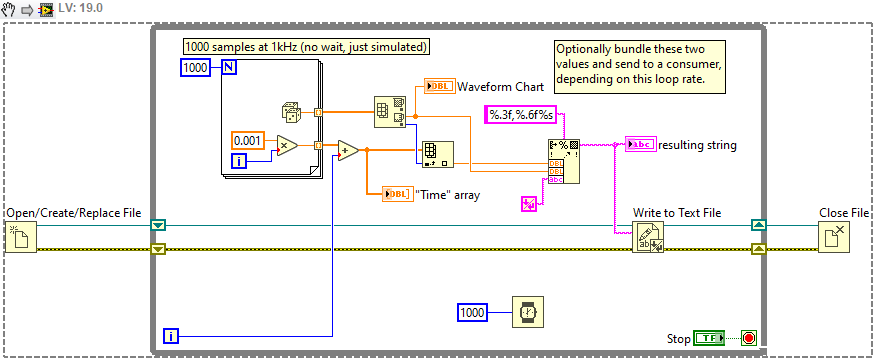
Does that help explain?
Here I construct the time value as a constant value (0.001) x i, such that each block of data has the time values 0..0.999. Then I add the While loop's "i" to give me a relative time compared to the VI's start. If you don't need to know which value corresponds to the minimum, you could just wire the "i" from the While loop, multiplied by the loop period of the While loop (here 1 second, due to the 1000ms Wait).


02-23-2020 11:23 AM
- Mark as New
- Bookmark
- Subscribe
- Mute
- Subscribe to RSS Feed
- Permalink
- Report to a Moderator
@cbutcher
Thank you for giving this example. I got to know new things from it. But please read my post, I have some more doubts.
@RavensFan
At present I am not in my lab so won't be able to attach the VI for time being. But I will try to explain again.
→ the 0th index thing: Actually, as it is shown in the image I attached earlier, I am taking the min value of the min max array and sending this min value to another array. But what is happening is that, in first cycle, the min value is going to 0th index of new array (A). Then in second cycle, new min value is going to the 0th index of A. Then again in 3rd cycle, new min value is going to the 0th index of A. So basically, I can see the 0th index of A is changing it's value continuously. And ultimately I'm ending up in getting just 1 index i.e. 1 value in A, the recent min value.
→ Now as you suggested to keep the open file before and close file after the loop, I am afraid of doing this because it will affect the whole code as the whole code is inside the loop. I will attach the VI in the morning ( it is night here).
→ but I want to mention that I am saving some more files in the same Vi using the same way (open file, write to file and close file at once). And in those cases I am getting proper data. 2 columns, with both x and y values, without any replacement of values. But yes, those graphs are xy graphs not waveform chart.
Thank you.
cbutcher
02-23-2020
12:03 PM
- last edited on
05-12-2025
05:17 PM
by
 Content Cleaner
- Mark as New
- Bookmark
- Subscribe
- Mute
- Subscribe to RSS Feed
- Permalink
- Report to a Moderator
New hypothesis (upload code to be sure): you need to use Set File Position.
Every time you open a file, by default it starts at the beginning.
When you write, you're overwriting the first value.
If you write a file, it updates the position (imagine the cursor when typing).
So essentially, if you open before a loop, and close after, you don't need to worry about this - but if you repeatedly open the same file (Open or Create, for example) and then immediately Write, you'll write to the beginning of the file.
With the X-Y graphs, you're writing the entire graph's data - and since XY Graphs (actually, just Graphs in general) don't store history, that's all of the data.
This means in iteration 0 you write 1 pair of points, in iteration #1 you write two pairs (the pair from 0 (which overwrites the previous write, which was also elements #0), then the new pair) and so on. Your writes will get slower and slower because you write more and more data each time, but each time you'll get the full data so far.
With a Chart, you don't need to write the old data (because they inherently store data) so you're overwriting the first part of the file, which is always the previous iteration's value.
Of course, the best solution is stop opening and closing the file. But if you can't/won't do that, you can set the file position to the "End" and then you'll append data. See this link for more details: Append to a Text or Binary File in LabVIEW.
cbutcher
02-23-2020 12:04 PM
- Mark as New
- Bookmark
- Subscribe
- Mute
- Subscribe to RSS Feed
- Permalink
- Report to a Moderator
As a side note, with the XY writes, you can improve performance by either
a) only write the new points (probably available before a Build Array node or similar on a Shift Register), or
b) only write the data once, after your loop finishes. Might not be possible for "continuous" acquisition, depending on the duration.
02-23-2020 12:28 PM
- Mark as New
- Bookmark
- Subscribe
- Mute
- Subscribe to RSS Feed
- Permalink
- Report to a Moderator
Oh yes. I didn't think in that way. That is why I was able to save data of xy graphs. It means they are also being replaced after each iteration. But since there are proper arrays, so I'm getting data everytime.
But here, in case of min value, it's just a single value. So after replacement (after each iteration) the only available value is getting replaced.
Thank you for the explanation @cbutcher
Then what should I do in order to save min value in the form of an array? I will try the option suggested by you. If any other possibility is also there, please suggest me. I will update if it works.
Thank you again.
cbutcher
02-23-2020
12:38 PM
- last edited on
05-12-2025
05:17 PM
by
Content Cleaner
- Mark as New
- Bookmark
- Subscribe
- Mute
- Subscribe to RSS Feed
- Permalink
- Report to a Moderator
If you want to write one value at a time to a file, you need to either Set File Position or just open once and keep the refnum available for subsequent writes (if appending to a file that was written during a previous VI run, you'll still need to set position but only when you open it).
The alternative is to store the values in an array or similar, using a Shift Register, and write them all at once to file when you're finished.
02-23-2020 10:39 PM
- Mark as New
- Bookmark
- Subscribe
- Mute
- Subscribe to RSS Feed
- Permalink
- Report to a Moderator
Here is the VI (attached). Below are the tasks I want to do.
- I will be running it continuously and at some instance of time (when I get desired plot), I will want to save the data of XY graph (power vs wavelength).
- Now I want to select the desired portion of the XY graph mentioned, and see only the selected range in othe XY graph (selected range).
- From this new graph (selected range), I want to take out the min value of Y values array anf plot it in a waveform chart (the VI is still running).
- At the end I want to save the data of waveform chart, for every single point we wee there. With time it is changing, I want to save that.
I hope I am clear now.
cbutcher
02-24-2020
01:05 AM
- last edited on
05-12-2025
05:18 PM
by
Content Cleaner
- Mark as New
- Bookmark
- Subscribe
- Mute
- Subscribe to RSS Feed
- Permalink
- Report to a Moderator
The VI helps to provide some more details, but I'm not entirely clear on the current behaviour. I also have a couple of observations that might clarify some of your code. I'll number for reference if you wish in a reply.
- You have a lot of "magic numbers" with Array Subsets. What determines these numbers? Why are they used like this?
- You can simplify several operations, for example:
- Rather than taking "Position" and then unbundling for "X", you can just get "Position.X" by going into the next menu level
- Rather than taking the Quotient from Quotient and Remainder with y=1, you can use "Round towards -Infinity"
- If you want to use Index Array and the values you want start from 0, you don't need to wire constants to the indices. See an example below.
- I see you're already using some subVI(s? - one in this VI) to simplify parts of your code. You might gain some more benefits if you're able to identify what operation you're carrying out in specific sections, then give that a name and icon and make it a subVI (for example, with all the array subsets, which I don't know the reasoning for specifically).
@Ben121 wrote:
- I will be running it continuously and at some instance of time (when I get desired plot), I will want to save the data of XY graph (power vs wavelength).
If you want to do something only some of the time, consider a Case Structure.
@Ben121 wrote:
- Now I want to select the desired portion of the XY graph mentioned, and see only the selected range in othe XY graph (selected range).
You're already trying to do this with cursors, and you have another thread about that here. I'll take a look there and respond.
@Ben121 wrote:
- From this new graph (selected range), I want to take out the min value of Y values array anf plot it in a waveform chart (the VI is still running).
You're basically fine with the min value bit. Just make sure you operate with the input array being the correct subset of data from the previous range selection.
Some labelling of wires (you can right click on then and choose Visible Items > Label) might assist in clarifying intent.
Take care to match the appropriate collection of X values if you index them as I suggested in my snippet above.
@Ben121 wrote:
- At the end I want to save the data of waveform chart, for every single point we wee there. With time it is changing, I want to save that.
I'm not exactly sure what this means. I guess you want to save all of the acquired data? In which case you can go ahead and do that.
If you're logging a lot of data (it looks like you might be) you might want to consider the use of a binary rather than text file - you could consider TDMS for example.
02-24-2020 02:51 AM
- Mark as New
- Bookmark
- Subscribe
- Mute
- Subscribe to RSS Feed
- Permalink
- Report to a Moderator
Thank you so much for clarifying several things. It is really helpful. Now I am somehow managing to have the data as desired but yes, there are several flaws in the VI. I need to work on it.
Now coming back to my original question, when I am trying to save the data from waveform chart, I am getting just one value instead of an array of numbers. Then I also tried using case structure. It is saving the data but after saving, it is again asking to save then again and so on. So I have to stop the code abruptly in middle.
Thank you your response.
