How to implement this logic

 tintin_99
Hi,
Could you please let me know how can I implemet this logic
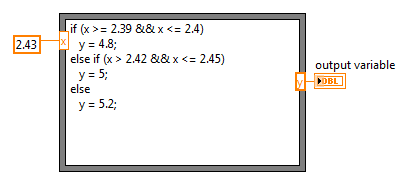
if 2.39<x<2.4 then y=4.8
if 2.42<x<2.45 then y=5.0
if 2.47<x<2.50 then y=5.2
.
.
.
All the values are hard coded
Thanks

 billko
As usual, show us what you got. 🙂
(Mid-Level minion.)
My support system ensures that I don't look totally incompetent.
Proud to say that I've progressed beyond knowing just enough to be dangerous. I now know enough to know that I have no clue about anything at all.
Humble author of the CLAD Nugget.
Then the value is invalid,
it should be actually like this
2.39<=x<=2.4 then y=4.8
2.42<=x<=2.45 then y=5
.
.

 RavensFan

I would multiply the value by 100 then wire that into a case structure selector terminal.
The case structure would have 4 cases defined.
239 .. 240 it outputs a 4.8 to the tunnel
242 .. 245 it outputs a 5.0 to the tunnel
247 .. 250 it outputs a 5.2 to the tunnel
Default it outputs a 0 or some other value that you define that you want to represent as an invalid value.



 Ranjeet_Singh
Multiplying by 100 and then comparing integer is always better then comparing floating value. Opt for 'X100'
Kudos are always welcome if you got solution to some extent.
I need my difficulties because they are necessary to enjoy my success.
--Ranjeet
billko
@Ranjeet_Singh wrote:
Multiplying by 100 and then comparing integer is always better then comparing floating value. Opt for 'X100'
So... what happens if the number has three decimal places? 😉
More correctly stated, I guess you could say "multiply the numbers to be compared by 10^x, where x equals the precision of your most precise number.
(Mid-Level minion.)
My support system ensures that I don't look totally incompetent.
Proud to say that I've progressed beyond knowing just enough to be dangerous. I now know enough to know that I have no clue about anything at all.
Humble author of the CLAD Nugget.

 crossrulz
@billko wrote:
@Ranjeet_Singh wrote:
Multiplying by 100 and then comparing integer is always better then comparing floating value. Opt for 'X100'
So... what happens if the number has three decimal places? 😉
More correctly stated, I guess you could say "multiply the numbers to be compared by 10^x, where x equals the precision of your most precise number.
This is an excellent point. Given the example, multiply by 100 would work fine. But you also need to be aware of rounding, which is a whole other issue you probably don't want to think about. When converting to an integer, the number will round toward 0.
There are only two ways to tell somebody thanks: Kudos and Marked Solutions
Unofficial Forum Rules and Guidelines
"Not that we are sufficient in ourselves to claim anything as coming from us, but our sufficiency is from God" - 2 Corinthians 3:5
billko
@crossrulz wrote:
@billko wrote:
@Ranjeet_Singh wrote:
Multiplying by 100 and then comparing integer is always better then comparing floating value. Opt for 'X100'
So... what happens if the number has three decimal places? 😉
More correctly stated, I guess you could say "multiply the numbers to be compared by 10^x, where x equals the precision of your most precise number.
This is an excellent point. Given the example, multiply by 100 would work fine. But you also need to be aware of rounding, which is a whole other issue you probably don't want to think about. When converting to an integer, the number will round toward 0.
But by multiplying as I have shown, that should result in all numbers being integers... or are you saying that if you specified 0.5 was internally represented as 0.499 you are in danger of coming up with 4 as your integer, not 5?
(Mid-Level minion.)
My support system ensures that I don't look totally incompetent.
Proud to say that I've progressed beyond knowing just enough to be dangerous. I now know enough to know that I have no clue about anything at all.
Humble author of the CLAD Nugget.
