- Subscribe to RSS Feed
- Mark Topic as New
- Mark Topic as Read
- Float this Topic for Current User
- Bookmark
- Subscribe
- Mute
- Printer Friendly Page
How to implement Wait time ERROR Message.
Solved!
 SaranVenkateshS
03-30-2015 11:45 PM
- Mark as New
- Bookmark
- Subscribe
- Mute
- Subscribe to RSS Feed
- Permalink
- Report to a Moderator
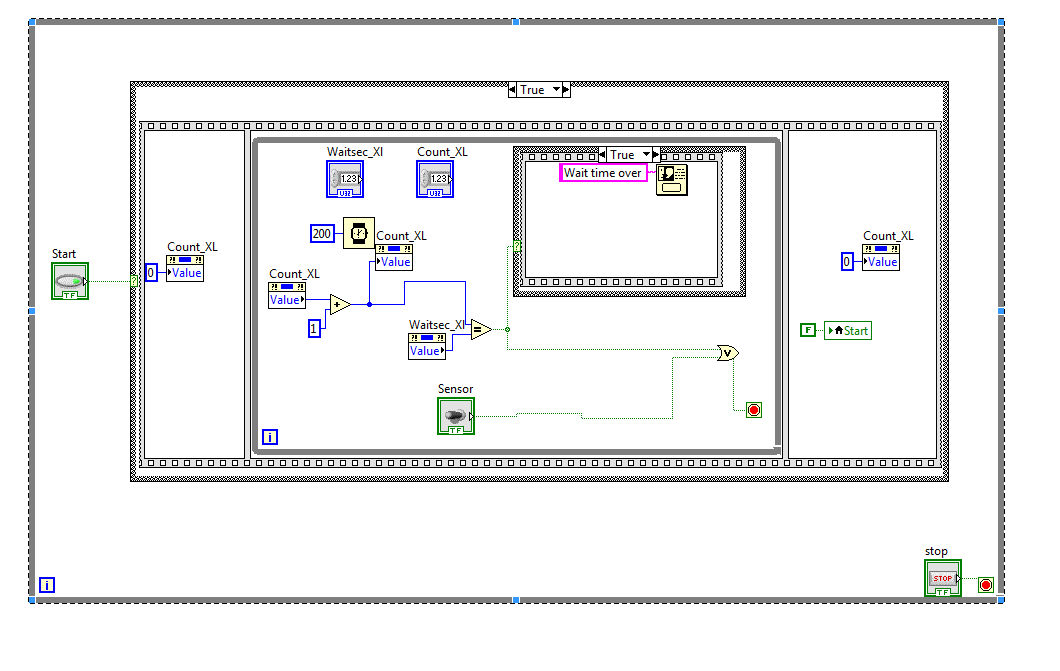
Hi all,
I need to implement a wait time(for example 400ms)
to read Sensor for ON .
if its Not Achive i need to show Error message .
I have implement this in folowing way ..
But i am not happy with this method ..
is this correct method.
I have attached my VI file
Solved! Go to Solution.
03-31-2015 08:13 PM
- Mark as New
- Bookmark
- Subscribe
- Mute
- Subscribe to RSS Feed
- Permalink
- Report to a Moderator
Hi is anybody got solution for my question .?
 mikeporter

03-31-2015 08:15 PM
- Mark as New
- Bookmark
- Subscribe
- Mute
- Subscribe to RSS Feed
- Permalink
- Report to a Moderator
Mike...
Certified Professional Instructor
Certified LabVIEW Architect
LabVIEW Champion
"... after all, He's not a tame lion..."
For help with grief and grieving.
03-31-2015 08:23 PM
- Mark as New
- Bookmark
- Subscribe
- Mute
- Subscribe to RSS Feed
- Permalink
- Report to a Moderator
Hi Mike,
i need to check the input pin (Sensor) of my arudino .
and i am waiting for the pin to high for a specfic time .
if its not achived at the specfic time ,i need to show pop message.
03-31-2015 08:30 PM
- Mark as New
- Bookmark
- Subscribe
- Mute
- Subscribe to RSS Feed
- Permalink
- Report to a Moderator
I am asking kind of "TIMEOUT" function ..

03-31-2015 10:18 PM
- Mark as New
- Bookmark
- Subscribe
- Mute
- Subscribe to RSS Feed
- Permalink
- Report to a Moderator
You can replace the Count_XL functionality you made by just using the iteration terminal in the bottom left of your while loop.
As for making a timeout, you could use the Elapsed Time express VI to check if a certain amount of time has elapsed and end the loop if your sensor is true or time has elapsed. There are a lot of ways to do this but the best way will be determined by how you want your application to work.
03-31-2015 10:31 PM
- Mark as New
- Bookmark
- Subscribe
- Mute
- Subscribe to RSS Feed
- Permalink
- Report to a Moderator
