How to get image of entire tab control in LabVIEW
已解决!


 AnalogKid2Digit
Try using the FP.Get Image invoke node instead.
-AK2DM
"It’s the questions that drive us.”
~~~~~~~~~~~~~~~~~~~~~~~~~~
 Kyle97330
I don't think there's a trick to get the whole tab just using the builtin method. But you could use a workaround, maybe.
Put the tab control in a container of some kind (another tab control, a subpanel, or block it off with a couple of splitter bars). Make the container transparent so it doesn't look weird with the extra border. Then tell the container to take an image of itself, and all it will see is your tab control.

 altenbach

In any case, this almost looks like a bug. Did you report it? Did anyone test in newer versions?

I do not have access to newer versions. It is not clear to me where to report bugs. I have searched and found known bug list for 2017 and it doesn't seem to be listed or for 2018. Doing a search of "how to report bugs" on the NI page search bar yields bogs of unrelated results such as "How to buy..." and every other mention of the words "How to". I would be glad to report it. Can you point me to a link?
altenbach
@TeraTech wrote:
It is not clear to me where to report bugs.
If your business depends on it and you have SSP, you can always file a service request. They will evaluate the severity, put it in the bug database with a reference number, and possibly offer a workaround.
However, typically it should be sufficient to post a link to this discussion here in the annual bug thread and it will be seen by NI eventually. In the meantime, forum users can also do some casual testing or search for workarounds.
Thanks. I posted on the Annual bug thread here:

 jqu
jqu
Hi TeraTech,
had the same problem now and figured out a fairly easy workaround. Posting here now just in case anybody else runs into this bug 😉
Please note though, it's only that simple if the front-panel origin is aligned with the upper left corner of the visible pane area.
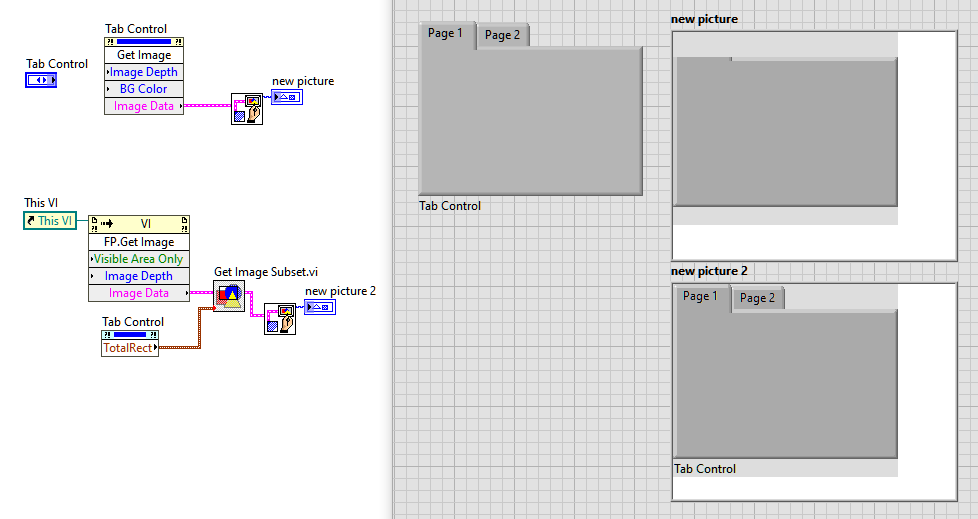
Please KUDO if you like it 😉
Best,
Jan
Thanks for the clever idea. However, the Total Bounds Rect Property (TotalRect on your diagram) is a scripting command, thus the cyan coloring. Scripting commands are only available during design time and aren't available in a compiled executable. So I can't use it for my situation.
