- Subscribe to RSS Feed
- Mark Topic as New
- Mark Topic as Read
- Float this Topic for Current User
- Bookmark
- Subscribe
- Mute
- Printer Friendly Page
How to generate a string with a known length with a particular character.
Solved!
 msabah38
01-17-2022 10:40 PM
- Mark as New
- Bookmark
- Subscribe
- Mute
- Subscribe to RSS Feed
- Permalink
- Report to a Moderator
I have a string take for example : labview , I would like to convert it into a string with look like this: ******* .
My logic should be like, first find the string length, and then replace the character with *.
Can anyone tell which blocks I should use to make this possible.
Solved! Go to Solution.

 kartiknattar
01-17-2022 10:55 PM
- Mark as New
- Bookmark
- Subscribe
- Mute
- Subscribe to RSS Feed
- Permalink
- Report to a Moderator
Are you trying to replace the strings or you want to display the string as password??
If you want to display the string (control/indicator) as password you can try below method by just right click.

CLD Using LabVIEW since 2013

 thols
thols
01-18-2022 01:23 AM
- Mark as New
- Bookmark
- Subscribe
- Mute
- Subscribe to RSS Feed
- Permalink
- Report to a Moderator
These are quite rudimentary operations. Browse the string functions and see what you find. It is all there. Have you taken any courses? The forum board lists training resources to get you started.
(I am also curious if you really just wanted to set the string to password display)

 santo_13
01-18-2022 10:11 AM
- Mark as New
- Bookmark
- Subscribe
- Mute
- Subscribe to RSS Feed
- Permalink
- Report to a Moderator
These are two techniques I would use

Soliton Technologies
New to the forum? Please read community guidelines and how to ask smart questions
Only two ways to appreciate someone who spent their free time to reply/answer your question - give them Kudos or mark their reply as the answer/solution

 altenbach

01-18-2022 01:26 PM
- Mark as New
- Bookmark
- Subscribe
- Mute
- Subscribe to RSS Feed
- Permalink
- Report to a Moderator
I agree with some of the other posters that you are probably looking in the wrong place for a solution. can you explain in more detail what you are actually trying to do?
In any case, here's one possible solution (string size, for loop, indexing tunnel, concatenate strings):



 RTSLVU
01-18-2022 01:51 PM
- Mark as New
- Bookmark
- Subscribe
- Mute
- Subscribe to RSS Feed
- Permalink
- Report to a Moderator
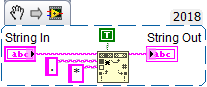
Here's another way...

But like the others I wonder why you would need to do this...
=== Engineer Ambiguously ===
========================
altenbach
01-18-2022 10:43 PM
- Mark as New
- Bookmark
- Subscribe
- Mute
- Subscribe to RSS Feed
- Permalink
- Report to a Moderator
RTSLVU
01-18-2022 10:54 PM - edited 01-18-2022 11:01 PM
- Mark as New
- Bookmark
- Subscribe
- Mute
- Subscribe to RSS Feed
- Permalink
- Report to a Moderator
@altenbach wrote:
@RTSLVU wrote:
Here's another way...
You need LabVIEW 2021 to do it this way. 😄
This was feature released in LabVIEW 2012
=== Engineer Ambiguously ===
========================
 aeastet
01-19-2022 07:17 AM
- Mark as New
- Bookmark
- Subscribe
- Mute
- Subscribe to RSS Feed
- Permalink
- Report to a Moderator
I think he was giving you a hard time because you posted it using LabVIEW 2021. Not that what you did was not available before that. 😁
GHSP

 paul_cardinale
01-19-2022 08:22 AM
- Mark as New
- Bookmark
- Subscribe
- Mute
- Subscribe to RSS Feed
- Permalink
- Report to a Moderator