LabVIEW
- Iscriversi a feed RSS
- Contrassegnare la discussione come nuova
- Contrassegnare la discussione come letta
- Sposta questo Discussione per l'utente corrente
- Preferito
- Iscriversi
- Disattiva notifiche
- Pagina in versione di stampa
How do I start a new line of text inside a cell in excel using labview?
Risolto!
 GRC5000
in data 12-24-2019 02:27 PM
- Contrassegnare come Nuovo
- Preferito
- Iscriversi
- Disattiva notifiche
- Iscriversi a feed RSS
- Evidenziare
- Stampare
- Segnalare contenuto inappropriato
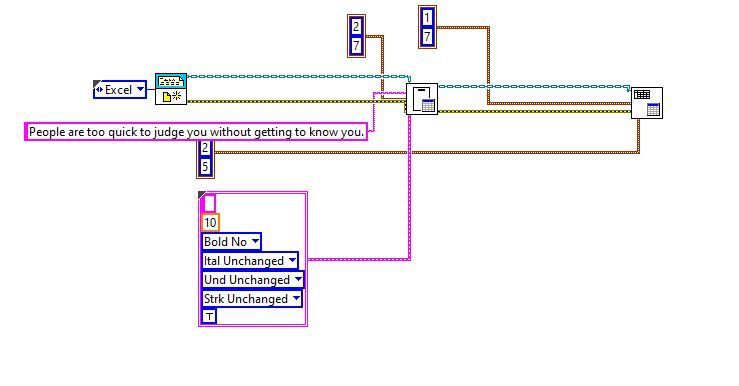
Below is the screenshot of my VI. Also I attached my VI.
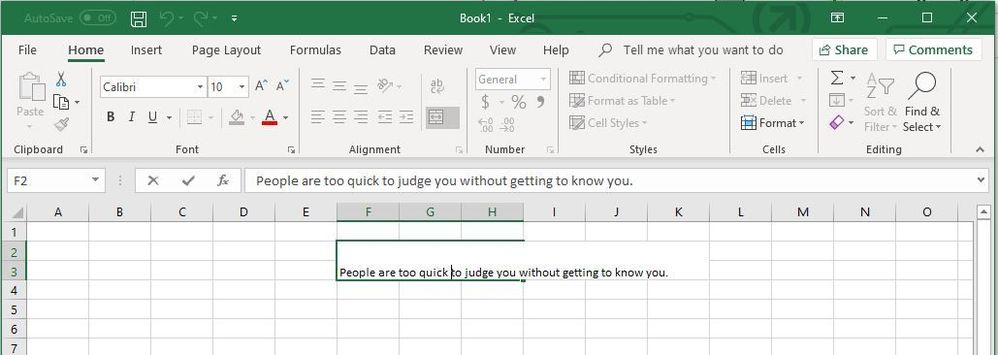
This is what I am getting (I do not want the words to go beyond column H. So how do I do it using LabView?
Risolto Andare alla soluzione.

 Bob_Schor

in data 12-24-2019 10:29 PM
- Contrassegnare come Nuovo
- Preferito
- Iscriversi
- Disattiva notifiche
- Iscriversi a feed RSS
- Evidenziare
- Stampare
- Segnalare contenuto inappropriato
This sounds like an "Excel" question to me. If you open Excel and type a long line of text into a cell, it will look something like this:
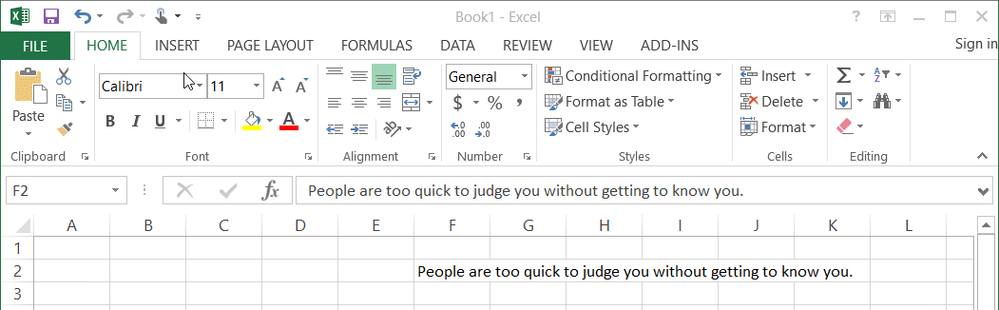
The above example comes from Excel 2013.
If you want Cell F2 to fit the string, you do some Excel commands (I don't use Excel so regularly that I remember all the details ...). If you want (as your example seems to illustrate) to have the text "wrap" in Cells F2, G2, and H2, you have to do some other Excel manipulations. Some of these might be possible with the RGT, but first figure out what you want Excel to do, then see if you can get LabVIEW to "ask Excel" to do it for you.
Bob Schor

 RolfO
RolfO
in data 12-30-2019 09:46 AM
- Contrassegnare come Nuovo
- Preferito
- Iscriversi
- Disattiva notifiche
- Iscriversi a feed RSS
- Evidenziare
- Stampare
- Segnalare contenuto inappropriato
Have you tried to just put a new line in your text?
I have LabVIEW 2012 so i could not use your VI, but i implemented it. Tested against Office 365 and Office 2003. For me it worked. Sort of. The text in the merged cells the text was cut at border. I also tried with a newline at the end of the string and then the text was wrapped and the cells expanded. But it was not pretty since it was to much empty space in the cells.

 Michael_Munroe
in data 12-30-2019 10:42 AM
- Contrassegnare come Nuovo
- Preferito
- Iscriversi
- Disattiva notifiche
- Iscriversi a feed RSS
- Evidenziare
- Stampare
- Segnalare contenuto inappropriato
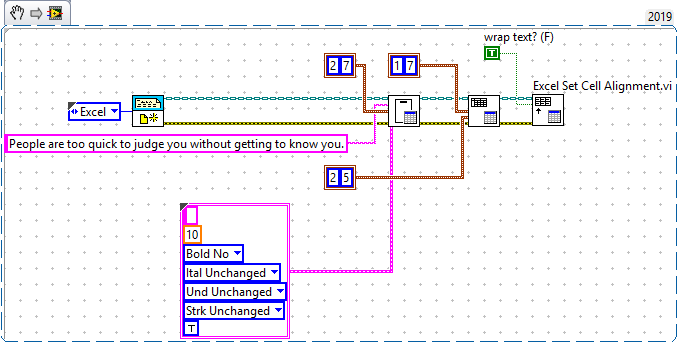
Just drop the RPG function Excel Set Cell Alignment and set the wrap text (F) input to True. You may have to adjust the vertical height of the cell to make all the text visible.
Automate 1M+ VI Search, Sort and Edit operations with Property Inspector 5.1, now with a new Interactive Window Manager!
Now supports full project automation using one-click custom macros or CLI.
in data 12-30-2019 08:25 PM
- Contrassegnare come Nuovo
- Preferito
- Iscriversi
- Disattiva notifiche
- Iscriversi a feed RSS
- Evidenziare
- Stampare
- Segnalare contenuto inappropriato
Thank you, Michael. That works!!!! That's exactly what I was trying to do.
