- Subscribe to RSS Feed
- Mark Topic as New
- Mark Topic as Read
- Float this Topic for Current User
- Bookmark
- Subscribe
- Mute
- Printer Friendly Page
Help on : Allow default Run-Time shortcut menus
Solved!
 MogaRaghu
05-14-2019 12:54 AM
- Mark as New
- Bookmark
- Subscribe
- Mute
- Subscribe to RSS Feed
- Permalink
- Report to a Moderator
While customizing the FP, I have never been able to understand the function of this menu option.. what exactly is a Default run time short cut menu ? ( This is one instance where LV Help is not helping me 😉
Thanks
LabVIEW to Automate Hydraulic Test rigs.
Solved! Go to Solution.
- Tags:
- short cut menu

 PsyenceFact
05-14-2019 04:19 AM
- Mark as New
- Bookmark
- Subscribe
- Mute
- Subscribe to RSS Feed
- Permalink
- Report to a Moderator
Every front panel control has a menu associated with it, accessible by right-clicking on the control when the VI is running. For example, for a numeric control:
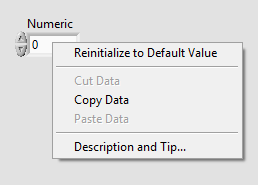
These can be individually customised at edit time (right click menu - Advanced - Run-Time Shortcut Menu) or programatically through property nodes.
If "Allow default run-time shortcut menus" is TRUE, the menu for every control is available unless it has been individually disabled.
If "Allow default run-time shortcut menus" is FALSE, the menu for every control is not available unless it has been replaced by a custom run-time menu.
I usually do not allow the default menus, then just define custom menus for controls as required. This saves the user being presented with options that are not relevant or appropriate.

 wiebe@CARYA

05-14-2019 04:20 AM
- Mark as New
- Bookmark
- Subscribe
- Mute
- Subscribe to RSS Feed
- Permalink
- Report to a Moderator
Copy, Paste, Reinitialize to Default, that menu.
 Search LabVIEW like a graph!
 05-14-2019 05:11 AM
- Mark as New
- Bookmark
- Subscribe
- Mute
- Subscribe to RSS Feed
- Permalink
- Report to a Moderator
Great ... got it. Thanks !!
LabVIEW to Automate Hydraulic Test rigs.
