- Subscribe to RSS Feed
- Mark Topic as New
- Mark Topic as Read
- Float this Topic for Current User
- Bookmark
- Subscribe
- Mute
- Printer Friendly Page
HTTPS commands with LabView

 aeroengineer123
01-26-2022 04:44 PM
- Mark as New
- Bookmark
- Subscribe
- Mute
- Subscribe to RSS Feed
- Permalink
- Report to a Moderator

 billko
01-26-2022 05:01 PM - edited 01-26-2022 05:02 PM
- Mark as New
- Bookmark
- Subscribe
- Mute
- Subscribe to RSS Feed
- Permalink
- Report to a Moderator
I'm guessing you need a browser to run the actual code on the web page. Unless there's a button to push, but it seems that you are just going there?
(Mid-Level minion.)
My support system ensures that I don't look totally incompetent.
Proud to say that I've progressed beyond knowing just enough to be dangerous. I now know enough to know that I have no clue about anything at all.
Humble author of the CLAD Nugget.
 wiebe@CARYA

01-27-2022 06:01 AM
- Mark as New
- Bookmark
- Subscribe
- Mute
- Subscribe to RSS Feed
- Permalink
- Report to a Moderator
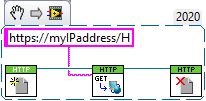
In Quick drop (CTRL+Space) type HTTP...
Or in the palette, go to Data Communication>Protocols>HTTP Client.
You'd have to do a OpenHandle, a post, put or get (it depends, all could work), and a CloseHandle.
 Search LabVIEW like a graph!
billko
Search LabVIEW like a graph!
billko
01-27-2022 07:32 AM - edited 01-27-2022 07:35 AM
- Mark as New
- Bookmark
- Subscribe
- Mute
- Subscribe to RSS Feed
- Permalink
- Report to a Moderator
wiebe@CARYA wrote:
In Quick drop (CTRL+Space) type HTTP...
Or in the palette, go to Data Communication>Protocols>HTTP Client.
You'd have to do a OpenHandle, a post, put or get (it depends, all could work), and a CloseHandle.
I think you'll need to look at the source code so you know what to do? It's funny, I didn't even think of standard http. That's why I don't create web pages, I suppose.
(Mid-Level minion.)
My support system ensures that I don't look totally incompetent.
Proud to say that I've progressed beyond knowing just enough to be dangerous. I now know enough to know that I have no clue about anything at all.
Humble author of the CLAD Nugget.
wiebe@CARYA
01-27-2022 10:49 AM
- Mark as New
- Bookmark
- Subscribe
- Mute
- Subscribe to RSS Feed
- Permalink
- Report to a Moderator
@billko wrote:
wiebe@CARYA wrote:
In Quick drop (CTRL+Space) type HTTP...
Or in the palette, go to Data Communication>Protocols>HTTP Client.
You'd have to do a OpenHandle, a post, put or get (it depends, all could work), and a CloseHandle.
I think you'll need to look at the source code so you know what to do? It's funny, I didn't even think of standard http. That's why I don't create web pages, I suppose.
It's not a website that's opened.
The device has a web server. By doing a HTTP GET, the webserver gets a trigger that does some action based on the URL.
This is pretty much how REST works, although there can be content in the body of the commands, for instance a value to set, in the form of raw data, XML, JSON.
A URL in a browser does the same, the URL triggers a server. But for webpages, the response is a webpage.
