Turn on suggestions
Auto-suggest helps you quickly narrow down your search results by suggesting possible matches as you type.
Showing results for
Topic Options
- Subscribe to RSS Feed
- Mark Topic as New
- Mark Topic as Read
- Float this Topic for Current User
- Bookmark
- Subscribe
- Mute
- Printer Friendly Page
Gyroscope and Shimmer LabVIEW Library

 cabal123
Member
06-20-2012 06:59 AM
Options
- Mark as New
- Bookmark
- Subscribe
- Mute
- Subscribe to RSS Feed
- Permalink
- Report to a Moderator
Dear All,
I want to build LabView .vi file to acquire data from 3 Shimmer units. Collected data has to be saved in text file and, in the same time, display in chart indicators.
I use following Shimmer configuration: two Shimmer Wireless Sensor Units + one Shimmer Wireless Sensor Unit with GYRO BOARD, firmware: BoilerPlate_shimmer2r_14_06_2011.ihex
In "LabView Instrument Driver-Library" I found LV example "Four Shimmer Write". It seemed to be suitable for my needs after few corrects: add new tab to display real-time data.
First step.
I started with one Shimmer Wireless Sensor Unit configured as accelerometer. For Shimmer 1 (in "Four Shimmer Write.vi") modified file "Four Shimmer Write.vi" looks like this:
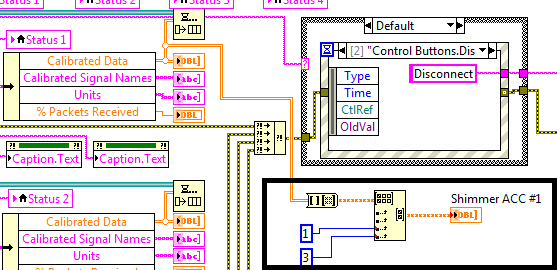
According to "Shimmer 9DoF Calibration Application – User Manual, page 52" I selected columns 1 to 3 to display acceleration in three axes. It works fine.
Then, I wanted to add chart to display GYROSCOPE data in the same manner. I have a problem. I cannot find "INTEGRATED VI' for gyroscope. Moreover, I cannot apply "9DOF INTEGRATED VI" for my configuration: Shimmer Wireless Sensor Unit with GYRO BOARD.
My first question is as follows: how can I acquire data from gyroscope (in following configuration:Shimmer Wireless Sensor Unit with GYRO BOARD) using "LabView Instrument Driver-Library" for Shimmer platform?
Krzysiek
 kod
kod
Member
11-21-2012 03:12 AM
Options
- Mark as New
- Bookmark
- Subscribe
- Mute
- Subscribe to RSS Feed
- Permalink
- Report to a Moderator
If you enable both the accelerometer and gyroscope using the front panel controls then you should have 7 columns of data in the calibrated data array. Column 0 is the timestamp, columns 1,2 and 3 are the accelerometer (you seem to hve this part figured out) and columns 4, 5 and 6 will be the gyroscope data.
Karol
