- Subscribe to RSS Feed
- Mark Topic as New
- Mark Topic as Read
- Float this Topic for Current User
- Bookmark
- Subscribe
- Mute
- Printer Friendly Page
Graphics

 Kito
Kito
08-12-2009 11:53 AM
- Mark as New
- Bookmark
- Subscribe
- Mute
- Subscribe to RSS Feed
- Permalink
- Report to a Moderator
Hi everyone,
I'd like to know if it is possible instead of using number as scale style uses string or other stuff.
I know that in the graph properties/scale I can manipulate some itens.
What I mean is:In the Y-Axis instead 1,2,3 and 4 I want to use strings FPLAN,LAN,SDLC and UART
4
3
2
1
Y-axis
FPLAN
LAN
SDLC
UART
Y-axis
Thans
Kito

 Ben
Ben

08-12-2009 12:00 PM
- Mark as New
- Bookmark
- Subscribe
- Mute
- Subscribe to RSS Feed
- Permalink
- Report to a Moderator
You may want to hack the example I posted here to do the Y-Axis instead of the X-Axis.
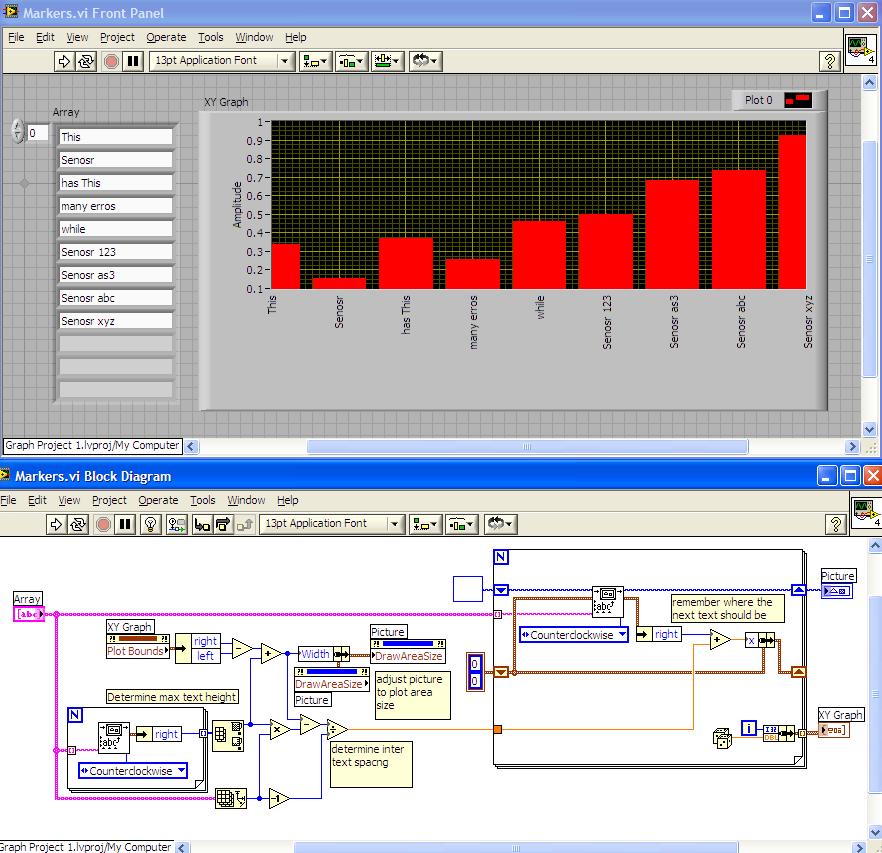
Ben
08-12-2009 02:51 PM
- Mark as New
- Bookmark
- Subscribe
- Mute
- Subscribe to RSS Feed
- Permalink
- Report to a Moderator
Thanks Ben. It's going to help me a lot. But, is there any easier way to do that?
Regards
Kito
Ben
08-12-2009 03:03 PM
- Mark as New
- Bookmark
- Subscribe
- Mute
- Subscribe to RSS Feed
- Permalink
- Report to a Moderator
Kito wrote:Thanks Ben. It's going to help me a lot. But, is there any easier way to do that?
Regards
Kito
Easier than having someone figure out how to do it ahead of time and pointing you to it? 
If there is I would very much like to hear about it, after all, I am here to learn.
Ben

 Cory_K
08-12-2009 03:12 PM
- Mark as New
- Bookmark
- Subscribe
- Mute
- Subscribe to RSS Feed
- Permalink
- Report to a Moderator
Ben wrote:
Kito wrote:Thanks Ben. It's going to help me a lot. But, is there any easier way to do that?
Regards
Kito
Easier than having someone figure out how to do it ahead of time and pointing you to it?
If there is I would very much like to hear about it, after all, I am here to learn.
Ben
I guess if he had LabVIEW 2009, he could just drag the code to his block diagram as a snippet.
That would be easier....
08-12-2009 03:15 PM
- Mark as New
- Bookmark
- Subscribe
- Mute
- Subscribe to RSS Feed
- Permalink
- Report to a Moderator
Sorry Ben, I am a begginer. That's why I asked that. I couldn't do even that example that you posted it.
Regards
Kito
Cory_K
08-12-2009 03:16 PM
- Mark as New
- Bookmark
- Subscribe
- Mute
- Subscribe to RSS Feed
- Permalink
- Report to a Moderator
Also, since you want your text on the y-axis instead of the x,
you wont need any of the code that rotates the text.
There, that simplified it even more
08-12-2009 03:32 PM
- Mark as New
- Bookmark
- Subscribe
- Mute
- Subscribe to RSS Feed
- Permalink
- Report to a Moderator
Ben could you help me to fix my structure.
Following attached what I've done.
Regards

 Darin.K
08-12-2009 04:29 PM
- Mark as New
- Bookmark
- Subscribe
- Mute
- Subscribe to RSS Feed
- Permalink
- Report to a Moderator
Kito wrote:Thanks Ben. It's going to help me a lot. But, is there any easier way to do that?
I like Ben's solution, and I believe there should be an easy way to do it. Since you have fixed y values, why not make a little room on the graph, remove the existing scale (and title) and add some text labels by hand. Disable y-axis autoscale and you are all set.

 altenbach
08-12-2009 06:44 PM
- Mark as New
- Bookmark
- Subscribe
- Mute
- Subscribe to RSS Feed
- Permalink
- Report to a Moderator
If you want this feature in an upcoming version of LabVIEW, please vote for my idea here. 😄
So far it did not get such a great response. 😞


