- Subscribe to RSS Feed
- Mark Topic as New
- Mark Topic as Read
- Float this Topic for Current User
- Bookmark
- Subscribe
- Mute
- Printer Friendly Page
GetValueByPointer difference between LV2011 SP1 and LV2012

 vix
vix
11-20-2012 10:33 AM
- Mark as New
- Bookmark
- Subscribe
- Mute
- Subscribe to RSS Feed
- Permalink
- Report to a Moderator
Using LV2011 SP1 I developed an application where I successfully used GetValueByPointer.xnode (see here) both while debugging it and while executing it as a standalone application.
After I upgraded to LV2012 the application works fine while debugging it, but not as standalone application.
After some investigation I found that xnode code has changed from LV2011 SP1 to LV2012 (see snippets).
Why this code has been modified?
How can I get my application working in LabVIEW 2012?
-------------------------------------------
In claris non fit interpretatio
-------------------------------------------
Using LV from 7
Using LW/CVI from 6.0
11-20-2012 01:29 PM
- Mark as New
- Bookmark
- Subscribe
- Mute
- Subscribe to RSS Feed
- Permalink
- Report to a Moderator
I forgot to add that running as standalone, the application doesn't work because it isn't able to find the lvimptsl.dll library;
and I think this is a problem of path
-------------------------------------------
In claris non fit interpretatio
-------------------------------------------
Using LV from 7
Using LW/CVI from 6.0

11-23-2012 08:22 AM
- Mark as New
- Bookmark
- Subscribe
- Mute
- Subscribe to RSS Feed
- Permalink
- Report to a Moderator
Hi
the GetValueByPointer generated code makes a call to lvimptsl.dll, which is in the resource directory. Since resource is not in the search path, moving a VI that contains GetValueByPointer from one version of LV to another will not update the version of the DLL that is used.
This problem could also be related to RunTimeEngine.
Install
<http://joule.ni.com/nidu/cds/view/p/id/3582/lang/en>
or
<http://joule.ni.com/nidu/cds/view/p/id/3588/lang/en>
and try again!
Let us know!
11-26-2012 04:34 AM
- Mark as New
- Bookmark
- Subscribe
- Mute
- Subscribe to RSS Feed
- Permalink
- Report to a Moderator
I had already installed the LV2012 f3 patch, but I think this is not the problem.
As a matter of fact the behavior is different even if you create projects from scratch.
-------------------------------------------
In claris non fit interpretatio
-------------------------------------------
Using LV from 7
Using LW/CVI from 6.0
12-10-2012 01:32 AM
- Mark as New
- Bookmark
- Subscribe
- Mute
- Subscribe to RSS Feed
- Permalink
- Report to a Moderator
CAR 380809
-------------------------------------------
In claris non fit interpretatio
-------------------------------------------
Using LV from 7
Using LW/CVI from 6.0

 wolfeman
01-29-2013 04:35 PM
- Mark as New
- Bookmark
- Subscribe
- Mute
- Subscribe to RSS Feed
- Permalink
- Report to a Moderator
I am having simmilar problem? Any word on cause / fix?
wolfeman
01-29-2013 05:58 PM
- Mark as New
- Bookmark
- Subscribe
- Mute
- Subscribe to RSS Feed
- Permalink
- Report to a Moderator
Actually,
The problem is in the development env everything works as advertized; but in the compilied binary the call to "getvaluebypointer" doesnt come back with any data at all....
This worked fine in LV2011 and earlier version - the only change was to 2012 and it broke...
Any help or hints would be appreciated...
Thanks
01-30-2013 01:06 AM
- Mark as New
- Bookmark
- Subscribe
- Mute
- Subscribe to RSS Feed
- Permalink
- Report to a Moderator
Hi
as I wrote, this has been recognized as a bug by NI, and CAS 380809 has been filled.
Unforntunately this will be fixed in one of the future LabVIEW releases.
In the meanwhile you must:
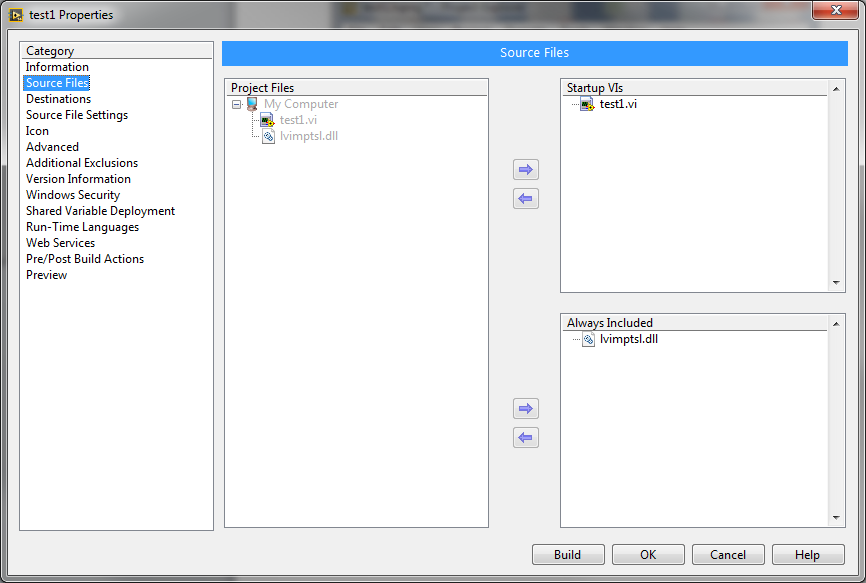
- add lvimpts.dll to the project files (so that you can see it in Build specification >> Exe)
- modify the Build Specification >> Exe so that a new subfolder called "resource" is created as destination
- include lvimpts.dll inside "resource" subfolder
Hope this helps
-------------------------------------------
In claris non fit interpretatio
-------------------------------------------
Using LV from 7
Using LW/CVI from 6.0
wolfeman
02-04-2013 09:03 AM
- Mark as New
- Bookmark
- Subscribe
- Mute
- Subscribe to RSS Feed
- Permalink
- Report to a Moderator
Ok thanks,
I did get it working, but I manually "recreated" the old way by converting the xnode calls to a static vi dll call, that mirrors the 2011 method.

 ChrisLudwig
05-28-2015 10:07 AM
- Mark as New
- Bookmark
- Subscribe
- Mute
- Subscribe to RSS Feed
- Permalink
- Report to a Moderator
This is an old thread, but I ran into the exact same problem in LV 2014. Guess this very simple bug is still not fixed. The provided work around did the trick. I searched within my Labview install folder for lvimptsl.dll and copied it into my project folder and then drug it into the project explorer and placed it next to my VI:

I then opened the build specification properties and set the dll as always included:
And then changed the destination path to "resource":
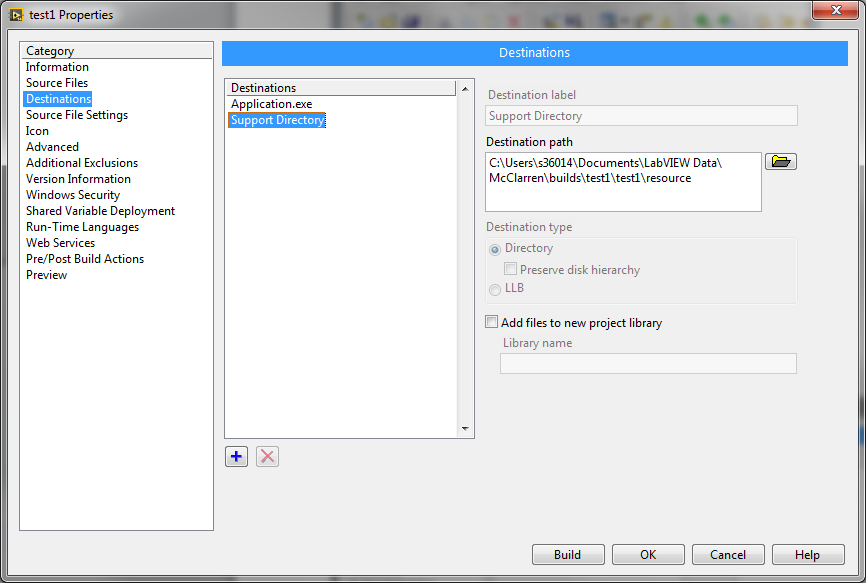


I rebuilt my application and all works now.
Thanks for the work around and Kudos to you.
