- Subscribe to RSS Feed
- Mark Topic as New
- Mark Topic as Read
- Float this Topic for Current User
- Bookmark
- Subscribe
- Mute
- Printer Friendly Page
Formula node help?

 chazzchuzz
07-05-2013 12:45 AM
- Mark as New
- Bookmark
- Subscribe
- Mute
- Subscribe to RSS Feed
- Permalink
- Report to a Moderator
I am new to Labview and I'm trying to calculate an area based on the a formula. The error message says array indexing expected, but I don't have any arrays feeding into the formula node. Does anyone know how I could fix this? Here's a snapshot of the block diagram. Thanks!


 moderator1983
07-05-2013 01:17 AM - edited 07-05-2013 01:21 AM
- Mark as New
- Bookmark
- Subscribe
- Mute
- Subscribe to RSS Feed
- Permalink
- Report to a Moderator
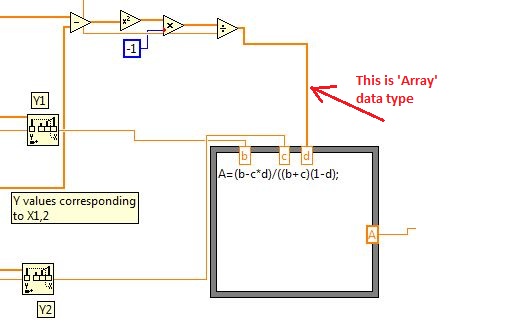
Check the width of the wire going as input to 'd'... that an array...!!
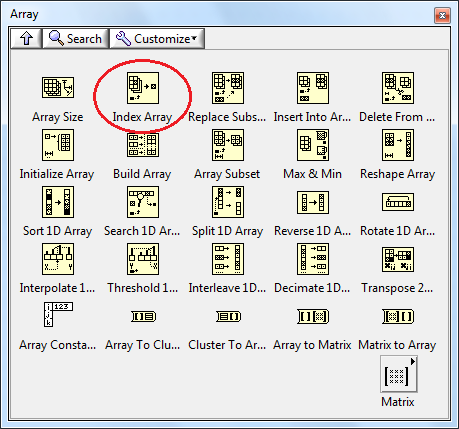
It might contain just one element or may be multiple elements...!! So use 'Index Array' and convert it into a scalar value...!!

07-05-2013 10:15 AM
- Mark as New
- Bookmark
- Subscribe
- Mute
- Subscribe to RSS Feed
- Permalink
- Report to a Moderator
Thank you so much! It is still showing an error message-missing left parenthesis. Then it says Error on line 1 is marked by a '#' character: "A=(b-c*d)/((b+c)(#1-d);"

 Rod42
Rod42
07-05-2013 10:26 AM
- Mark as New
- Bookmark
- Subscribe
- Mute
- Subscribe to RSS Feed
- Permalink
- Report to a Moderator
Rod.
07-05-2013 10:28 AM
- Mark as New
- Bookmark
- Subscribe
- Mute
- Subscribe to RSS Feed
- Permalink
- Report to a Moderator
Oops yea that fixed it. Thanks!
