- Subscribe to RSS Feed
- Mark Topic as New
- Mark Topic as Read
- Float this Topic for Current User
- Bookmark
- Subscribe
- Mute
- Printer Friendly Page
Formula Node returning incorrect output
Solved!
 girish_jadhav
10-07-2019 08:46 AM
- Mark as New
- Bookmark
- Subscribe
- Mute
- Subscribe to RSS Feed
- Permalink
- Report to a Moderator
I don't see what is wrong in the equation I have entered. It is returning wrong output compared to my manual calculation. 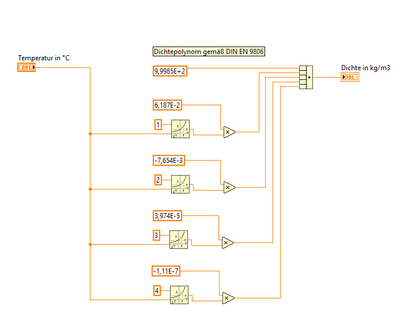
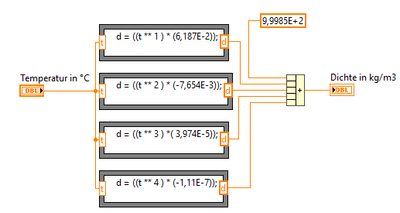
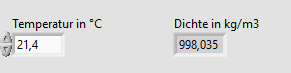
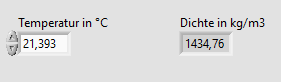
Have I entered the formula wrong in the formula node or is there anything else I am doing wrong here?
Solved! Go to Solution.

 RavensFan

10-07-2019 08:55 AM
- Mark as New
- Bookmark
- Subscribe
- Mute
- Subscribe to RSS Feed
- Permalink
- Report to a Moderator
Attach your VI please. It is a lot easier to debug a VI than it is to debug a bunch of pictures!
10-07-2019 09:02 AM
- Mark as New
- Bookmark
- Subscribe
- Mute
- Subscribe to RSS Feed
- Permalink
- Report to a Moderator
Sorry. I have added two VI snippets now.
RavensFan
10-07-2019 09:40 AM
- Mark as New
- Bookmark
- Subscribe
- Mute
- Subscribe to RSS Feed
- Permalink
- Report to a Moderator
I see the problem.
You are using a comma as a decimal point inside the formula node. Don't! Use the proper decimal point of a period.
Read the context help for the formula node. It says, "
- Formula Nodes accept only the period (.) as a decimal separator. The nodes do not recognize localized decimal separators."

 cbutcher
10-07-2019
12:00 PM
- last edited on
06-30-2026
03:16 PM
by
 Content Cleaner
- Mark as New
- Bookmark
- Subscribe
- Mute
- Subscribe to RSS Feed
- Permalink
- Report to a Moderator
Although it doesn't answer your question (which appears to be already solved), you might consider using the Polynomial Evaluation VI:


10-08-2019 05:14 AM
- Mark as New
- Bookmark
- Subscribe
- Mute
- Subscribe to RSS Feed
- Permalink
- Report to a Moderator
That looks really neat.
Thanks for the suggestion. I am still a newbie and learning new things everyday 🙂
