- Subscribe to RSS Feed
- Mark Topic as New
- Mark Topic as Read
- Float this Topic for Current User
- Bookmark
- Subscribe
- Mute
- Printer Friendly Page
Error when programmatically adding item to LabVIEW project
Solved!
 dlanger
08-24-2010 11:56 AM - edited 08-24-2010 11:59 AM
- Mark as New
- Bookmark
- Subscribe
- Mute
- Subscribe to RSS Feed
- Permalink
- Report to a Moderator
I am trying to add a VI programmatically to a LabVIEW project using ActiveX property/invoke nodes:
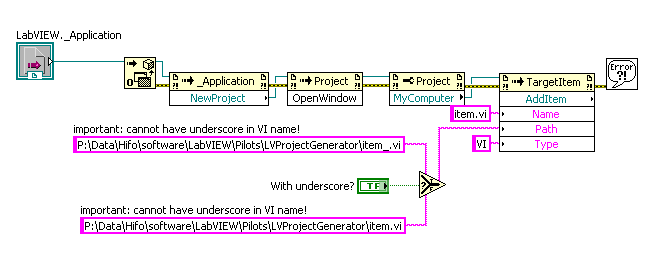
I get an error message (not an ordinary LabVIEW error) when the VI's name contains an underscore (which many of my VIs do...):
- when I try to add item.vi, everything is fine
- when I try to add item_.vi, the error dialog appears.
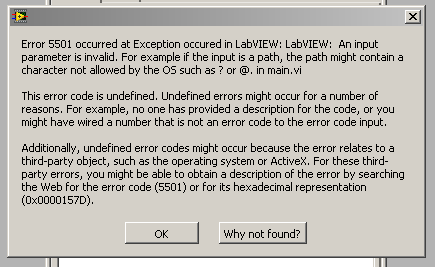
See attachment for an example application (LabVIEW 2010) demonstrating the problem.
Does anybody have an idea how I can avoid that problem without having to rename all my VIs?
Solved! Go to Solution.

 Duffy2007
08-26-2010 10:09 AM
- Mark as New
- Bookmark
- Subscribe
- Mute
- Subscribe to RSS Feed
- Permalink
- Report to a Moderator
Hello dlanger
you want to add a file please try this

Adding items is used for adding a folder to a project.
Pleas let me know if it works.
Alexander
08-26-2010 11:33 AM
- Mark as New
- Bookmark
- Subscribe
- Mute
- Subscribe to RSS Feed
- Permalink
- Report to a Moderator
Super cool, it works! Thank you! 🙂
