- Subscribe to RSS Feed
- Mark Topic as New
- Mark Topic as Read
- Float this Topic for Current User
- Bookmark
- Subscribe
- Mute
- Printer Friendly Page
Error using Matlab Node

 krang
krang
09-21-2011 03:18 PM
- Mark as New
- Bookmark
- Subscribe
- Mute
- Subscribe to RSS Feed
- Permalink
- Report to a Moderator
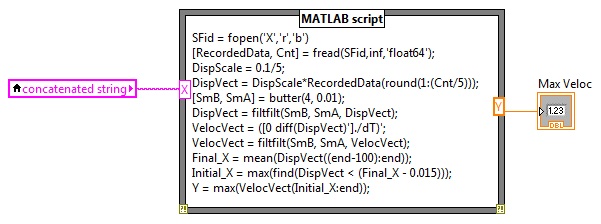
Please help. I am getting a couple errors using the Matlab script node in my.vi file.
1) First, I am getting an error message telling me to use fopen to generate a valid file identifier. I am able to bypass this with by removing the semicolon after the first line of the script, as shown below. Although I do not understand why this works.
2) With the semicolon removed, I am now getting an error message stating I have an undefined function or variable 'Y'. I am completely stumped. Please help!
 smercurio_fc
09-21-2011 05:45 PM
- Mark as New
- Bookmark
- Subscribe
- Mute
- Subscribe to RSS Feed
- Permalink
- Report to a Moderator
The 'X' should not be enclosed in single quotes. You are passing in a string, and this is what you want the first parameter. As you have it, the filename is "X".
I have no idea about the error with Y. I can enter a simple Y=max(0,2) and have a Y output and it works just fine. What version of LabVIEW are you using, and what version of Matlab are you using.
09-22-2011 08:31 AM
- Mark as New
- Bookmark
- Subscribe
- Mute
- Subscribe to RSS Feed
- Permalink
- Report to a Moderator
I am using Labview Version 10 and Matlab 2009b.
smercurio_fc
09-22-2011 08:32 AM
- Mark as New
- Bookmark
- Subscribe
- Mute
- Subscribe to RSS Feed
- Permalink
- Report to a Moderator
OK... Did you make the correction I mentioned?
09-22-2011 08:34 AM
- Mark as New
- Bookmark
- Subscribe
- Mute
- Subscribe to RSS Feed
- Permalink
- Report to a Moderator
Yes, I still the get same error: 'undefined function or variable Y'

09-23-2011 12:32 PM
- Mark as New
- Bookmark
- Subscribe
- Mute
- Subscribe to RSS Feed
- Permalink
- Report to a Moderator
Hello krang,
Have you been able to get a simple function working correctly using the Matlab Script? For example, can you try just feeding it a numeric constant x, do a simple y = 4+x then grabbing y?
David A.
