- Subscribe to RSS Feed
- Mark Topic as New
- Mark Topic as Read
- Float this Topic for Current User
- Bookmark
- Subscribe
- Mute
- Printer Friendly Page
Error 1671 Python Node
Solved!
 Operandus009
07-28-2020 02:55 AM
- Mark as New
- Bookmark
- Subscribe
- Mute
- Subscribe to RSS Feed
- Permalink
- Report to a Moderator
Hi,
Labview 2018 user here. For some time, I was using Labview with Matlab script node to throw in some maths. I decided to switch to Python since the 2018 version of Labview supports it.
I tried some very basic tests ("Hello world" and some others) but when it comes to use one of my scripts (reading a three columns txt file), it sends me an error message :
Python Node in testlecturefichier.vi<APPEND>
Python returned the following error: <class 'SystemError'>
..\Objects\listobject.c:189: bad argument to internal function
The function is running flawlessly with the ipython console but not with the Labview node.
There are some additionnal infos :
- 3.6.2 python, 64 bits
- Labview 2018 64 bits
Maybe there is something obvious I missed. Can someone look through my code and maybe tell me what is wrong ?
Thank you in advance for your time.
Solved! Go to Solution.

 wiebe@CARYA

07-28-2020 08:31 AM
- Mark as New
- Bookmark
- Subscribe
- Mute
- Subscribe to RSS Feed
- Permalink
- Report to a Moderator
Did you search the forum? This has been posted quite a few times before.
There are also (at least) 3 related knowledge base articles:
Error 1671 Occurred at Open Python Session
Error 1671 in LabVIEW When Calling Files Using Python Node
Error 1671 Using Python Script Stored on Network Drive in LabVIEW
 Search LabVIEW like a graph!
 07-28-2020 08:39 AM
- Mark as New
- Bookmark
- Subscribe
- Mute
- Subscribe to RSS Feed
- Permalink
- Report to a Moderator
Thank you for your answer.
Yes I searched for answers but none of the previous topics deal with my specific error. But I am wondering if you read my query before posting ...
07-28-2020 10:15 AM
- Mark as New
- Bookmark
- Subscribe
- Mute
- Subscribe to RSS Feed
- Permalink
- Report to a Moderator
Ok, found the error.
I was expecting an array but I was trying to return a list in the script so it wasn't working.
- Tags:
- found

 Will_S.
04-26-2022 02:52 PM - edited 04-26-2022 02:53 PM
- Mark as New
- Bookmark
- Subscribe
- Mute
- Subscribe to RSS Feed
- Permalink
- Report to a Moderator
Just to add to this answer, since I just went through this: LabVIEW apparently can have trouble converting a list to an array unless it is explicitly built as a list.
For example, even though a slice returns a list, LabVIEW can give you Error 1671 if your python function returns it directly:
# Can cause Error 1671 in the LabVIEW Python node
def myfunc():
    return myData[:6]
Instead, do this:
# Does not cause an error in the LabVIEW Python node
def myfunc():
    returnData = []
    for x in range(6):
        returnData.append(myData[x])

    return returnData
 derGogo
06-23-2023 03:51 AM - edited 06-23-2023 03:55 AM
- Mark as New
- Bookmark
- Subscribe
- Mute
- Subscribe to RSS Feed
- Permalink
- Report to a Moderator
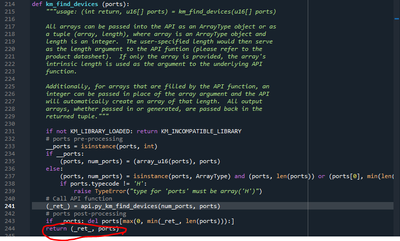
Hum. I think I'm having exactly the same problem. Only I'd like to avoid modifying the python script, because 1- it's not mine, 2- it is used by other apps.
Can you think of a way to solve that on the Labview side?
my Python:
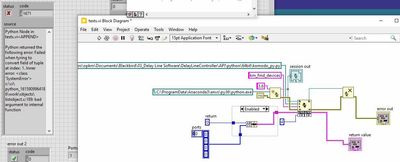
my labview code (right) and error (left), in which the keyword hinting to the same problem as yours is "Failed when trying to convert field into tuple at index 1":