- Subscribe to RSS Feed
- Mark Topic as New
- Mark Topic as Read
- Float this Topic for Current User
- Bookmark
- Subscribe
- Mute
- Printer Friendly Page
Display array data in a Listbox

 VCU
VCU
04-16-2007 10:45 AM
- Mark as New
- Bookmark
- Subscribe
- Mute
- Subscribe to RSS Feed
- Permalink
- Report to a Moderator

 Dennis_Knutson
04-16-2007 10:49 AM - edited 04-16-2007 10:49 AM
- Mark as New
- Bookmark
- Subscribe
- Mute
- Subscribe to RSS Feed
- Permalink
- Report to a Moderator
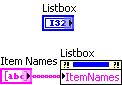
You don't have to change anything. The ItemNames property is a string array and this is what you write to populate the listbox. Just write click on the listbox and select Create>Property Node. Right click on the property node select Properties>Item Names. Right click on it again and select Change to Write.
Message Edited by Dennis Knutson on 04-16-2007 09:51 AM

 Jorge_Amaral
04-16-2007 10:50 AM
- Mark as New
- Bookmark
- Subscribe
- Mute
- Subscribe to RSS Feed
- Permalink
- Report to a Moderator
I think that what you want it's what I've made on the example
See it..
www.mcm-electronics.com
PORTUGAL
04-16-2007 11:41 AM
- Mark as New
- Bookmark
- Subscribe
- Mute
- Subscribe to RSS Feed
- Permalink
- Report to a Moderator
04-16-2007 11:42 AM
- Mark as New
- Bookmark
- Subscribe
- Mute
- Subscribe to RSS Feed
- Permalink
- Report to a Moderator

 altenbach

04-16-2007 11:50 AM
- Mark as New
- Bookmark
- Subscribe
- Mute
- Subscribe to RSS Feed
- Permalink
- Report to a Moderator
@VCU wrote:
Is it possible to display data from two arrays in one multicolumn listbox?
Yes, just concatenate the two arrays using a "built array" function (wire it up, then right-click on the "built array" and select concatenate mode).


04-16-2007 12:32 PM
- Mark as New
- Bookmark
- Subscribe
- Mute
- Subscribe to RSS Feed
- Permalink
- Report to a Moderator
altenbach
04-16-2007 01:32 PM
- Mark as New
- Bookmark
- Subscribe
- Mute
- Subscribe to RSS Feed
- Permalink
- Report to a Moderator
04-16-2007 02:35 PM
- Mark as New
- Bookmark
- Subscribe
- Mute
- Subscribe to RSS Feed
- Permalink
- Report to a Moderator
Me again. It does not show in separate columns in the listbox. I would like to know how the data in each array can display in separate column.
For example,
array 1 = {1,2,3,4}
array 2={1.2,1.3,1.4}
In multicolumn listbox, array 1 should be display in first column and array 2 in second column.
Thank you for your promptly help.
altenbach
04-16-2007 03:28 PM - edited 04-16-2007 03:28 PM
- Mark as New
- Bookmark
- Subscribe
- Mute
- Subscribe to RSS Feed
- Permalink
- Report to a Moderator

Message Edited by altenbach on 04-16-2007 01:29 PM

