- Subscribe to RSS Feed
- Mark Topic as New
- Mark Topic as Read
- Float this Topic for Current User
- Bookmark
- Subscribe
- Mute
- Printer Friendly Page
Data saving with time
Solved!
 Chowdhury_Milon
12-05-2018 12:24 AM
- Mark as New
- Bookmark
- Subscribe
- Mute
- Subscribe to RSS Feed
- Permalink
- Report to a Moderator
Hello,
I am trying to save time with data in MS excel sheet. I am using "File I/O > Write to measurement file" option. But can't succeed. I have attached a picture of setting. Any suggestion would be appreciated.
Solved! Go to Solution.

 GerdW
GerdW

12-05-2018 12:36 AM
- Mark as New
- Bookmark
- Subscribe
- Mute
- Subscribe to RSS Feed
- Permalink
- Report to a Moderator
Hi Milon,
I am using "File I/O > Write to measurement file" option. But can't succeed.
Where are you trying to save "time with data"? All you do is using a tmestamp for filename creation…
I guess you want to have a column with timestamps in your Excel sheet!?
Any suggestion would be appreciated.
Do you know the problem with using ExpressVIs? (Apart from DDT wires?)
They only support exactly the functionality they are made for!
When you want to achieve goals with functions not included in ExpressVIs you need to get rid of those ExpressVIs and create your own tool…
GerdW
using LV2016/2019/2021 on Win10/11+cRIO, TestStand2016/2019
12-05-2018 12:47 AM
- Mark as New
- Bookmark
- Subscribe
- Mute
- Subscribe to RSS Feed
- Permalink
- Report to a Moderator
Hello Mr. GerdW,
Greetings. Sorry for my poor explanation. Yes I want a column with timestamps along with data column in my excel sheet. Is it possible using 'write to measurement file.VI'?
If not, I have attached another picture here related with data saving with time. But can't understand instructions, specially 3 and 4.
GerdW
12-05-2018 04:04 AM
- Mark as New
- Bookmark
- Subscribe
- Mute
- Subscribe to RSS Feed
- Permalink
- Report to a Moderator
Hi milon,
Item 3+4 are used to create a valid filename ( in a complicated way), but still that example only isesthe timestamp for filename creation.
No, you will not reach your goal using that ExpressVI...
GerdW
using LV2016/2019/2021 on Win10/11+cRIO, TestStand2016/2019
12-05-2018 11:22 PM
- Mark as New
- Bookmark
- Subscribe
- Mute
- Subscribe to RSS Feed
- Permalink
- Report to a Moderator
Hi Mr. GerdW,
Would you please suggest any simple way to do it (data with time)?
GerdW
12-06-2018 07:47 AM
- Mark as New
- Bookmark
- Subscribe
- Mute
- Subscribe to RSS Feed
- Permalink
- Report to a Moderator
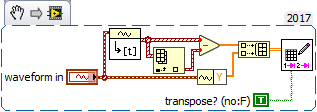
Hi Milon,
here you go:
GerdW
using LV2016/2019/2021 on Win10/11+cRIO, TestStand2016/2019

 JÞB
JÞB
12-06-2018 08:11 AM
- Mark as New
- Bookmark
- Subscribe
- Mute
- Subscribe to RSS Feed
- Permalink
- Report to a Moderator
Actually, the express vi can be configured to add a time column and even supports changing the time format
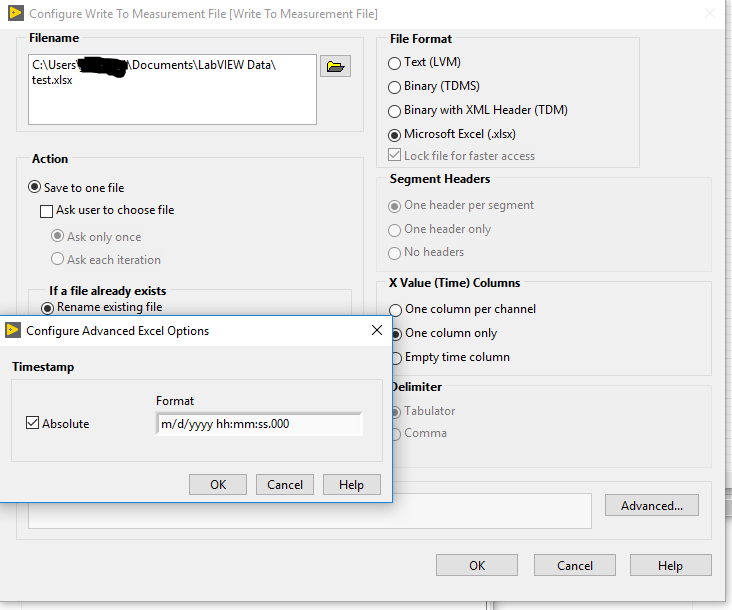
And the novice that wrote that example did not know that Format Date Time has a format specifier input
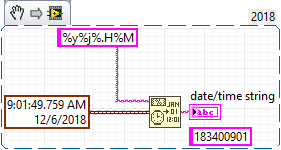


%y - Year within century (0-99)
%j - Julian date (0-366)
%H - Hour (0-23)
%M - Minute (0-60)
No special characters!
"Should be" isn't "Is" -Jay
GerdW
12-06-2018 08:19 AM
- Mark as New
- Bookmark
- Subscribe
- Mute
- Subscribe to RSS Feed
- Permalink
- Report to a Moderator
Hi Jeff,
thanks for your correction.
(Maybe I should lower my bias against ExpressVIs to notice their capabilities…)
GerdW
using LV2016/2019/2021 on Win10/11+cRIO, TestStand2016/2019
JÞB
12-06-2018 08:36 AM
- Mark as New
- Bookmark
- Subscribe
- Mute
- Subscribe to RSS Feed
- Permalink
- Report to a Moderator
@GerdW wrote:
Hi Jeff,
thanks for your correction.
(Maybe I should lower my bias against ExpressVIs to notice their capabilities…)
I wouldn't want you to lower your bias. The Write Measurement File Express vi still uses the dreaded DDT and hides a whole lot of configuration information that can't be debugged from a *.jpg
"Should be" isn't "Is" -Jay

 RTSLVU
12-06-2018 09:30 AM
- Mark as New
- Bookmark
- Subscribe
- Mute
- Subscribe to RSS Feed
- Permalink
- Report to a Moderator
Express VI's are only there for those 2 hour LabVIEW classes sales pitches to show managers and other non programmers how you can "just throw something together" in LabVIEW without knowing anything.
But in real world applications Express VI's fail more often than not.
=== Engineer Ambiguously ===
========================
