LabVIEW
- Suscribirse a un feed RSS
- Marcar tema como nuevo
- Marcar tema como leído
- Colocar este tema arriba del foro
- Favorito
- Suscribir
- Silenciar
- Página de impresión sencilla
- « Anterior
- Siguiente »
DSC Error: IAK_SHARED unable to start service
¡Resuelto!
 TomBrass
el 10-10-2008 03:23 PM
- Marcar como nuevo
- Favorito
- Suscribir
- Silenciar
- Suscribirse a un feed RSS
- Resaltar
- Imprimir
- Informe de contenido inapropiado
When I try to deploy a shared variable library, it fails to deploy and gives me the following message: error: -1967362042, IAK_SHARED: (Hex 0x8ABC7006) Unable to start service. I am using LabVIEW 8.6 with DSC 8.6. I was trying to run one of the examples (the Heat Exchanger example). Any ideas? I do have LabVIEW 8.5 installed as well (many of my clients are still using this), and I had DSC 8.5 installed. Does DSC 8.5 need to be uninstalled first?
Thanks,
Tom
Certified LabVIEW Architect
Choose Movement Consulting, Inc.
www.choose-mc.com
¡Resuelto! Ir a solución.

el 10-13-2008 04:30 PM
- Marcar como nuevo
- Favorito
- Suscribir
- Silenciar
- Suscribirse a un feed RSS
- Resaltar
- Imprimir
- Informe de contenido inapropiado
Hi Tom,
It does not mean you have to uninstall any services. I would advise the following:
1. Do a repair on your DSC 8.6 installation by going to Start<Control Panel<Add Remove Programs and then to National Instruments software.
2. Also check if you have the Variable engine running as a service when you are using the DSC module.
Ipshita C.
Applications Engineer
el 10-13-2008 04:46 PM
- Marcar como nuevo
- Favorito
- Suscribir
- Silenciar
- Suscribirse a un feed RSS
- Resaltar
- Imprimir
- Informe de contenido inapropiado
I do not have the Variable Engine service installed apparently. I went to Control Panel>Administrative Tools>Services and looked for anything labeled "Variable". Nothing listed. I've tried running the repair on the DSC 8.6 installation without any luck. So how do I install the Shared Variable Engine if it isn't already installed?
Thanks!
Tom
Certified LabVIEW Architect
Choose Movement Consulting, Inc.
www.choose-mc.com
el 10-14-2008 10:50 AM
- Marcar como nuevo
- Favorito
- Suscribir
- Silenciar
- Suscribirse a un feed RSS
- Resaltar
- Imprimir
- Informe de contenido inapropiado
Hi Tom,
This implies that your installation is corrupt and some of the SQL components did not get installed with it. I would advise uninstalling it completely and then reinstalling it using the installation CD you have. I hope this helps.
Ipshita C.
Applications Engineer
el 10-15-2008 11:16 AM
- Marcar como nuevo
- Favorito
- Suscribir
- Silenciar
- Suscribirse a un feed RSS
- Resaltar
- Imprimir
- Informe de contenido inapropiado
I have it working now. I uninstalled all of my DSC modules (including ver 8.6, 8.5, and 8.2), repaired LabVIEW 8.6, and then reinstalled DSC 8.6. I'm wondering if having three different versions of the DSC module was just a little too much for my system to handle. In any case, bottom line, LabVIEW 8.6 didn't install properly first time, but the repairing it seems to have fixed the problem.
Thanks!
Tom
Certified LabVIEW Architect
Choose Movement Consulting, Inc.
www.choose-mc.com
 dfiorillo
el 05-28-2010 01:45 PM
- Marcar como nuevo
- Favorito
- Suscribir
- Silenciar
- Suscribirse a un feed RSS
- Resaltar
- Imprimir
- Informe de contenido inapropiado
Hi,
I already uninstalled all the national products 2 times and always appears the same error 1967362042.

dfiorillo
el 05-28-2010 01:45 PM
- Marcar como nuevo
- Favorito
- Suscribir
- Silenciar
- Suscribirse a un feed RSS
- Resaltar
- Imprimir
- Informe de contenido inapropiado
el 05-28-2010 02:02 PM
- Marcar como nuevo
- Favorito
- Suscribir
- Silenciar
- Suscribirse a un feed RSS
- Resaltar
- Imprimir
- Informe de contenido inapropiado
The DSC module seems extremely touchy in my opinion. Can't tell you how many hours I spent trying to figure out how to get things to work. My advice is to first look i the Variable Engine is running (Start>>Control Panel>>Administrative Tools>>Services). On the list of services should be "National Instruments Variable Engine" and it should be "Started". Do you have that present? When I had troubles, it was because it somehow got corrupted and therefore did not show up on the list of services.
If it is there, another problem I had was with the login. If you right-click on the service and select Properties, then click on the Log On tab, make sure "log on as this account" is checked along with the name and password of an Administrator. That might fix your problem.
Tom Brass
Certified LabVIEW Developer
Saint Bernard Engineering, Inc.
Certified LabVIEW Architect
Choose Movement Consulting, Inc.
www.choose-mc.com
dfiorillo
el 05-28-2010 02:28 PM
- Marcar como nuevo
- Favorito
- Suscribir
- Silenciar
- Suscribirse a un feed RSS
- Resaltar
- Imprimir
- Informe de contenido inapropiado
Tom,
In my case it is there. But the status of the variable engine is always "not started". When I start this service and ran the VI, it fall. Something is stopping this service. But what? And Why? In my other PC, with Win XP, it works perfectly.
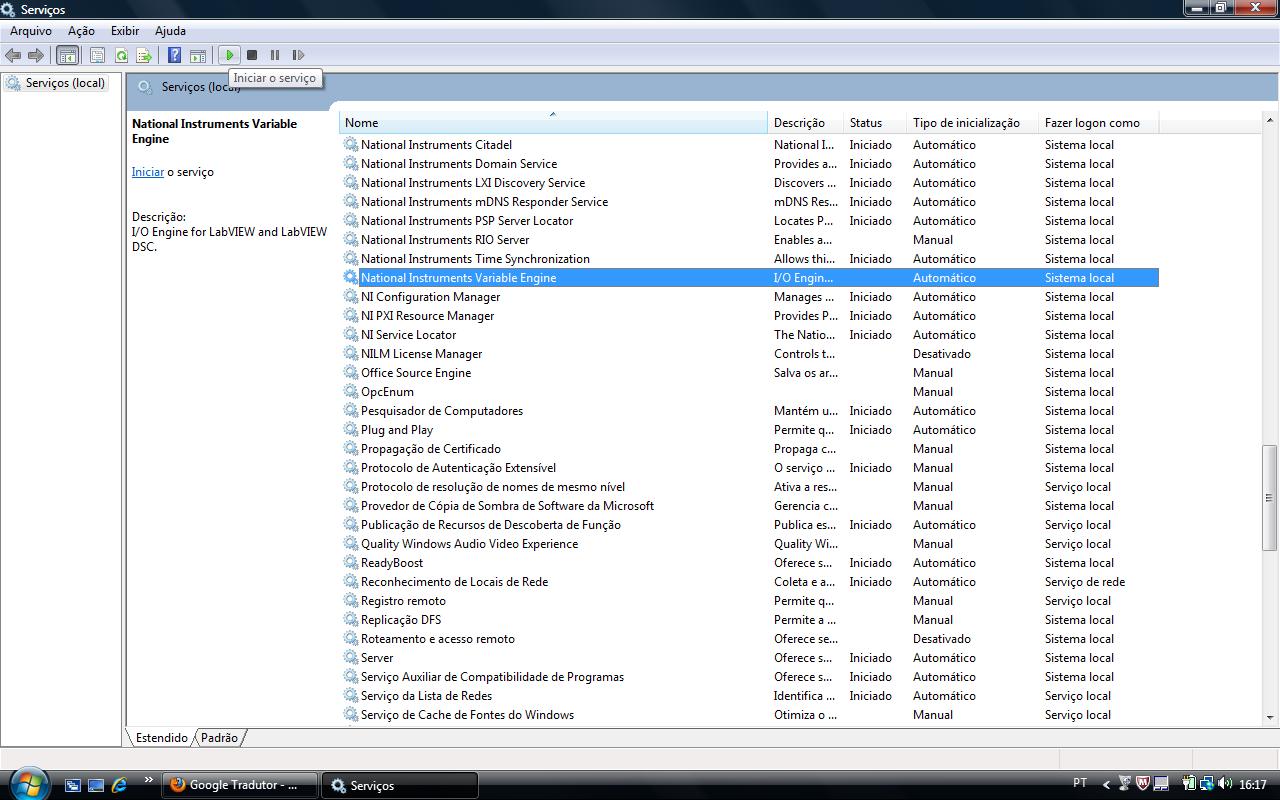
best regards,
dfiorillo
el 05-28-2010 03:12 PM
- Marcar como nuevo
- Favorito
- Suscribir
- Silenciar
- Suscribirse a un feed RSS
- Resaltar
- Imprimir
- Informe de contenido inapropiado
Tom,
I made what did you suggest but didn't work. Even that I try starts the service, the Variable Engine Service do not remain started.
Best regards.
- « Anterior
- Siguiente »
